由于需要实现第一次作业的全部功能,于是利用第一次作业的计算器代码进行改进
[实验目的]
1.掌握软件开发的基本流程
2.掌握常用的软件开发方式和工具。
[实验内容]
设计一个包含登录界面的计算器软件,该软件可以实现第一次作业中的全部功能,同时可以保存用户的历史计算记录。
[实验环境及开发工具]
- 使用Java开发
- 使用MySQL数据库储存数据
- 使用JDBC链接数据库
[登录流程图]

[前端界面的代码]
<!DOCTYPE html>
<html lang="en">
<head>
    <meta charset="utf-8"/>
    <title>登录页面</title>
    <link rel="stylesheet" href="css/style.css" />
    <script src="js/login.js"></script>
    <style>
        body {
            margin: 0;
            padding: 0;
            background-color: #f0f8ff;
        }

        #loginBox {
            margin: 0 auto;
            margin-top: 100px;
            padding: 20px 40px;
            background-color: #f5f5f5;
            text-align: center;
            width: 400px;
            height: 300px;
            border-radius: 10px;
            box-shadow: 0 0 10px rgba(0, 0, 0, 0.1);
        }

        #loginBox h1 {
            padding: 0;
            padding-top: 20px;
            color: #333;
            font-size: 24px;
        }

        .inputBox {
            margin-top: 20px;
        }

        .inputBox input {
            border: 0;
            padding: 15px 30px;
            border-bottom: 2px solid #333;
            width: 80%;
        }

        .inputBox input[type="button"] {
            background-color: #4169e1;
            color: #fff;
            cursor: pointer;
        }

        #signup {
            margin-top: 10px;
            font-size: 14px;
            color: #555
        }
    </style>
</head>
<body>
    <div id="loginBox">
        <h1>用户登录</h1>
        <div class="inputBox">
            <input id="username" type="text" placeholder="用户名"/>
        </div>
        <div class="inputBox">
            <input id="pwd" type="password" placeholder="密码"/>
        </div>
        <input class="inputBox" type="button" onclick="login()" value="登录"/>
        <div id="signup">
            还没有账号?<a href="#">立即注册</a>
        </div>
    </div>
    <script>
        function login() {
            var name = document.getElementById("username").value;
            var pwd = document.getElementById("pwd").value;

            var xhr = new XMLHttpRequest();
            xhr.onreadystatechange = function() {
                if (this.readyState == 4) {
                    if (this.status == 404) {
                        alert("很抱歉,您请求的页面不存在,请确认路径是否正确。");
                    } else if (this.status == 500) {
                        alert("很抱歉,服务器遇到了一些问题,请联系管理员进行修复。");
                    } else if (this.status == 200) {
                        document.getElementById("mydiv").innerHTML = this.responseText;
                        alert("欢迎回来," + name + "!");
                    }
                }
            };

            xhr.open("GET", "/api/login", true);
            xhr.send();
        }
    </script>
</body>
</html>
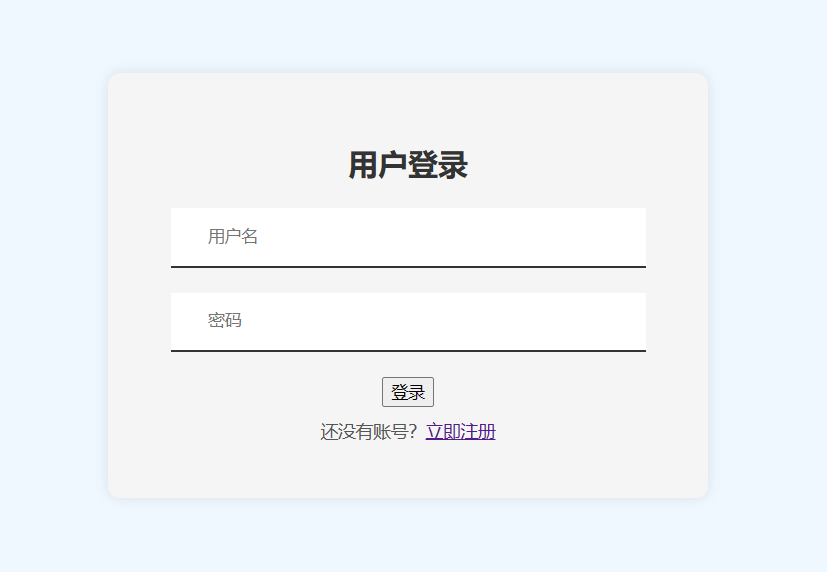
前端界面
[计算器代码]
<!DOCTYPE html>
<html lang="ch-ZN">
<head>
    <meta charset="UTF-8">
    <title>计算器</title>
    <style>
        * {
            margin: 0;
            padding: 0;
        }

        .button {
            width: 50px;
            height: 50px;
            font-size: 25px;
            margin: 2px;
            cursor: pointer;
            background: #607d8b;
            border: none;
            color: white;
        }

        .button1 {
            width: 221px;
            height: 50px;
            font-size: 25px;
            margin: 2px;
            cursor: pointer;
            background: #607d8b;
            border: none;
            color: white;
        }

        .textView {
            width: 200px;
            margin: 5px;
            font-size: 23px;
            padding: 5px;
            border: thick double #32a1ce;;
        }

        .main {
            position: absolute;
            top: 50%;
            left: 50%;
            transform: translateX(-50%) translateY(-50%);
        }

        html {
            background: linear-gradient(to right, #00f7ff, #d0cd77);
            height: 100%;
        }

    </style>
    <script>
        let a="1343.43245";
        let b=a.indexOf(".");
        console.log(b);
        let c=a.substring(0,b+3);
        console.log(c);

        function insert(num) {
            // TODO 插入
            document.form.textView.value = document.form.textView.value + num;
        }

        function equal() {
            // TODO 计算结果,并且结果保留两位小数
            let exp = document.form.textView.value;
                if (exp) {
                 let eval1 = eval(document.form.textView.value);
                // eval() 执行括号内的语句 , 记录结果
                let number = eval1.toString().indexOf(".");
                if (number!==-1){
                    // 如果是小数,保留两位小数
                    eval1=eval1.toString().substring(0,number+3);
                    // 截取
                    document.form.textView.value=eval1;
                }else {
                    // 如果不是小数,直接赋值
                    document.form.textView.value=eval1;
                }
            }
        }

        function Mclean() {
            // TODO 清理输入框的文字
            document.form.textView.value = null;
        }

        function back() {
            // TODO 删除文本框的一个字符
            let exp = document.form.textView.value;
            document.form.textView.value = exp.substring(0, exp.length - 1);
            // 截取字符串
        }

        function sqrt() {
            let num = parseFloat(document.form.textView.value);
            if (num < 0) {
                document.form.textView.value='false';
                return;
            }
                var guess = num / 2; // 初始猜测值为 num / 2
                var epsilon = 0.00001; // 定义精度值
                var previousGuess; // 用于存储上一次的猜测值
                do {
                previousGuess = guess; // 保存当前猜测值以便下一次迭代使用
                guess = (guess + num / guess) / 2; // 牛顿迭代法更新猜测值
                 } while (Math.abs(guess - previousGuess) > epsilon); // 当两次猜测值之差小于精度值时停止迭代
                document.form.textView.value=guess;
        }

    </script>
</head>
<body>
<div class="main">
    <form name="form">
        <input class="textView" name="textView" >
    </form>
    <table>
        <tr>
            <td><input type="button" class="button" value="C" onclick="Mclean()"></td>
            <td><input type="button" class="button" value="<" onclick="back()"></td>
            <td><input type="button" class="button" value="/" onclick="insert('/')"></td>
            <td><input type="button" class="button" value="x" onclick="insert('*')"></td>
        </tr>
        <tr>
            <td><input type="button" class="button" value="7" onclick="insert(7)"></td>
            <td><input type="button" class="button" value="8" onclick="insert(8)"></td>
            <td><input type="button" class="button" value="9" onclick="insert(9)"></td>
            <td><input type="button" class="button" value="-" onclick="insert('-')"></td>
        </tr>
        <tr>
            <td><input type="button" class="button" value="4" onclick="insert(4)"></td>
            <td><input type="button" class="button" value="5" onclick="insert(5)"></td>
            <td><input type="button" class="button" value="6" onclick="insert(6)"></td>
            <td><input type="button" class="button" value="+" onclick="insert('+')"></td>

        </tr>
        <tr>
            <td><input type="button" class="button" value="1" onclick="insert(1)"></td>
            <td><input type="button" class="button" value="2" onclick="insert(2)"></td>
            <td><input type="button" class="button" value="3" onclick="insert(3)"></td>
            <td rowspan="2"><input style="height: 107px" type="button" class="button" value="=" onclick="equal()"></td>

        </tr>
        <tr>
            <td colspan="2"><input style="width: 107px" type="button" class="button" value="0" onclick="insert(0)"></td>
            <td><input type="button" class="button" value="." onclick="insert('.')"></td>
        </tr>


    </table>
    <tr>
            <td><input class="button1"  value="         开方计算" onclick="sqrt()"></td>
        </tr>
</div>
</body>
</html>
计算器功能
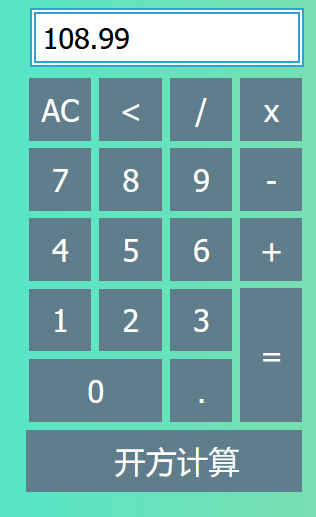
1.加法(输入99.99+9)
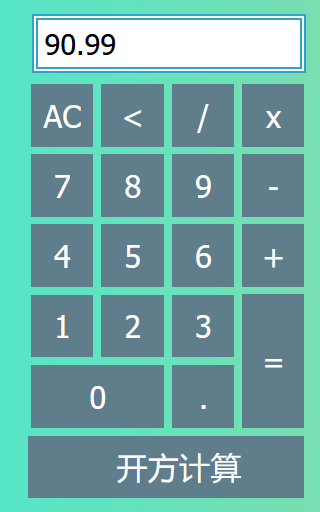
2.减法(输入99.99-9)
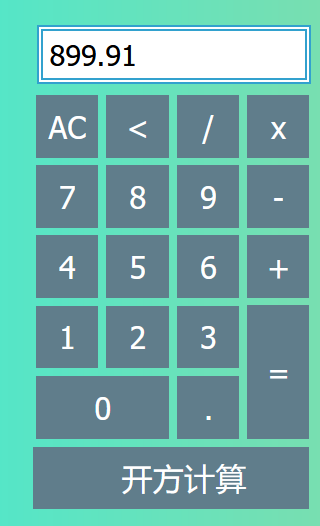
3.乘法(输入99.99*9)
4.除法(输入99.99/9)
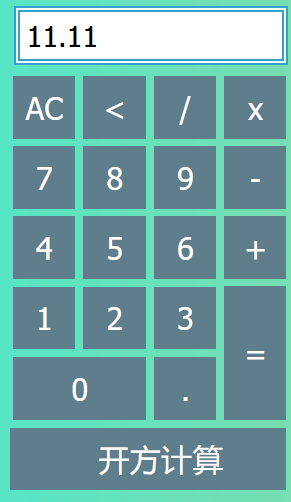
5.开方(输入99.99)

[数据库代码]
数据库用户表users
const mongoose = require('mongoose');
const bcrypt = require('bcrypt');
const userSchema = new mongoose.Schema({
name: String,
password: String
});
userSchema.pre('save', async function (next) {
const user = this;
if (user.isModified('password') || user.isNew) {
try {
const hashedPassword = await bcrypt.hash(user.password, 10);
user.password = hashedPassword;
} catch (error) {
return next(error);
}
}
next();
});
const User = mongoose.model('User', userSchema);
module.exports = User;
var customError = require('http-errors');
var expressApp = require('express');
var pathUtils = require('path');
var cookieParserUtil = require('cookie-parser');
var loggerUtil = require('morgan');

var homeRoutes = require('./routes/home');
const authRoutes = require('./routes/authentication');
var customerRoutes = require('./routes/customers');

var customApp = expressApp();

// 设置视图引擎
customApp.set('views', pathUtils.join(__dirname, 'views'));
customApp.set('view engine', 'hbs');

customApp.use(loggerUtil('dev'));
customApp.use(expressApp.json());
customApp.use(expressApp.urlencoded({ extended: false }));
customApp.use(cookieParserUtil());
customApp.use(expressApp.static(pathUtils.join(__dirname, 'public')));

customApp.use('/', homeRoutes);
customApp.use('/authenticate', authRoutes);
customApp.use('/clients', customerRoutes);

// 处理404错误并转发到错误处理程序
customApp.use(function(req, res, next) {
  next(customError(404));
});

// 错误处理程序
customApp.use(function(err, req, res, next) {
  res.locals.errorMessage = err.message;
  res.locals.errorDetails = req.app.get('env') === 'development' ? err : {};

  // 渲染错误页面
  res.status(err.status || 500);
  res.render('errorPage');
});

module.exports = customApp;
// 引入express模块和router模块
var express = require('express');
var customRouter = express.Router();

// 引入lowdb模块和FileSync模块
const lowDB = require('lowdb');
const FileSync = require('lowdb/adapters/FileSync');

// 创建一个FileSync适配器对象
const customAdapter = new FileSync(__dirname + '/../data/custom_db.json');
// 使用适配器对象创建一个lowdb对象
const customDB = lowDB(customAdapter);

// 引入uuid模块
const { v4: uuidv4 } = require('uuid');

customRouter.get('/profile', function(req, res, next) {

  let devices = customDB.get('devices').value();

  res.render('device-list', { devices });
});

customRouter.post('/add-device', function(req, res, next) {const { name, type } = req.body;

  // 添加设备到数据库
  customDB.get('devices').push({ id: uuidv4(), name, type }).write();
  res.redirect('/profile');
});

module.exports = customRouter;