若依移动端源码
https://gitee.com/y_project/RuoYi-App
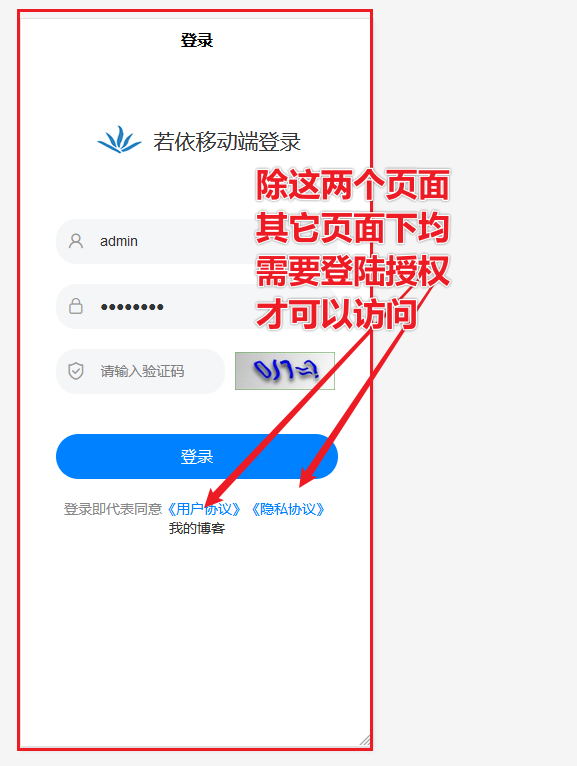
一: 新应用场景通点:
写一个类似微博,需要一部份页面,未授权也可以访问,此应该必须要求登陆无法满足场景需求。
二: 源码分析析
一)白名单,支持未登陆查访问
源码位置:根目录下文件:permission.js(非utils文件夹内部的permission.js哦)
import { getToken } from '@/utils/auth'

// 登录页面
const loginPage = "/pages/login"

// 页面白名单
const whiteList = [
  '/pages/login', '/pages/common/webview/index'
]

// 检查地址白名单
function checkWhite(url) {
  const path = url.split('?')[0]
  return whiteList.indexOf(path) !== -1
}

// 页面跳转验证拦截器
let list = ["navigateTo", "redirectTo", "reLaunch", "switchTab"]
list.forEach(item => {
  uni.addInterceptor(item, {
    invoke(to) {
      if (getToken()) {
        if (to.url === loginPage) {
          uni.reLaunch({ url: "/" })
        }
        return true
      } else {
        if (checkWhite(to.url)) {
          return true
        }
        uni.reLaunch({ url: loginPage })
        return false
      }
    },
    fail(err) {
      console.log(err)
    }
  })
})
对如上源码分析:
// 页面白名单
const whiteList = [
  '/pages/login', '/pages/common/webview/index'
]
 上文源可以手动添中开放页面白名单,未登陆可以访问,但对于开类似微博多个页面未登陆也可以访问,多个页面添加实在不方便。
经过分析,如何源码判断是否在白名单决定放权
// 检查地址白名单
function checkWhite(url) {
  const path = url.split('?')[0]
  return whiteList.indexOf(path) !== -1
}
对如上源码进行改造,通过对路径转换为字符串比较,决定开发符串字符串的路径为白名单。本例为"weblog"
// 检查地址白名单
function checkWhite(url) {
    const path = url.split('?')[0]
    console.log("url:", url, "path:", path);
    console.log("判断是否包括weblog:", whiteList.toString().indexOf('weblog'));
    //判断全路径是否包含weblog,不包含为-1,如果不是-1,即为白名单
    const isWeblog=whiteList.toString().indexOf('weblog');
    return (whiteList.indexOf(path) !== -1) || (isWeblog!==-1)
}