Apache HttpComponents Client(也称为HttpClient)是一个开源的Java库,用于发送HTTP请求并处理HTTP响应。它提供了一组易于使用的API,用于构建和执行HTTP请求,并处理请求和响应的各个方面,如URL处理、请求头、请求体、响应状态、响应内容等。
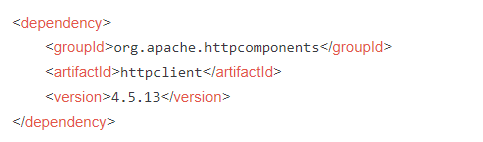
下面是一些关于使用Apache HttpComponents Client的常见操作:
-
发送GET请求:
// 创建HttpClient对象
CloseableHttpClient httpClient = HttpClients.createDefault();

// 创建HttpGet请求
HttpGet httpGet = new HttpGet("http://example.com");

// 执行请求
CloseableHttpResponse response = httpClient.execute(httpGet);

// 处理响应
try {
    // 获取响应状态码
    int statusCode = response.getStatusLine().getStatusCode();

    // 获取响应内容
    String responseBody = EntityUtils.toString(response.getEntity());

    // 处理响应数据...
} finally {
    // 关闭响应
    response.close();
}

// 关闭HttpClient
httpClient.close();

发送POST请求:
// 创建HttpClient对象
CloseableHttpClient httpClient = HttpClients.createDefault();

// 创建HttpPost请求
HttpPost httpPost = new HttpPost("http://example.com");

// 设置请求体参数
List<NameValuePair> params = new ArrayList<>();
params.add(new BasicNameValuePair("param1", "value1"));
params.add(new BasicNameValuePair("param2", "value2"));
httpPost.setEntity(new UrlEncodedFormEntity(params));

// 执行请求
CloseableHttpResponse response = httpClient.execute(httpPost);

// 处理响应...

// 关闭HttpClient
httpClient.close();
设置请求头:
httpGet.addHeader("Content-Type", "application/json");
httpPost.setHeader("Authorization", "Bearer token123");
处理文件上传:
// 创建HttpClient对象
CloseableHttpClient httpClient = HttpClients.createDefault();

// 创建HttpPost请求
HttpPost httpPost = new HttpPost("http://example.com/upload");

// 创建文件
File file = new File("path/to/file");

// 创建文件上传实体
MultipartEntityBuilder builder = MultipartEntityBuilder.create();
builder.addBinaryBody("file", file, ContentType.DEFAULT_BINARY, file.getName());
HttpEntity multipartEntity = builder.build();

// 设置请求实体
httpPost.setEntity(multipartEntity);

// 执行请求...

// 关闭HttpClient
httpClient.close();
处理重定向:
// 创建HttpClient对象
HttpClientBuilder httpClientBuilder = HttpClientBuilder.create();
httpClientBuilder.setRedirectStrategy(new LaxRedirectStrategy());
CloseableHttpClient httpClient = httpClientBuilder.build();

// 执行请求...
这些只是Apache HttpComponents Client库的一些基本用法示例,它还提供了许多其他功能和配置选项,如连接池管理、代理设置、超时设置、SSL/TLS配置等,以满足更复杂的HTTP请求需求。