事件的基本使用
1) 使用v-on:xxx 或 @xxx 绑定事件,其中 xxx 是事件名
2) 事件的回调需要配置在 methods对象中,最终会在 vm实例对象上
3) methods中配置的函数,不要用箭头函数,否则 this 指向的就不是 vm实例对象了
4) methods中配置的函数,都是被Vue所管理的函数,this的指向是 vm实例对象 或 组件实例对象
5) @click="demo" @click="demo($event)"效果一样,但后者可以传参
常见的事件有
onclick: 鼠标单击事件;ondblclick: 鼠标双击事件;onmousedown: 鼠标按下去的事件;onmouseup: 鼠标弹起事件;
onmouseover,onmouseenter,onmouseout,onmouseleave, onmousemove 监控鼠标的移入移出,以及移动事件
onkeydown: 按下任意按键的时候触发的事件;onkeyup: 抬起按键的时候触发的事件;onkeypress: 按下并放开任何字母数字键时触发的事件
<!DOCTYPE html>
<html lang="en">
    <head>
        <meta charset="UTF-8">
        <title>事件的基本使用</title>
        <!--  引入Vue  -->
        <script type="text/javascript" src="../js/vue.js"></script>
    </head>
    <body>
        <!--  准备好一个容器  -->
        <div id="root">
            <h2>欢迎来到{{name}}</h2>
            <!--  点击按钮事件时,会调用showInfo函数  -->
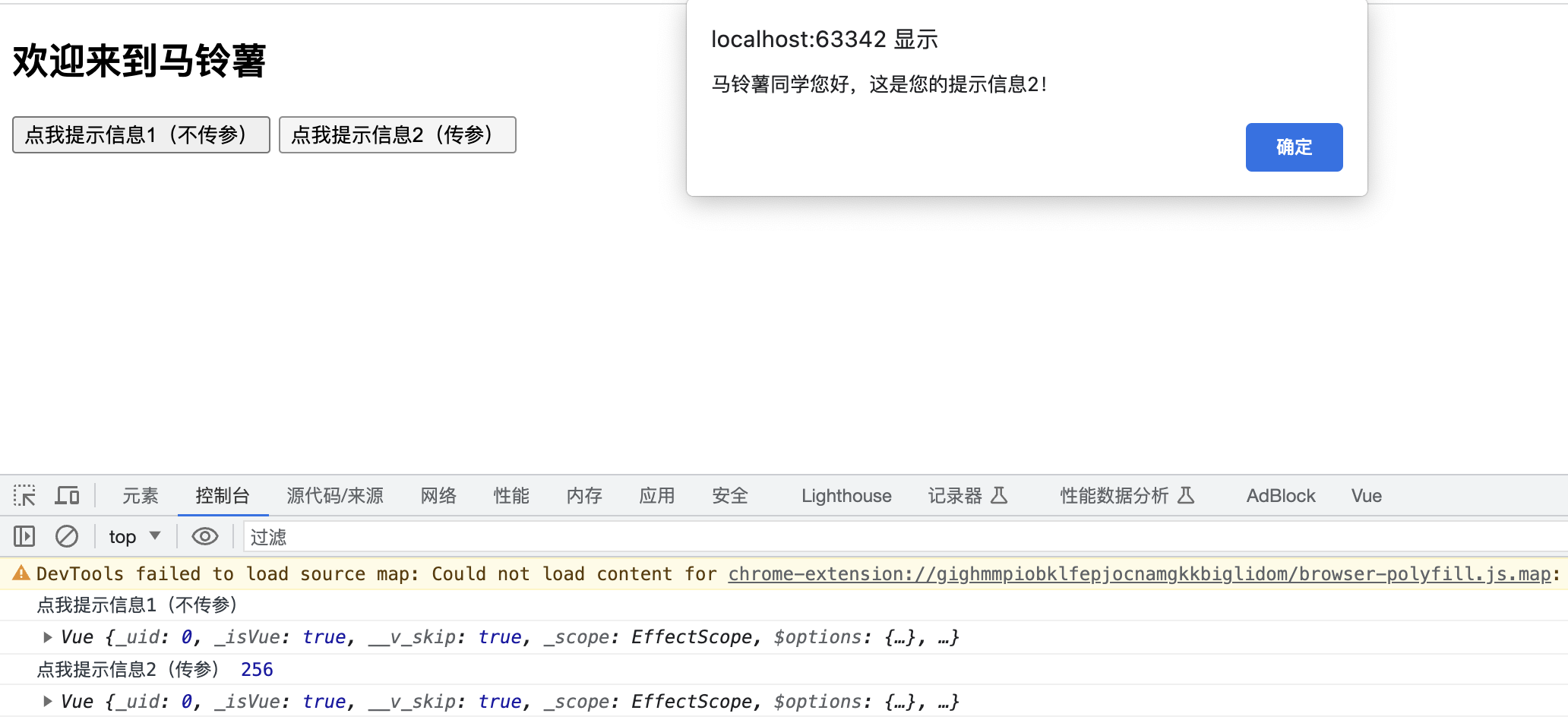
            <button v-on:click="showInfo1">点我提示信息1(不传参)</button>
            <button @click="showInfo2($event,256)">点我提示信息2(传参)</button>
        </div>

        <script type="text/javascript">
            // 阻止 vue 在启动时生成生产提示
            Vue.config.productionTip = false

            const vm = new Vue({
                el:"#root",
                data(){
                    return{
                        name:"马铃薯"
                    }
                },
                methods:{
                    showInfo1(event){
                        // event.target 拿到发生事件的事件目标,这里也就是button目标
                        // event.target.innerText,这里是拿到button目标的文本内容
                        console.log(event.target.innerText)
                        // 这里的 this 代表Vue实例对象
                        console.log(this)
                        alert(this.name + "同学您好,这是您的提示信息1!")
                    },
                    showInfo2(event,number){
                        console.log(event.target.innerText,number)
                        console.log(this)
                        alert(this.name + "同学您好,这是您的提示信息2!")
                    }
                }
            })

        </script>
    </body>
</html>
拓展:事件流(事件捕获和事件冒泡)
在JavaScript中,我们将事件发生的顺序成为“事件流”,当我们触发某个事件时,会发生一系列的连锁反应。
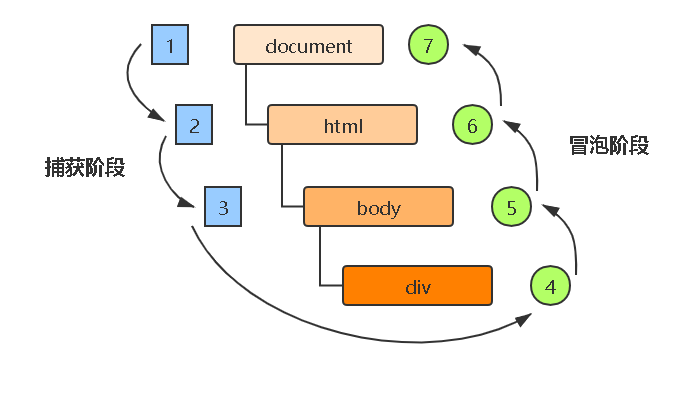
1) 事件捕获
事件捕获是由外到内的。在事件捕获阶段,事件会从 DOM 树的最外层开始,依次经过目标节点的各个父节点,并触发父节点上的事件,直至到达事件的目标节点。

2) 事件冒泡
事件冒泡和事件捕获是完全相反的。事件冒泡是由内到外的,它是从目标节点开始,沿父节点依次向上,并触发父节点上的事件,直至文档根节点,就像水底的气泡一样,会一直向上。

事件修饰符
1) prevent:阻止默认事件
2) stop:阻止事件冒泡
3) once:事件只触发一次修饰符
4) capture:使用事件的捕获模式
5) self:只有event.target是当前操作的元素时,才触发事件
<!DOCTYPE html>
<html lang="en">
    <head>
        <meta charset="UTF-8">
        <title>事件修饰符</title>
        <!--  引入Vue  -->
        <script type="text/javascript" src="../js/vue.js"></script>
        <style>
            *{
                margin-top: 20px
            }
            .demo{
                height: 65px;
                background-color: skyblue;
            }
            .box1{
                background-color: skyblue;
                padding:5px;
            }
            .box2{
                background-color: orange;
                padding:5px;
            }
        </style>
    </head>
    <body>
        <!--准备好一个容器-->
        <div id="root">
            <h2>欢迎来到{{name}}的学习网站</h2>

            <!--1.阻止默认事件修饰符:prevent-->
            <!--<a v-bind:href="url" v-on:click="showInfo">点我提示信息</a>-->
            <a v-bind:href="url" v-on:click.prevent="showInfo">点我提示信息</a>

            <!--2.阻止事件冒泡修饰符:stop-->
            <!--事件冒泡:给父级绑定了事件,子级没有绑定事件,但是当鼠标移入子级的时候会触发父级的事件-->
            <div class="demo" @click="showInfo">
                <button @click.stop="showInfo">点我提示信息</button>
            </div>

            <!--3.事件只触发一次修饰符:once-->
            <button @click.once="showInfo">点我提示信息</button>

            <!--4.使用事件的捕获模式:capture-->
            <div class="box1" @click.capture="showMsg(111)">
                div1
                <div class="box2" @click="showMsg(222)">div2</div>
            </div>

            <!--5.只有event.target是当前操作的元素时,才触发事件:self-->
            <div class="demo" @click.self="showInfo">
                <button @click="showInfo">点我提示信息</button>
            </div>

        </div>

        <script type="text/javascript">
            // 阻止 vue 在启动时生成生产提示
            Vue.config.productionTip = false

            new Vue({
                el:"#root",
                data(){
                    return{
                        name:"马铃薯",
                        url:"https://www.cnblogs.com/REN-Murphy/category/2342442.html"
                    }
                },
                methods:{
                    showInfo(event){
                        // event.preventDefault()不执行与该事件关联的默认动作
                        // 这里也就是不执行 <a> 的href="url"跳转链接动作
                        // event.preventDefault()
                        alert(this.name + "同学您好!")
                        console.log(event.target)
                    },
                    showMsg(msg){
                        console.log(msg)
                    }
                }
            })
        </script>
    </body>
</html>