计算器设计
一、软件界面设计
1、计算器界面
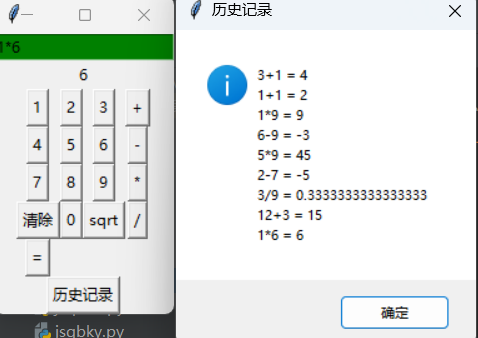
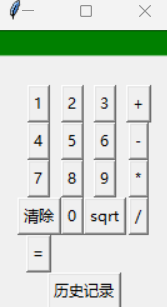
我所设计的计算器界面由表达式显示界面,结果显示界面和数字、运算符按钮这三个部分组成。
2、登陆界面
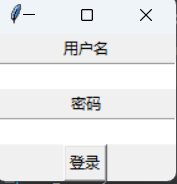
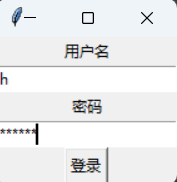
登陆界面由用户名和密码输入框和登陆按钮三个部分组成。
输入账号密码
账号密码验证失败弹出提示窗

二、计算器流程图设计
1、登陆流程图
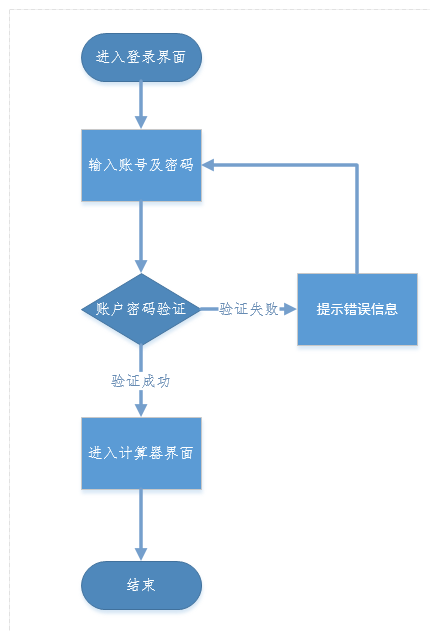
程序运行后,出现登陆界面,输入账号及密码,进行判断,若账号密码验证成功则进入计算器界面;若账号密码验证失败提示错误信息,再次输入账号和密码。
2、计算器运算流程图
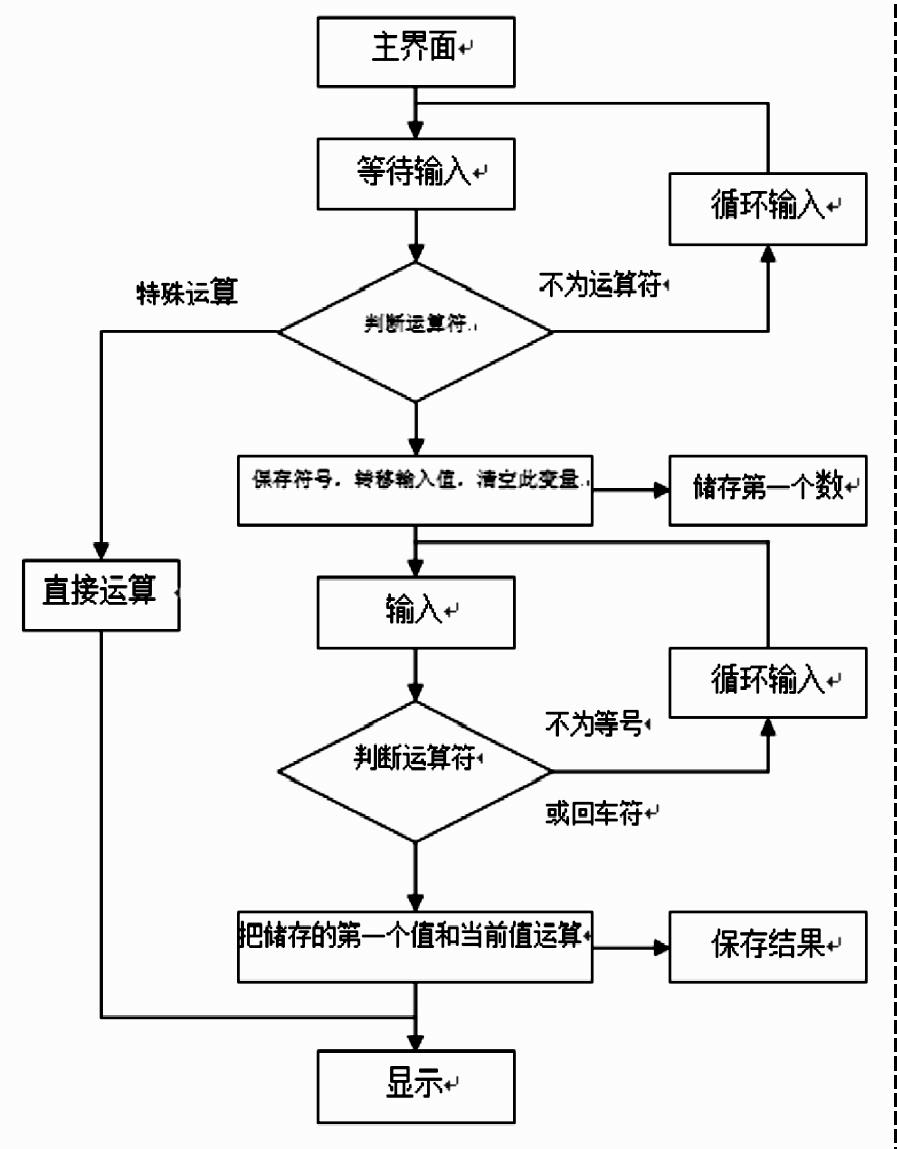
进入计算器界面,进行第一次输入,对第一次输入的值进行判断,若不为运算符则继续循环输入;若为特殊运算则直接进行运算显示结果并保存数据;若为运算符则保存运算符,存储第一个数。再次输入并对此输入进行判断,若不为等号则继续循环输入,若为等号则将第一个数与此输入进行运算显示结果并保持数据。
三、重要代码解析
1、登陆验证代码
 1 # 用户登录信息
 2 users = {"h": "123456"}
 3
 4 # 登录函数
 5 def login():
 6     username = username_entry.get()
 7     password = password_entry.get()
 8     if username in users and password == users[username]:
 9         login_window.destroy()
10         calculator()
11     else:
12         messagebox.showerror("错误", "用户名或密码错误")
2、窗口界面设计
 1 #计算器界面
 2  calc_window = tk.Tk()
 3     calc_window.title('hwz的计算器')
 4
 5     num_entry = tk.Entry(calc_window,bg="green")
 6     num_entry.pack()
 7
 8     result_label = tk.Label(calc_window)
 9     result_label.pack()
10
11     digit_frame = tk.Frame(calc_window)
12     digit_frame.pack()
13 #登陆界面
14 login_window = tk.Tk()
15 login_window.title("登录")
16
17 username_label = tk.Label(login_window, text="用户名")
18 username_label.pack()
19 username_entry = tk.Entry(login_window)
20 username_entry.pack()
21
22 password_label = tk.Label(login_window, text="密码")
23 password_label.pack()
24 password_entry = tk.Entry(login_window, show="*")
25 password_entry.pack()
26
27 login_button = tk.Button(login_window, text="登录", command=login)
28 login_button.pack()
3、按键设计
 1 button_1 = tk.Button(digit_frame, text="1", command=lambda: add_digit(1))
 2     button_1.grid(row=0, column=0)
 3
 4     button_2 = tk.Button(digit_frame, text="2", command=lambda: add_digit(2))
 5     button_2.grid(row=0, column=1)
 6
 7     button_3 = tk.Button(digit_frame, text="3", command=lambda: add_digit(3))
 8     button_3.grid(row=0, column=2)
 9
10     button_4 = tk.Button(digit_frame, text="4", command=lambda: add_digit(4))
11     button_4.grid(row=1, column=0)
12
13     button_5 = tk.Button(digit_frame, text="5", command=lambda: add_digit(5))
14     button_5.grid(row=1, column=1)
15
16     button_6 = tk.Button(digit_frame, text="6", command=lambda: add_digit(6))
17     button_6.grid(row=1, column=2)
18
19     button_7 = tk.Button(digit_frame, text="7", command=lambda: add_digit(7))
20     button_7.grid(row=2, column=0)
21
22     button_8 = tk.Button(digit_frame, text="8", command=lambda: add_digit(8))
23     button_8.grid(row=2, column=1)
24
25     button_9 = tk.Button(digit_frame, text="9", command=lambda: add_digit(9))
26     button_9.grid(row=2, column=2)
27
28     button_0 = tk.Button(digit_frame, text="0", command=lambda: add_digit(0))
29     button_0.grid(row=3, column=1)
30
31     add_button = tk.Button(digit_frame, text="+", command=lambda: add_digit("+"))
32     add_button.grid(row=0, column=3)
33
34     subtract_button = tk.Button(digit_frame, text="-", command=lambda: add_digit("-"))
35     subtract_button.grid(row=1, column=3)
36
37     multiply_button = tk.Button(digit_frame, text="*", command=lambda: add_digit("*"))
38     multiply_button.grid(row=2, column=3)
39
40     divide_button = tk.Button(digit_frame, text="/", command=lambda: add_digit("/"))
41     divide_button.grid(row=3, column=3)
42
43     sqrt_button = tk.Button(digit_frame, text="sqrt", command=lambda: add_digit("sqrt("))
44     sqrt_button.grid(row=3, column=2)
45
46     equal_button = tk.Button(digit_frame, text="=", command=calculate)
47     equal_button.grid(row=4, column=0)
48
49     clear_button = tk.Button(digit_frame, text="清除", command=clear)
50     clear_button.grid(row=3, column=0)
51
52     history_button = tk.Button(calc_window, text="历史记录", command=show_history)
53     history_button.pack()
4、运算函数
 1 def calculator():
 2     def add_digit(digit):
 3         num_entry.insert(tk.END, str(digit))
 4
 5     def calculate():
 6         expression = num_entry.get()
 7         try:
 8             result = eval(expression)
 9             result_label.config(text=str(result))
10
11             # 保存历史记录到文件
12             with open("history.txt", "a") as file:
13                 file.write(expression + " = " + str(result) + "\n")
14         except Exception as e:
15             messagebox.showerror("错误", str(e))
16
17     def clear():
18         num_entry.delete(0, tk.END)
19         result_label.config(text="")
5、数据保存
 1 # 从文件中读取历史记录
 2 def show_history():
 3          with open("history.txt", "r") as file:
 4               history_data = file.read()
 5           messagebox.showinfo("历史记录", history_data)
 6
 7   def calculate():
 8          expression = num_entry.get()
 9          try:
10              result = eval(expression)
11              result_label.config(text=str(result))
12             # 保存历史记录到文件
13             with open("history.txt", "a") as file:
14                 file.write(expression + " = " + str(result) + "\n")
15          except Exception as e:
16             messagebox.showerror("错误", str(e))
计算结果会保存在‘history.txt’的文件中,点击历史记录调出‘history.txt’文件。
四、全部代码
import tkinter as tk
from tkinter import messagebox
import math

# 用户登录信息
users = {"h": "123456"}

# 登录函数
def login():
    username = username_entry.get()
    password = password_entry.get()
    if username in users and password == users[username]:
        login_window.destroy()
        calculator()
    else:
        messagebox.showerror("错误", "用户名或密码错误")

# 计算器函数
def calculator():
    def add_digit(digit):
        num_entry.insert(tk.END, str(digit))

    def calculate():
        expression = num_entry.get()
        try:
            result = eval(expression)
            result_label.config(text=str(result))

            # 保存历史记录到文件
            with open("history.txt", "a") as file:
                file.write(expression + " = " + str(result) + "\n")
        except Exception as e:
            messagebox.showerror("错误", str(e))

    def clear():
        num_entry.delete(0, tk.END)
        result_label.config(text="")

    def show_history():
        # 从文件中读取历史记录
        with open("history.txt", "r") as file:
            history_data = file.read()
        messagebox.showinfo("历史记录", history_data)

    #计算器界面
    calc_window = tk.Tk()
    calc_window.title('hwz的计算器')

    num_entry = tk.Entry(calc_window,bg="green")
    num_entry.pack()

    result_label = tk.Label(calc_window)
    result_label.pack()

    digit_frame = tk.Frame(calc_window)
    digit_frame.pack()
#按键设计
    button_1 = tk.Button(digit_frame, text="1", command=lambda: add_digit(1))
    button_1.grid(row=0, column=0)

    button_2 = tk.Button(digit_frame, text="2", command=lambda: add_digit(2))
    button_2.grid(row=0, column=1)

    button_3 = tk.Button(digit_frame, text="3", command=lambda: add_digit(3))
    button_3.grid(row=0, column=2)

    button_4 = tk.Button(digit_frame, text="4", command=lambda: add_digit(4))
    button_4.grid(row=1, column=0)

    button_5 = tk.Button(digit_frame, text="5", command=lambda: add_digit(5))
    button_5.grid(row=1, column=1)

    button_6 = tk.Button(digit_frame, text="6", command=lambda: add_digit(6))
    button_6.grid(row=1, column=2)

    button_7 = tk.Button(digit_frame, text="7", command=lambda: add_digit(7))
    button_7.grid(row=2, column=0)

    button_8 = tk.Button(digit_frame, text="8", command=lambda: add_digit(8))
    button_8.grid(row=2, column=1)

    button_9 = tk.Button(digit_frame, text="9", command=lambda: add_digit(9))
    button_9.grid(row=2, column=2)

    button_0 = tk.Button(digit_frame, text="0", command=lambda: add_digit(0))
    button_0.grid(row=3, column=1)

    add_button = tk.Button(digit_frame, text="+", command=lambda: add_digit("+"))
    add_button.grid(row=0, column=3)

    subtract_button = tk.Button(digit_frame, text="-", command=lambda: add_digit("-"))
    subtract_button.grid(row=1, column=3)

    multiply_button = tk.Button(digit_frame, text="*", command=lambda: add_digit("*"))
    multiply_button.grid(row=2, column=3)

    divide_button = tk.Button(digit_frame, text="/", command=lambda: add_digit("/"))
    divide_button.grid(row=3, column=3)

    sqrt_button = tk.Button(digit_frame, text="sqrt", command=lambda: add_digit("sqrt("))
    sqrt_button.grid(row=3, column=2)

    equal_button = tk.Button(digit_frame, text="=", command=calculate)
    equal_button.grid(row=4, column=0)

    clear_button = tk.Button(digit_frame, text="清除", command=clear)
    clear_button.grid(row=3, column=0)

    history_button = tk.Button(calc_window, text="历史记录", command=show_history)
    history_button.pack()

    calc_window.mainloop()

# 登录界面
login_window = tk.Tk()
login_window.title("登录")

username_label = tk.Label(login_window, text="用户名")
username_label.pack()
username_entry = tk.Entry(login_window)
username_entry.pack()

password_label = tk.Label(login_window, text="密码")
password_label.pack()
password_entry = tk.Entry(login_window, show="*")
password_entry.pack()

login_button = tk.Button(login_window, text="登录", command=login)
login_button.pack()

login_window.mainloop()
五、数据测试