语言环境:ts + scss
1.自定义底部菜单
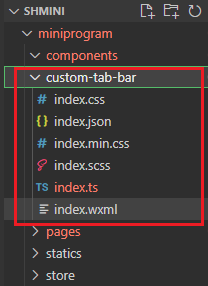
1. 在根目录下创建文件夹及文件
注意:如果文件夹的位置不是在根目录下,底部导航栏不会显示的。
index.wxml
<view class="tab-bar">
    <view
     wx:for="{{list}}"
     wx:key="index"
     class="tab-bar-item"
     data-path="{{item.pagePath}}"
     data-index="{{index}}"
     bindtap="switchTab"
    >
        <image src="{{selected === index ? item.selectedIconPath : item.iconPath}}" />
        <view style="color: {{selected === index ? selectedColor : color}}">{{item.text}}</view>
    </view>
</view>
index.ts
// components/custom-tab-bar/index.ts
const app = getApp();
Component({
  /**
   * 组件的属性列表
   */
  properties: {

  },

  /**
   * 组件的初始数据
   */
  data: {
    selected: 0,
    color: "#7A7E83",
    selectedColor: "#3cc51f",
    list: [{
      pagePath: "pages/home/index",
      iconPath: "/statics/tabbar/icon_component.png",
      selectedIconPath: "/statics/tabbar/icon_component_HL.png",
      text: "首页"
    },{
      pagePath: "pages/class/index",
      iconPath: "/statics/tabbar/icon_component.png",
      selectedIconPath: "/statics/tabbar/icon_component_HL.png",
      text: "分类"
    },{
      pagePath: "pages/home/index",
      iconPath: "/statics/tabbar/icon_component.png",
      selectedIconPath: "/statics/tabbar/icon_component_HL.png",
      text: "现场"
    },{
      pagePath: "pages/home/index",
      iconPath: "/statics/tabbar/icon_component.png",
      selectedIconPath: "/statics/tabbar/icon_component_HL.png",
      text: "购物车"
    },{
      pagePath: "pages/home/index",
      iconPath: "/statics/tabbar/icon_component.png",
      selectedIconPath: "/statics/tabbar/icon_component_HL.png",
      text: "我的"
    }, ]
  },

  /**
   * 组件的方法列表
   */
  methods: {
    switchTab(e:any) {
      const data = e.currentTarget.dataset
      const url = data.path
      wx.switchTab({url})
      this.setData({
        selected: data.index
      })
    }
  },
  pageLifetimes: {
    show() {
      if (typeof this.getTabBar === 'function' &&
        this.getTabBar()) {
        this.getTabBar().setData({
          selected: 0
        })
      }
    }
  }
})
index.scss
.tab-bar {
  position: fixed;
  bottom: 0;
  left: 0;
  right: 0;
  height: 98rpx;
  background: pink;
  display: flex;
  padding-bottom: env(safe-area-inset-bottom);
  z-index: 99999;
  box-shadow: 0 0 8rpx 3rpx rgba(45, 28, 13, 0.26);
  border-radius: 26rpx 26rpx 0 0;
}


.tab-bar-item {
  flex: 1;
  text-align: center;
  display: flex;
  justify-content: center;
  align-items: center;
  flex-direction: column;
  position: relative;
}

.tab-bar-item image {
  width: 46rpx;
  height: 46rpx;
}
.tab-bar-item:nth-child(3n) image{
  background-color: red;
  width: 80rpx;
  height: 80rpx;
  position: absolute;
  top: -30rpx;
}
.tab-bar-item:nth-child(3n) view{
  background-color: orange;
  position: absolute;
  bottom: 10rpx;
}
.tab-bar-item view {
  font-size: 20rpx;
}
2. 在app.json中配置文件
{
  "pages": [
    "pages/home/index",
    "pages/logs/logs",
    "pages/cart/index",
    "pages/class/index",
    "pages/my/index",
    "pages/spot/index"
  ],
  "window": {
    "backgroundTextStyle": "light",
    "navigationBarBackgroundColor": "#fff",
    "navigationBarTitleText": "",
    "navigationBarTextStyle": "black"
  },
  "style": "v2",
  "sitemapLocation": "sitemap.json",
  "tabBar": {
    "custom": true,
    "color": "#7A7E83",
    "selectedColor": "#3cc51f",
    "borderStyle": "black",
    "backgroundColor": "#ffffff",
    "list": [
      {
        "pagePath": "pages/home/index",
        "iconPath": "statics/tabbar/icon_component.png",
        "selectedIconPath": "statics/tabbar/icon_component_HL.png",
        "text": "首页"
      },
      {
        "pagePath": "pages/class/index",
        "iconPath": "statics/tabbar/icon_component.png",
        "selectedIconPath": "statics/tabbar/icon_component_HL.png",
        "text": "分类"
      },
      {
        "pagePath": "pages/spot/index",
        "iconPath": "statics/tabbar/icon_component.png",
        "selectedIconPath": "statics/tabbar/icon_component_HL.png",
        "text": "现场"
      },
      {
        "pagePath": "pages/cart/index",
        "iconPath": "statics/tabbar/icon_component.png",
        "selectedIconPath": "statics/tabbar/icon_component_HL.png",
        "text": "购物车"
      },
      {
        "pagePath": "pages/my/index",
        "iconPath": "statics/tabbar/icon_API.png",
        "selectedIconPath": "statics/tabbar/icon_API_HL.png",
        "text": "我的"
      }
    ]
  }
}
2.设置主题颜色
1.在utils中新建文件userstyle.ts
let themecolor="#1F554F"  //绿色
let fcolor1="#0D2D2C"  //黑色
let fcolor2="#8F9A99"  //灰色

export const colors = {
  themecolor:
  '--themecolor:'+themecolor+';' +
  '--fcolor1:'+fcolor1+';' +
  '--fcolor2:'+fcolor2+';'
  ,
  themejscolor:{
    themecolor,
    fcolor1,
    fcolor2,
  },
}
2. 在ts文件中使用案例
1)在app.ts中引入配置公共颜色的文件
// app.ts
import { colors } from "./utils/userstyle"
App<IAppOption>({
  globalData: {
    colors
  }
})
//index.t.ts
interface IAppOption {
  globalData: {
    userInfo?: WechatMiniprogram.UserInfo,
    colors?:{}
  }
  userInfoReadyCallback?: WechatMiniprogram.GetUserInfoSuccessCallback,
}
2)在使用到对应页面的ts文件中引入app
// components/custom-tab-bar/index.tsconst app = getApp();
Component({
  data: {
    colors:app.globalData.colors.themejscolor,
  }
})
// components/custom-tab-bar/index.wxml
<view class="tab-bar">
  <view
   wx:for="{{list}}"
   wx:key="index"
   class="tab-bar-item"
   data-path="{{item.pagePath}}"
   data-index="{{index}}"
   bindtap="switchTab"
  >
    <image src="{{selected === index ? item.selectedIconPath : item.iconPath}}" />
    <view style="color: {{selected === index ? colors.themecolor : colors.fcolor2}}">{{item.text}}</view>
  </view>
</view>
3.在scss文件中引用案例
在ts页面引入,样式引入,csss使用变量
const app = getApp();
Component({
  data: {
    colors:app.globalData.colors.themecolor,
  }
})

<view class="container containerintab" style="{{colors}}"></view>

.container{
  background-color:var(--themecolor);
}
3.request.ts文件封装