[实验目的]
1.掌握软件开发的基本流程
2.掌握常用的软件开发方式和工具。
[实验内容]
1.设计一个包含登录界面的计算器软件,该软件可以实现第一次作业中的全部功能,同时可以保存用户的历史计算记录(保存数据最好使用数据库)。
[实验要求]
1.完成软件的UI设计、使用Visio设计软件中所涉及的所有流程图。
2.选择合适的集成开发环境和工具完成计算器软件的开发
3.将开发好软件进行测试并截图
4.将本次实验过程写成实验报告提交在本次作业的链接中
5.关键代码部分以代码块格式粘贴在实验报告正文中
6.软件架构以及开发技术不限
[实验过程]
1、登录
流程图
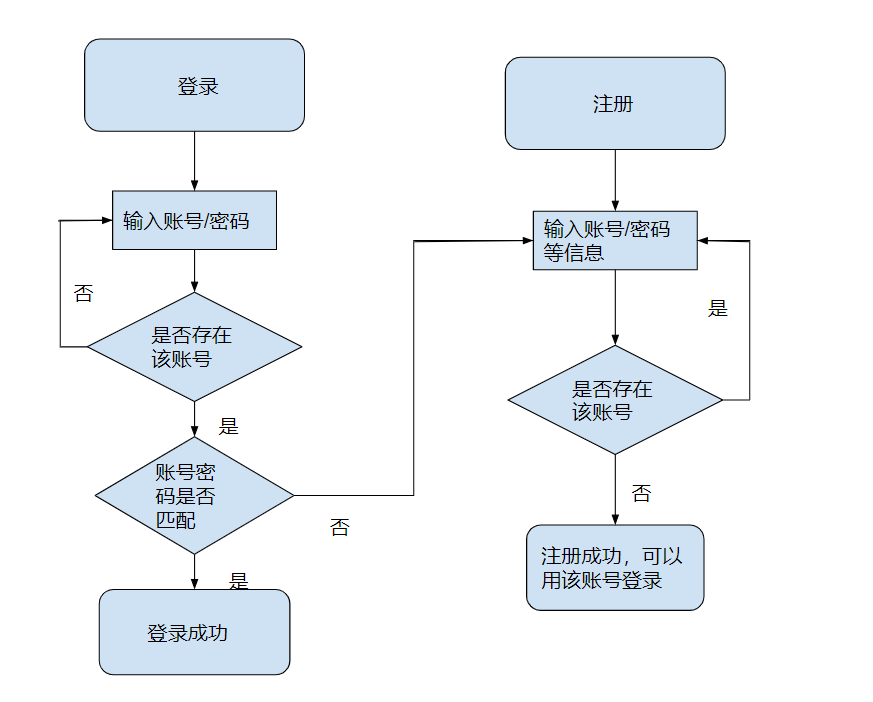
代码:
import javax.swing.*;
import java.awt.*;

public class LoginWithBackground extends JFrame {
    public LoginWithBackground() {
        setTitle("登录页面");
        setDefaultCloseOperation(JFrame.EXIT_ON_CLOSE);

        setLayout(new BorderLayout());

        ImageIcon background = new ImageIcon("background.jpg"); // 背景图的路径
        JLabel backgroundLabel = new JLabel(background);
        add(backgroundLabel, BorderLayout.CENTER);
        backgroundLabel.setLayout(new BorderLayout());

        JPanel loginPanel = new JPanel();
        loginPanel.setLayout(new GridLayout(3, 2));

        JLabel usernameLabel = new JLabel("用户名:");
        JTextField usernameField = new JTextField();
        loginPanel.add(usernameLabel);
        loginPanel.add(usernameField);

        JLabel passwordLabel = new JLabel("密码:");
        JPasswordField passwordField = new JPasswordField();
        loginPanel.add(passwordLabel);
        loginPanel.add(passwordField);

        JButton loginButton = new JButton("登录");
        loginPanel.add(new JLabel(""));
        loginPanel.add(loginButton);

        backgroundLabel.add(loginPanel, BorderLayout.SOUTH);

        pack();
        setVisible(true);
    }

    public static void main(String[] args) {
        SwingUtilities.invokeLater(new Runnable() {
            public void run() {
                new LoginWithBackground();
            }
        });
    }
}
登陆界面

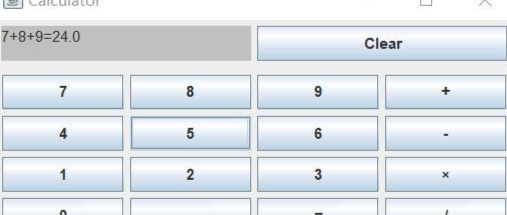
2、计算机
代码:
import javax.swing.*;
import java.awt.*;
import java.awt.event.ActionEvent;
import java.awt.event.ActionListener;

public class CalculatorLayout extends JFrame {
    private JTextField displayField;
    private String currentInput;
    private double result;
    private String selectedAction;

    public CalculatorLayout() {
        setTitle("Calculator");
        setDefaultCloseOperation(JFrame.EXIT_ON_CLOSE);

        JPanel buttonPanel = new JPanel(new GridLayout(4, 4));

        displayField = new JTextField(10);
        displayField.setEditable(false);
        add(displayField, BorderLayout.NORTH);

        String[] buttonLabels = {
            "7", "8", "9", "/",
            "4", "5", "6", "*",
            "1", "2", "3", "-",
            "C", "0", "=", "+"
        };

        for (String label : buttonLabels) {
            JButton button = new JButton(label);
            button.addActionListener(new ButtonClickListener());
            buttonPanel.add(button);
        }

        add(buttonPanel, BorderLayout.CENTER);

        pack();
        setVisible(true);
    }

    private class ButtonClickListener implements ActionListener {
        public void actionPerformed(ActionEvent e) {
            String command = e.getActionCommand();
            if ("0123456789".contains(command)) {
                currentInput = (currentInput == null) ? command : currentInput + command;
                displayField.setText(currentInput);
            } else if ("+-*/".contains(command)) {
                if (result == 0) {
                    result = Double.parseDouble(displayField.getText());
                    selectedAction = command;
                    currentInput = null;
                }
            } else if ("=".equals(command)) {
                if (result != 0 && selectedAction != null) {
                    double secondNum = Double.parseDouble(displayField.getText());
                    switch (selectedAction) {
                        case "+":
                            result += secondNum;
                            break;
                        case "-":
                            result -= secondNum;
                            break;
                        case "*":
                            result *= secondNum;
                            break;
                        case "/":
                            if (secondNum != 0) {
                                result /= secondNum;
                            } else {
                                displayField.setText("Error");
                                result = 0;
                            }
                            break;
                    }
                    displayField.setText(String.valueOf(result));
                    currentInput = null;
                    selectedAction = null;
                }
            } else if ("C".equals(command)) {
                displayField.setText("");
                currentInput = null;
                result = 0;
                selectedAction = null;
            }
        }
    }

    public static void main(String[] args) {
        SwingUtilities.invokeLater(new Runnable() {
            public void run() {
                new CalculatorLayout();
            }
        });
    }
}
计算机界面
数据库的连接
import java.sql.Connection;
import java.sql.DriverManager;
import java.sql.SQLException;

import javax.swing.JOptionPane;

public class DatabaseConnection {
    public static void main(String[] args) {
        String url = "jdbc:mysql://localhost:3306/database_name";
        String username = "username";
        String password = "password";

        try {
            Connection connection = DriverManager.getConnection(url, username, password);
            JOptionPane.showMessageDialog(null, "Database connection successful");

            // Use the connection to access the "djy1" table here

        } catch (SQLException e) {
            JOptionPane.showMessageDialog(null, "Database connection failed: " + e.getMessage());
        }
    }
}