<!DOCTYPE html>
<html lang="en">

<head>
  <meta charset="UTF-8">
  <meta http-equiv="X-UA-Compatible" content="IE=edge">
  <meta name="viewport" content="width=device-width, initial-scale=1.0">
  <title>Document</title>
  <link rel="stylesheet" href="https://unpkg.com/element-ui/lib/theme-chalk/index.css">
  <script src="https://unpkg.com/vue@2/dist/vue.js"></script>
  <script src="https://unpkg.com/element-ui/lib/index.js"></script>
  <style>
    .part2 {
      margin: 0 auto;
    }
  </style>
</head>

<body>
  <div id="app">
    <div style="width: 100%;display: flex;">
      <el-select ref="selectTree" clearable v-model="value" placeholder="总行(默认)" class="part2">
        <el-option :value="selectValue" style="height: auto !important;overFlow: auto">
          <el-tree :data="centerOptions" :props="defaultProps" node-key="id" show-checkbox ref="Tree"
            style="height:500px" @check="checkClick">
            </e1-tree>
        </el-option>
      </el-select>
    </div>
  </div>
  <script>
    new Vue(
      {
        el: '#app',
        data: {
          value: [],
          selectValue: [],
          defaultProps: {
            children: "children",
            value: "id",
            label: "name",
          },
          centerOptions: [
            {
              "name": "陕西省分行",
              "checked": false,
              "type": 'one',
              "id": "11005293",
              "children": [
                {
                  id: 1,
                  name: "A支行",
                  type: "one",
                },
                {
                  id: 2,
                  name: "B支行",
                  type: 'one'
                },
                {
                  id: 3,
                  name: "c 支行",
                  type: 'one'
                }
              ]
            },
            {
              "name": "厦门分行",
              "checked": false,
              "type": 'two',
              "id": "110052931",
              children: [
                {
                  "id": 4,
                  name: "D支行",
                  type: 'two'
                },
                {
                  id: 5,
                  name: "E支行",
                  type: 'two'
                }
              ]
            }
          ],
          initArr: [] // 存放选中的值
        },
        methods: {
          checkClick(checkedNodes, checkedKeys, halfCheckedNodes, halfCheckedKeys) {
            this.initArr.push(checkedNodes);
            if (this.initArr.length > 1) {
              if (this.initArr[0].type != this.initArr[1].type) { // 一级选中和跨级选中进行判断
                this.initArr = [this.initArr[1]];
                this.$nextTick(() => {
                  this.$refs.Tree.setCheckedKeys([this.initArr[0].id]);
                })
              } else if (this.initArr[this.initArr.length - 2].type != this.initArr[this.initArr.length - 1].type) { // 选中多个的时候进行判断
                this.initArr = [this.initArr[this.initArr.length - 1]];
                this.$nextTick(() => {
                  this.$refs.Tree.setCheckedKeys([this.initArr[this.initArr.length - 1].id]);
                })
              }
            }
          },
        }
      }
    )
  </script>
</body>

</html>
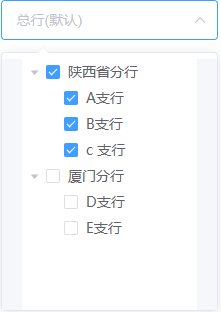
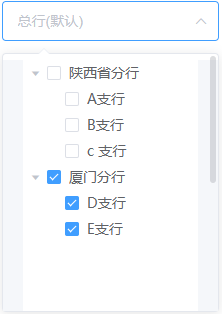
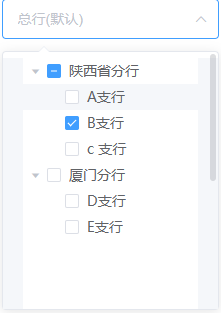
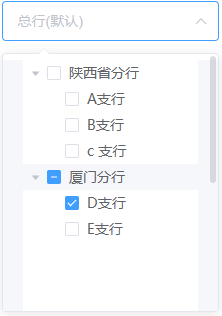
代码思路:
1. 通过点击第二次复选框与前一次点击复选框进行唯一值判断,相同类型的不做处理,不同类型的值取后面一次点击的,前面的数据都清空。
2. this.initArr[0].type != this.initArr[1].type // 一级选中和跨级选中进行判断
3. 除了2情况外,就是点击全选中的时候数据是多个,需要判断最后一个与最后倒数二个 this.initArr[this.initArr.length - 2].type != this.initArr[this.initArr.length - 1].type