【翻译中】骇入Unity游戏 | Unity游戏破解
来源:https://www.hypn.za.net/blog/2020/04/11/hacking-unity-games/
发布日期:2020年4月11日
在这篇文章中,我将探讨一些破解使用Unity编写的游戏的方法。在底层,Unity使用了名为"Mono"的工具,这是一个用于DotNet的跨平台编译器。
In this post I'm going to explore a few ways to hack games written using Unity. Under the hood Unity makes use of "Mono" which is a cross-compiler for DotNet.
在Unity引擎中,开发人员可以添加C#编写的“脚本”,这些脚本构成了游戏逻辑的一部分——这部分通常就是我们破解游戏的目标。与传统编译的游戏不同,这些“脚本”并没有直接编译成一个可通过查找静态内存偏移进行修改的.exe文件。但「道高一尺、魔高一丈」,我们仍然有其他选择。
Within the Unity engine, developers can add "scripts" (written in C#) which make up some of the game logic - these will often be our target. Unlike more traditionally compiled games, these "scripts" are not simply compiled into the .exe where we can find a static memory offset to patch... but we do have some other options.
作为参考,接下来我们要进行游戏破解,我们要破解的游戏名为"198X"(第一部分),这是一个以80年代街机为主题的游戏,包含多个迷你游戏。
The game we're going to hack is called "198X" (part 1), an 80s-arcade themed game with several mini-games.
- 关于游戏 About the game
- 使用dnSpy进行探索 Exploring with dnSpy
- 骇入游戏 Hacking the game
- 使用dnSpy with dnSpy
- 使用CheatEngine with CheatEngine
- 使用Frida with Frida
- 其他内容 Other
1. 关于游戏 | About the game
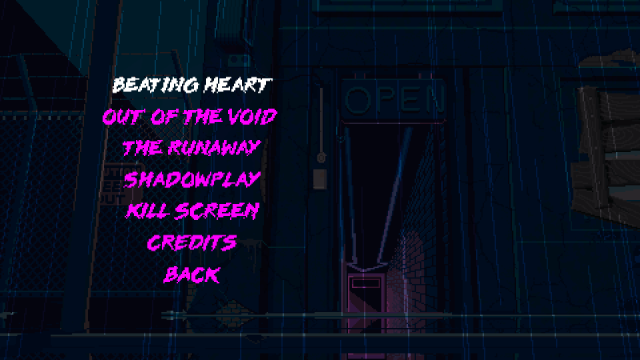
198X中有几个内置的迷你游戏,我们将对“Beating Heart”和“Shadowplay”进行破解:
198X has several mini games built in, we're going to be hacking "Beating Heart" and "Shadowplay":
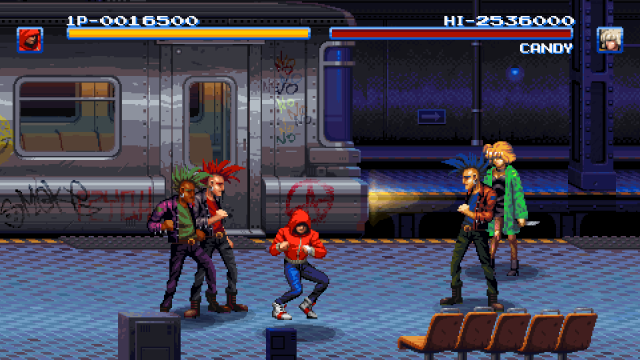
“Beating Heart”是一款“打击游戏”风格的游戏,具有生命条,当被敌人击中时,你会受到伤害:
"Beating Heart" is a "beat-em-up" style game with health bars and you take damage when hit by enemies:
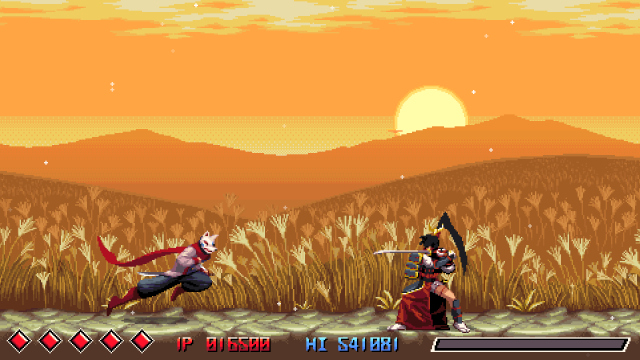
“Shadowplay”是一款“忍者(跑酷?)”风格的游戏,你有5条生命,与敌人或陷阱碰撞时会受到伤害:
"Shadowplay" is a "ninja (runner?)" style game in which you have 5 lives and take damage when colliding with enemies or traps:
这两款游戏恰好使用相同的游戏逻辑来处理伤害,无论是对玩家还是敌人(所以不能简单地将其 NOP 掉)。
Both happen to use the same game logic for dealing with damage, for both the player and enemies (so can't just be NOP'ed out)
2. 使用dnSpy进行探索 | Exploring with dnSpy
dnSpy是一款“.NET调试器和汇编编辑器”,允许你查看.NET应用程序的源代码。正如前面提到的,Unity游戏是使用Mono编译的,这意味着它们是.NET应用程序。
dnSpy is a ".NET debugger and assembly editor", which allows you to view the source of .NET applications. As mentioned above, Unity games are compiled with Mono, meaning they're .NET apps.
因为我们对“修改游戏逻辑”感兴趣,而不是去搞乱Unity游戏引擎本身,所以我们要“研究”的是用户的Unity"脚本"。方便的是,这些脚本通常被编译到一个叫做"Assembly-CSharp.dll"或"Assembly-CSharp-firstpass.dll"文件中。在我们正在研究的 198X 游戏中,可以在以下位置找到它们:Steam\SteamApps\common\198X\198X_Data\Managed。
Because we're interested in cheating the game's logic, and not necessarily messing with the Unity game engine itself, we're after the user's Unity "scripts". Conveniently these are typically compiled in to a "Assembly-CSharp.dll" or "Assembly-CSharp-firstpass.dll" file. In the case of the game 198X we're looking at, they can be found in: Steam\SteamApps\common\198X\198X_Data\Managed
在dnSpy中打开“Assembly-CSharp.dll”(选择“File” -> “Open” -> 浏览到“Managed”文件夹并选择文件),然后应该会在左侧的树状视图中添加“Assembly-CSharp.dll”和一些其他UnityEngine项。展开“Assembly-CSharp.dll”,点击“{}”将列出游戏中的类(代码类):
Opening "Assembly-CSharp.dll" in dnSpy (File -> Open -> browse to the "Managed" folder and select the file), should then add "Assembly-CSharp.dll" and a few other UnityEngine items to the treeview on the left. Expanding "Assembly-CSharp.dll" to, and clicking on, "{}" will list the (code) classes in the game:
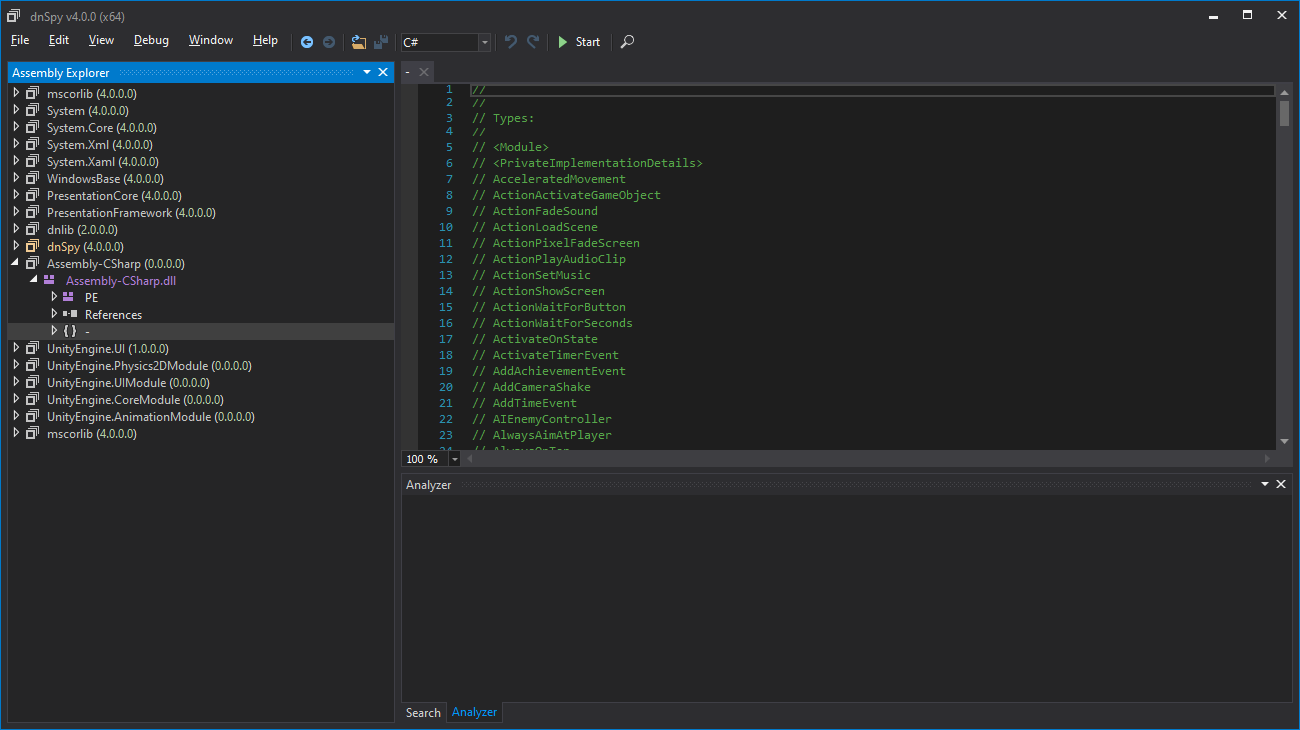
从这里开始,我们可以开始查找有用的术语(关键词),以帮助我们找到我们想要破解的内容,例如使用 CTRL+F 搜索 "damage" 会得到一些结果 —— 这里,我们感兴趣的是 "TakeDamage"。
From here we can start looking for useful terms that might help us find what we want to hack, for example searching (CTRL+F) for "damage" has a few results - the one we are interested in is "TakeDamage".
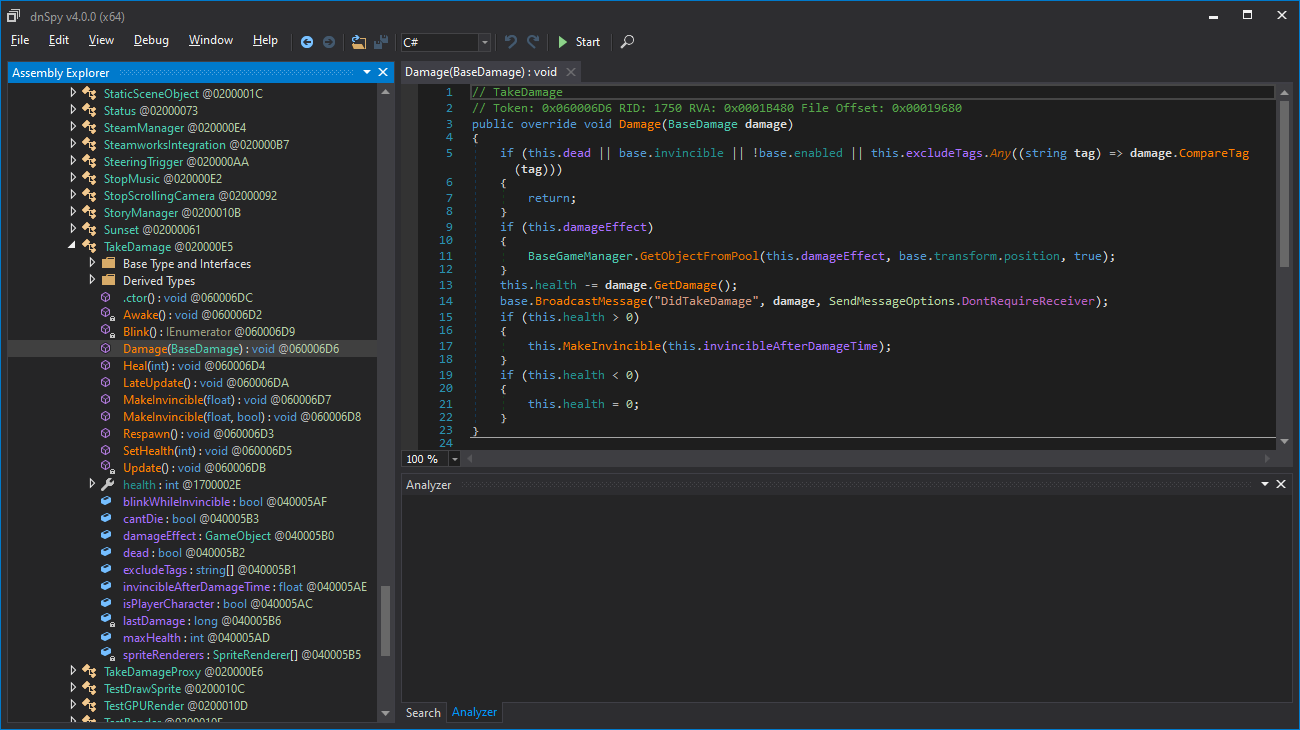
展开树形视图中的 "{}" 会显示所有的类,向下滚动并展开 "TakeDamage" 会显示一个 "Damage(BaseDamage)" 函数... 点击它会显示 "Damage" 函数的代码:
Expanding the "{}"" in the treeview gives a list of all the classes, scrolling down to and expanding "TakeDamage" reveals a "Damage(BaseDamage)" function... clicking on it shows the "Damage" function's code:
3. 骇入游戏 | Hacking the game
1. 使用dnSpy | with dnSpy
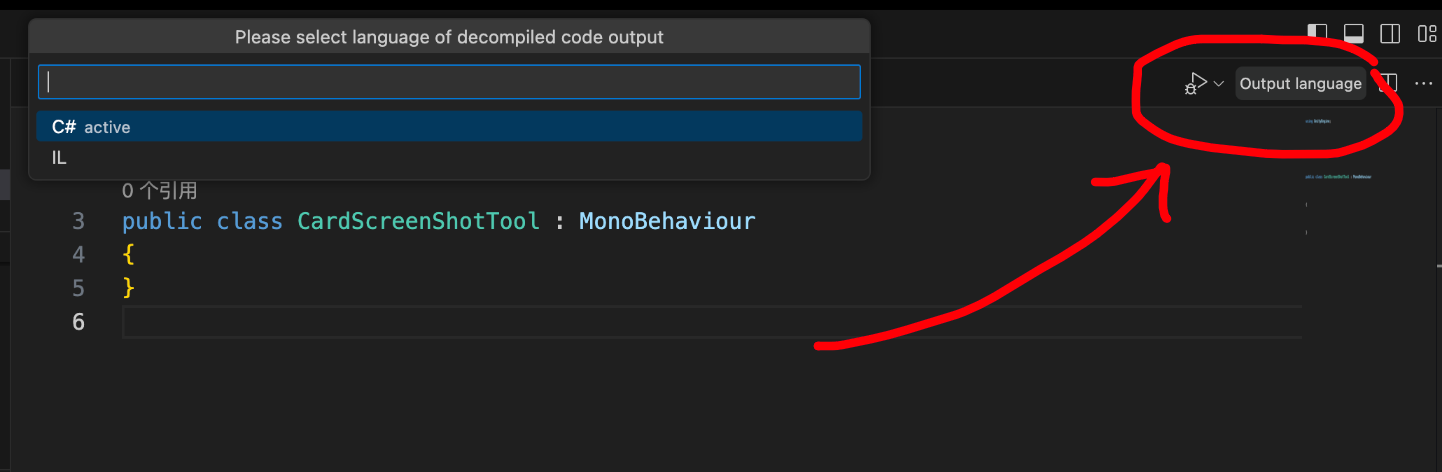
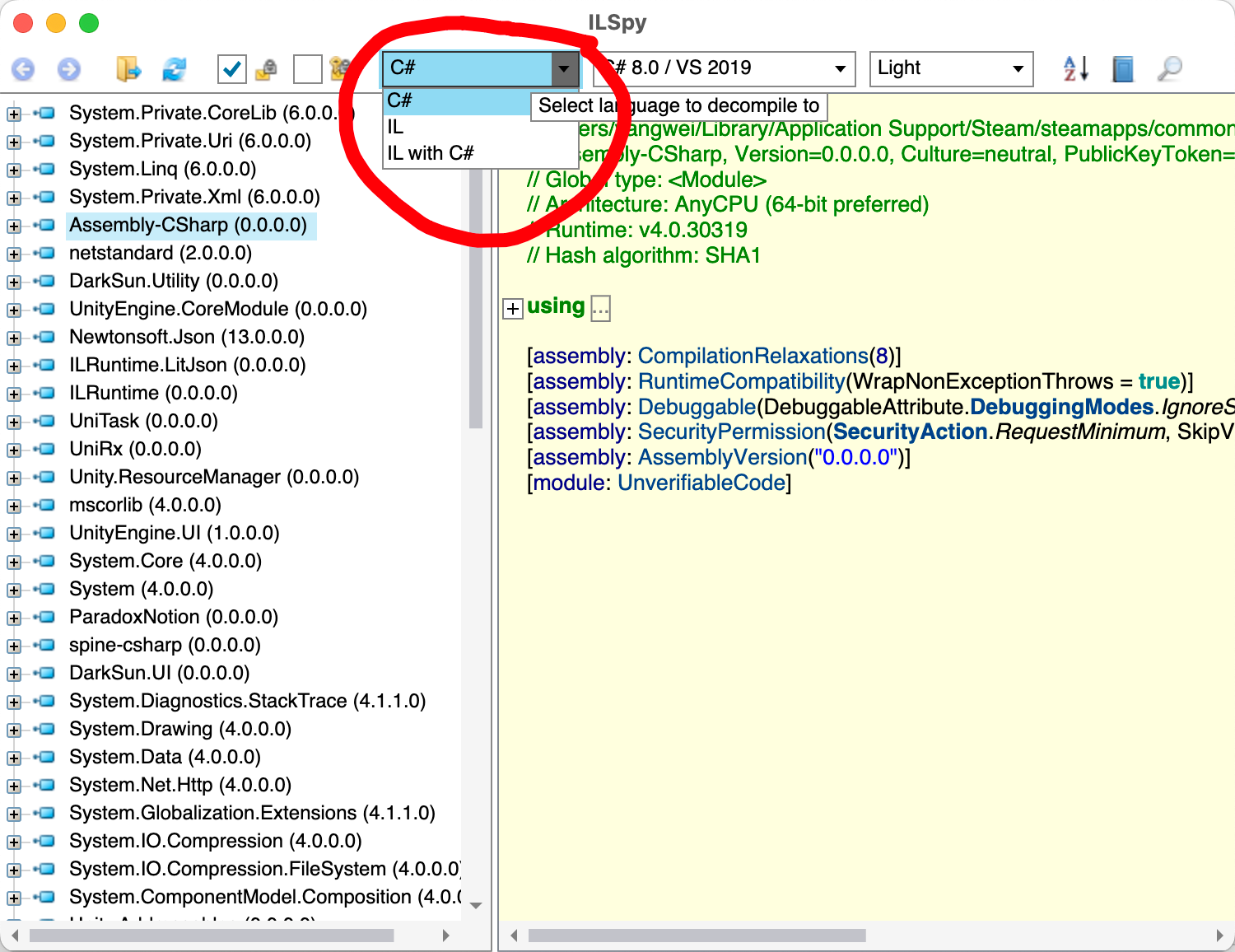
如果用不了 dnSpy,比如你使用的是 macOs 或 Linux,那么你可以试一下 ilSpy:
注意事项:
Notes:
这些方法涉及对游戏的"Assembly-CSharp.dll"文件进行更改,以使破解生效——在执行以下操作之前最好备份此文件。这些修改应该会在不同的游戏实例中保留,除非Steam进行更新或修复游戏文件。
These methods involve making changes to the game's "Assembly-CSharp.dll" file in order for the hacks to work - it's probably a good idea to back up this file before doing any of the below. These modifications should persist through different instances of the games unless Steam updates or repairs the game files.
您应该能够通过在Steam上右键单击游戏 -> "属性" -> "本地文件" -> "验证游戏文件完整性..."来将文件恢复到其原始状态。
You should be able to revert the file to its original state in Steam by right clicking on the game -> "Properties" -> "Local Files" -> "Verify Integrity of Game Files..."
怎么 "Edit Method(编辑方法)":
The "Edit Method" route:
虽然 dnSpy 确实提供了一些代码编辑功能,但它并不总是有效,并且常常会出现"丢失程序集(Missing assembly)"的错误。在 198X 这个游戏中,它们似乎在.exe中使用了嵌入的Mono,这可能会引起问题。尽管如此,我们仍然可以相当容易地对这个"Damage"函数进行补丁/修改。
While dnSpy does provide some code editing functionality, it doesn't always work and can often have "Missing assembly" errors. In the case of 198X they seem to be using Mono embedded in the .exe, which can cause problems. That said, we can still patch this "Damage" function fairly easily.
在 "Damage" 函数中,它首先执行一些检查,以确定是否应该应用伤害:
The first thing the "Damage" function does is perform a few checks to determine if damage should be applied:
if (this.dead || base.invincible || !base.enabled || this.excludeTags.Any((string tag) => damage.CompareTag(tag)))
{
	return;
}
在 dnSpy 的列表中,"Damage" 函数的下面几行有一个名为 "isPlayerCharacter: bool" 的属性——它实际上是一个标志,用于确定是否受到伤害的对象是否是玩家。我们可以通过确保选择了 "Damage" 函数,右键单击右侧代码窗口内部,然后选择"编辑方法(C#)"来修改上面的代码。
In the dnSpy listing, a few lines below the "Damage" function, is a "isPlayerCharacter: bool" property - literally a flag as to whether the object taking damage is the player or not. We can modify the above code by making sure the "Damage" function is selected, right clicking inside the code window on the right, and choosing "Edit Method (C#)".
在 "if" 的括号内添加 "this.isPlayerCharacter ||",然后点击窗口右下角的 "编译"。现在,"Damage" 函数应该如下所示:
Add this.isPlayerCharacter || inside the brackets of the "if" and click "Compile" (bottom right of the window). The damage function should now look like this:
if (this.isPlayerCharacter || this.dead || base.invincible || !base.enabled || this.excludeTags.Any((string tag) => damage.CompareTag(tag)))
{
	return;
}
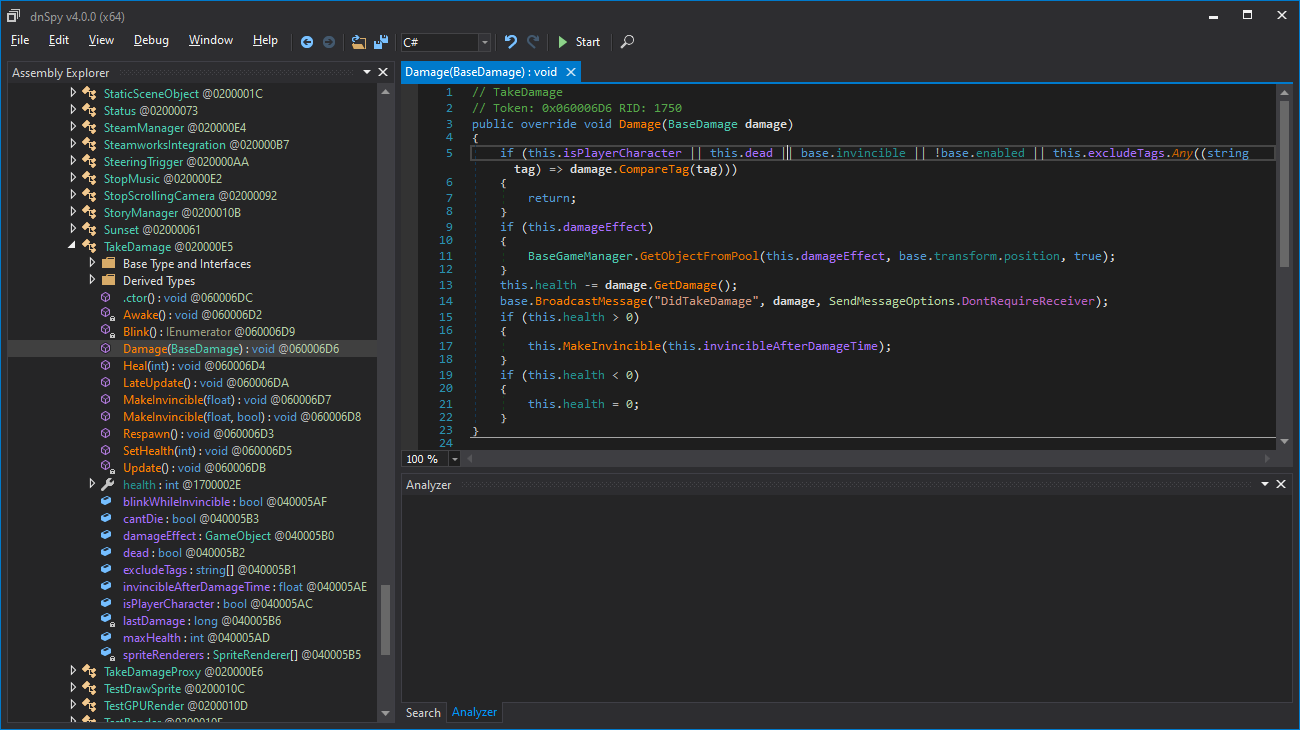
保存更改到文件(File -> Save Module),如果游戏已经打开,重新启动游戏以使更改生效。
Save the changes to file (File -> Save Module), and restart the game if open, for them to take effect.
怎么 "编辑IL指令":
The "Edit IL Instructions" route:
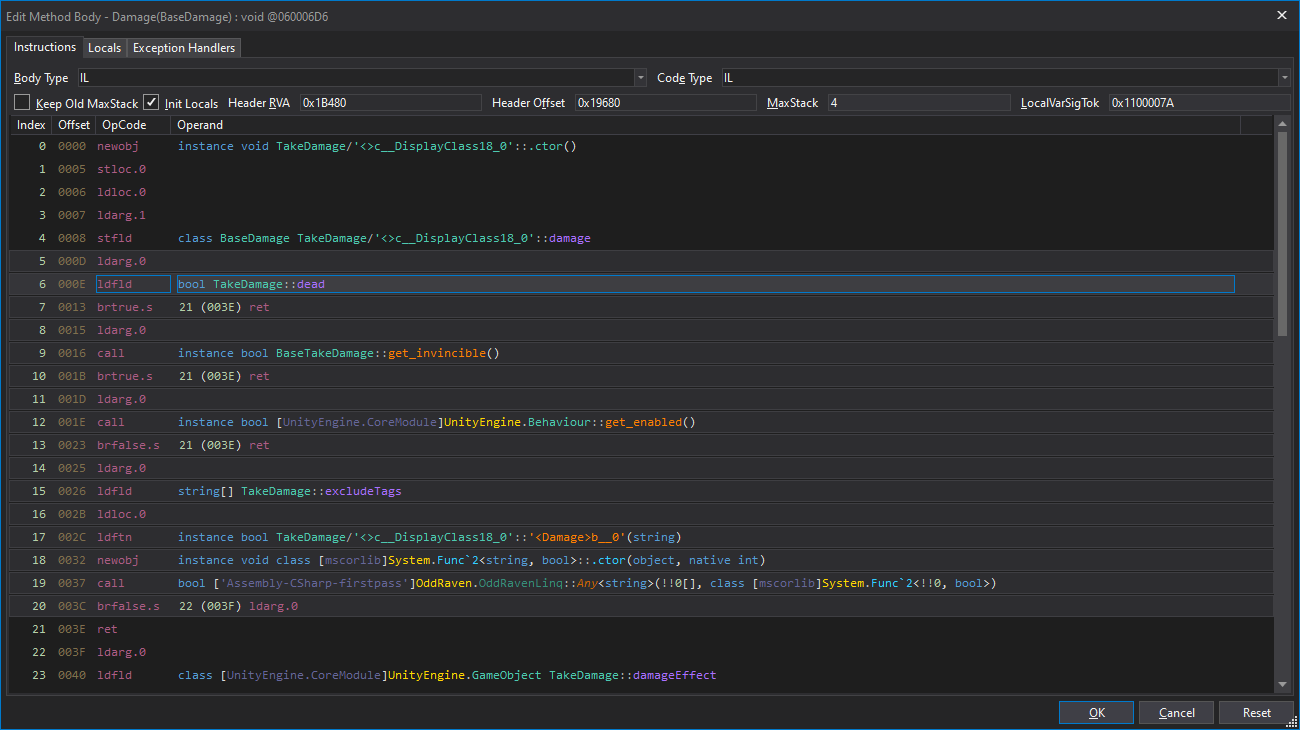
当更改和编译代码不起作用时(例如,当开发者对代码采取混淆或保护措施时),我们可以通过修改"IL指令"(中间语言操作码)来进行更微妙的低级别更改。要做到这一点,右键单击代码窗口,然后选择"编辑IL指令..."。
When changing and compiling the code doesn't work (eg: when obfuscation or protections have been put in place), we can make more subtle lower-level changes by modifying the "IL Instructions" (intermediate language opcodes). To do this right click in the code window and choose "Edit IL Instructions..."
译者:
在
ilspy-vscode中如下图操作
在
AvaloniaILSpy中如下图操作
虽然这个模式下的“视图”更难阅读和操作,但仍然可以识别先前看到的代码中使用的字段,例如在"if"条件中的"this.dead":
While this view is much harder to read and work with, it's possible to identify fields used in the previously seen code, such as the "this.dead" in the "if" condition:
6 000E ldfld bool TakeDamage::dead
单击单词"dead"会弹出一个包含"Field..."选项的弹出窗口,单击这个选项可以让我们选择一个不同的类属性来替代它。单击"isPlayerCharacter"字段应该会修改代码为:
Left clicking on the word "dead" should give a popup with a "Field..." option, and clicking this lets us pick a different class property to use in its place. Clicking the "isPlayerCharacter" field should modify the code to:
6 000E ldfld bool TakeDamage::isPlayerCharacter
单击"Ok"按钮(右下角)应该会将您返回到代码编辑器,"if"语句将被更改为:
Clicking the "Ok" button (bottom right) should return you to the code editor with the "if" statement changed to:
if (this.isPlayerCharacter || base.invincible || !base.enabled || this.excludeTags.Any((string tag) => damage.CompareTag(tag)))
{
	return;
}
这段代码与我们之前的更改不完全相同,但也能会达成我们的目标——赋予我们无敌状态... 尽管存在引入bug的风险,允许"dead"对象受到伤害,希望这不会对游戏产生太严重的影响。
This code is not quite the same as our previous change, but should have the same result - granting us invulnerability... at the risk of introducing a bug allowing "dead" objects to take damage, which hopefully won't affect anything too serious.
再次强调,您需要保存更改(File -> Save Module)并重新启动游戏以使更改生效。
Once again, you'll need to save the changes (File -> Save Module) and restart the game for them to take effect.