作业①
实验:爬取软科排名的大学信息
code
	import requests
	import bs4
	from bs4 import BeautifulSoup

	unilist = [] # 用于存储爬取的学校信息的空列表

	url = "https://www.shanghairanking.cn/rankings/bcur/2020"
	html = requests.get(url,timeout = 30)
	html.raise_for_status()
	html.encoding = html.apparent_encoding

	soup = BeautifulSoup(html.text,"html.parser")
	for tr in soup.find('tbody').children:
		if isinstance(tr,bs4.element.Tag):
			a = tr('a')
			tds = tr('td')
		unilist.append([tds[0].text.strip(), a[0].string.strip(), tds[2].text.strip(),
						tds[3].text.strip(), tds[4].text.strip()])
		# 查阅网页的HTML后分别取出所需的、藏在对应标签后面的内容

	print("排名\t学校名称\t\t省市\t\t学校类型\t\t总分") # 输出格式
	for i in range(0,16): # 学号102102116尾号16 这里只输出前16
		x = unilist[i]
		print("%s\t\t%s\t\t\t%s\t\t%s\t\t%s" % (x[0],x[1],x[2],x[3],x[4]))
		#将信息按照对应的格式进行输出
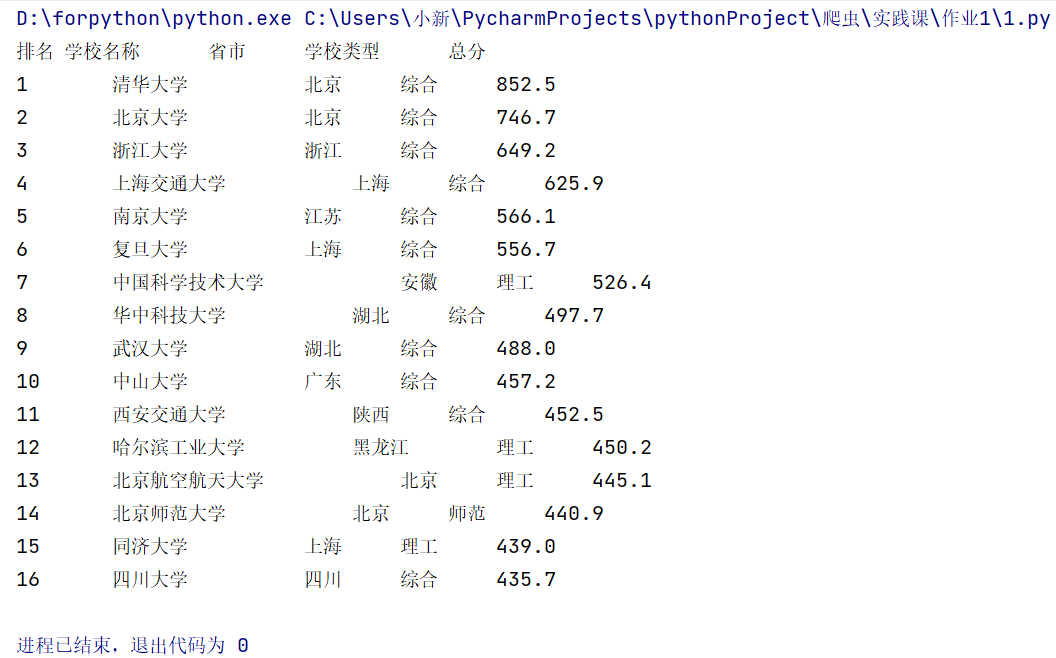
- 运行结果:
实验心得
- 收获:对request方法和BeautifulSoup方法的爬虫有更为深入的理解与认识!同时使用BeautifulSoup方法前可以先查阅相应的HTML内目标标签的特点、规律,便于爬虫代码的简化。但输出格式没有调整到位,使用制表符仍存在不对其的情况。
作业②
实验:爬取商城商品的名称与价格
- 要求:用requests和re库方法设计某个商城(自已选择)商品比价定向爬虫,爬取该商城,以关键词“书包”搜索页面的数据,爬取商品名称和价格。
- 输出信息:
序号 价格 商品名
1 65.00 xxx
2......
- 具体代码:
code
import requests
from bs4 import BeautifulSoup

price = [] # 用于存放价格的列表
title = [] # 用于存放商品名称的列表

# 初始化
url = "http://search.dangdang.com/?key=%CA%E9%B0%FC&act=input&page_index=1"
html = requests.get(url,timeout = 30)
html.raise_for_status()
html.encoding = html.apparent_encoding
soup = BeautifulSoup(html.text,"html.parser")

list1 = soup.find_all('span','price_n') # 观察其HTML发现price就直接藏在’span‘标签下
for i in list1:
   price.append(str(i).split('>')[1].split('<')[0]) # 对得到的初始价格数据进行切割 提取目标价格信息
# print(price) 检测切割结果用
list2 = soup.find_all('a', {"name":"itemlist-title"}) # 观察其HTML发现商品名称的独特的属性与属性值
# "name":"itemlist-title"
for i in list2:
   title.append(i["title"]) # list2里存放的数据type显示为bs的标签 即字典

print("{:1}\t\t{:1}\t\t{:1}".format("序号","商品名称","价格")) #打印最终结果
for i in range(len(title)):
   print(f"NO.{i}\t{title[i]}\t{price[i]}")
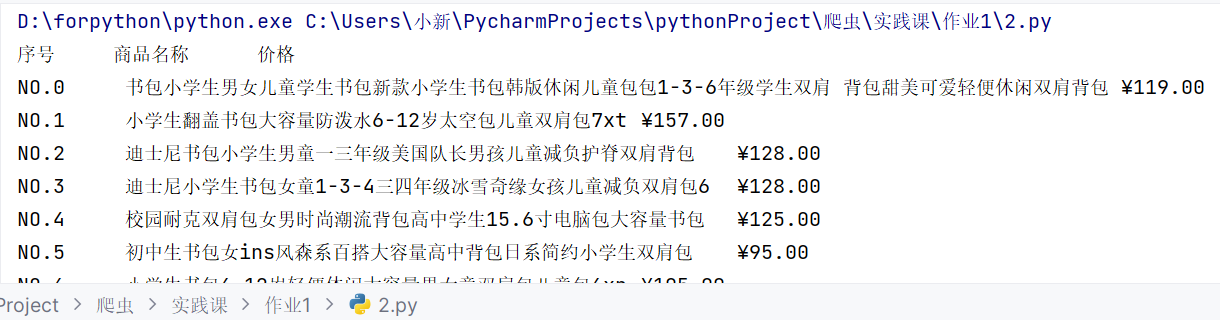
- 运行结果:
实验心得
- 收获:对商城网页的商品爬取到的信息可以先转化为字符串类型,进一步使用str类型的split()方法进行切割、提取我们所需的部分;对于find_all()方法返回值存储在列表里,但列表里的元素是标签属性,可以通过字典键值对的方式输入"key",直接获取所需的"value"避免切割方法的不便利!(具体体现在代码的备注当中)
实验③
实验:爬取给定网页所有JPEG、JPG格式文件
code
from bs4 import BeautifulSoup
import requests

url = "https://xcb.fzu.edu.cn/info/1071/4481.htm"
html = requests.get(url)
html.raise_for_status()
html.encoding = html.apparent_encoding # 常规初始化操作

soup = BeautifulSoup(html.text,"html.parser")
list = soup.find_all('img') # 查阅HTML后 得知目标信息藏在 img标签下 查找所有的img返回到列表里

path = []  # 用于存储图片路径信息的列表
for j in range(len(list)):
#     path.append(str(i).split(' ')[1].split('"')[1]) # 用于测试数据的处理是否正确
# print(path)
    i = list[j]
    img_url = "https://xcb.fzu.edu.cn" + str(i).split(' ')[1].split('"')[1] #得到真正能下载对应jpg的url

    with open(f".\pic\{j+1}.jpeg","wb") as f: #打开相应文件并保存图片
        content = requests.get(img_url)
        f.write(content.content)
        print("下载成功!")
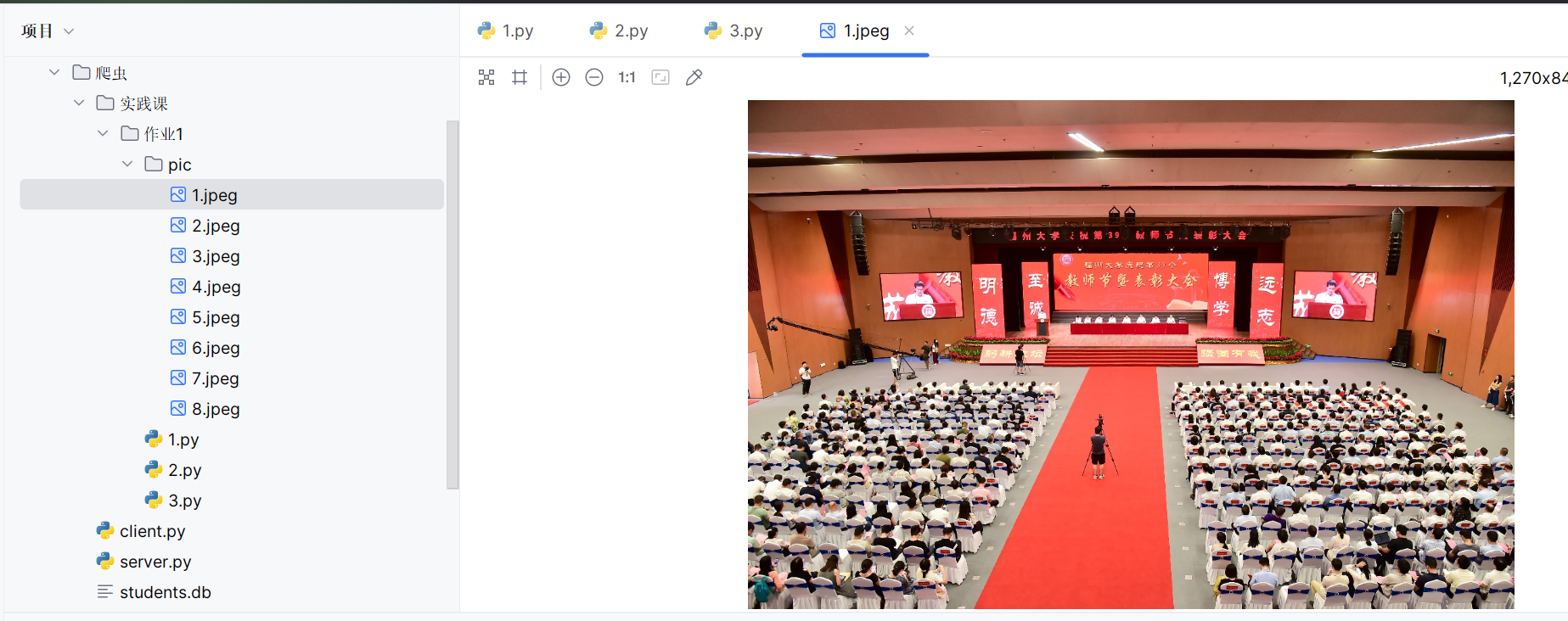
- 运行结果:
实验心得
- 收获:实验三容易受到网速的影响,最开始使用校园网进行实验会发现爬取速度特别慢,改用连接热点后可以快速爬取出所要的图片。