技术栈:supervisor + nginx + uwsgi + django + virtualenv + mariadb
基本流程
crm 纯后端部署是通过模板语言进行和前端通信的,前端代码写在后端中
<!--模板语言-->
{{static.el}}
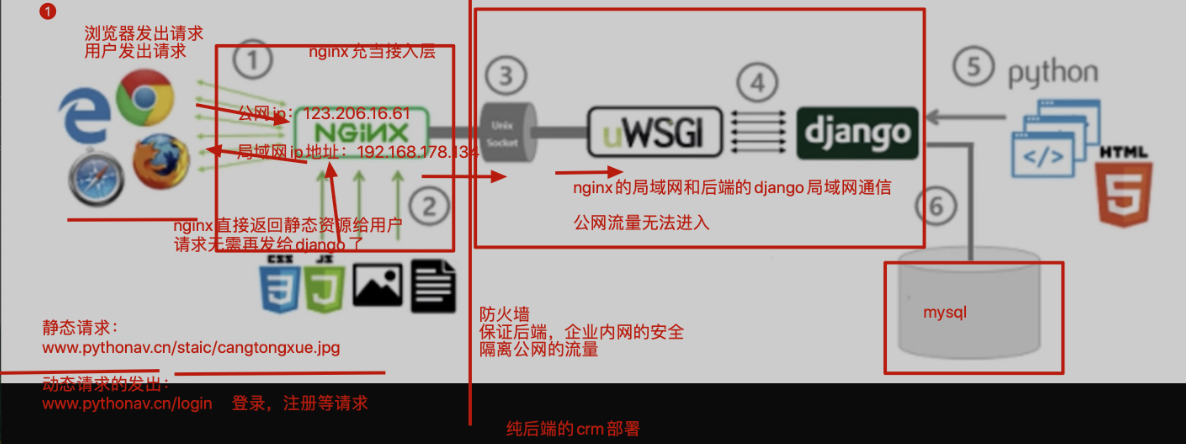
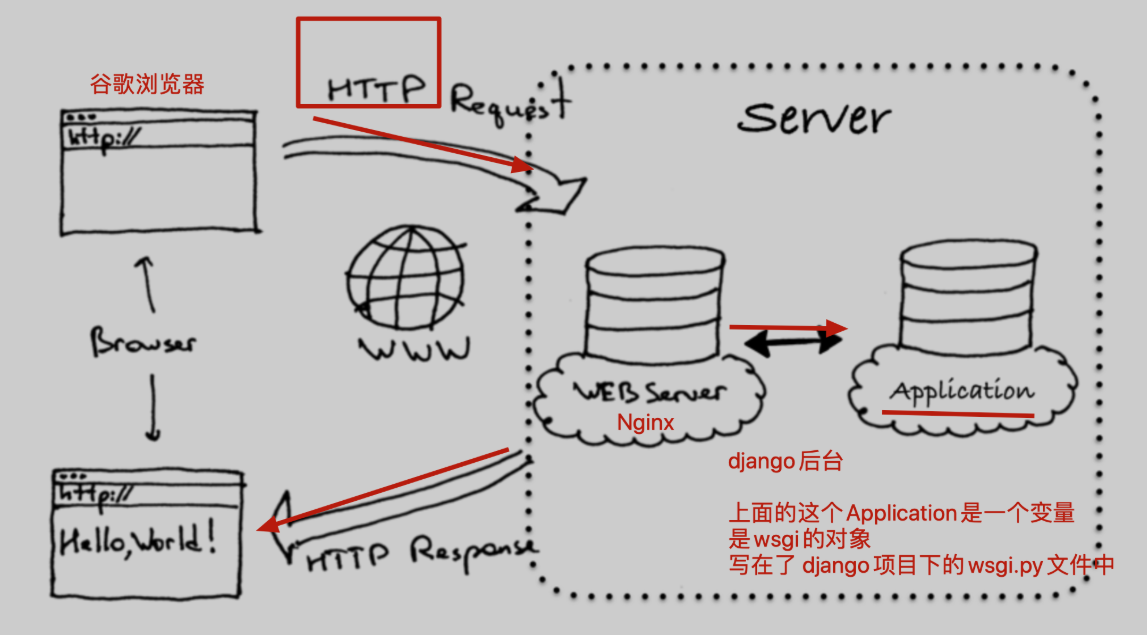
先配置后端,uwsgi+crm进行项目运行
环境变量
[root@localhost ~]# vim /etc/profile
PATH="/opt/tngx232/sbin:/opt/python369/bin:/usr/local/sbin:/usr/local/bin:/usr/sbin:/usr/bin:"
[root@localhost ~]# source /etc/profile
[root@localhost ~]# echo $PATH
/opt/tngx232/sbin:/opt/python369/bin:/usr/local/sbin:/usr/local/bin:/usr/sbin:/usr/bin:
1.先创建虚拟环境,用于运行crm
[root@localhost ~]# mkdir /s25crm
[root@localhost ~]# cd /s25crm/
[root@localhost s25crm]# ls
[root@localhost s25crm]# pwd
/s25crm
[root@localhost s25crm]# virtualenv --python=python3 s25_crm
created virtual environment CPython3.6.9.final.0-64 in 138ms
  creator CPython3Posix(dest=/s25crm/s25_crm, clear=False, no_vcs_ignore=False, global=False)
  seeder FromAppData(download=False, pip=bundle, setuptools=bundle, wheel=bundle, via=copy, app_data_dir=/root/.local/share/virtualenv)
    added seed packages: pip==21.3.1, setuptools==59.6.0, wheel==0.37.1
  activators BashActivator,CShellActivator,FishActivator,NushellActivator,PowerShellActivator,PythonActivator
[root@localhost s25crm]# ls
s25_crm
[root@localhost s25crm]# source s25_crm/bin/activate
(s25_crm) [root@localhost s25crm]#
2.上传代码到linux中,调试项目是否能够运行
(s25_crm) [root@localhost s25crm]# git clone https://github.com/zylyehuo/tf_crm.git
Cloning into 'tf_crm'...
remote: Enumerating objects: 153, done.
remote: Counting objects: 100% (153/153), done.
remote: Compressing objects: 100% (133/133), done.
remote: Total 153 (delta 20), reused 150 (delta 17), pack-reused 0
Receiving objects: 100% (153/153), 1.17 MiB | 0 bytes/s, done.
Resolving deltas: 100% (20/20), done.
(s25_crm) [root@localhost s25crm]# ls
s25_crm  tf_crm
(s25_crm) [root@localhost s25crm]# ls tf_crm/
app01  manage.py  static  templates  tf_crm
(s25_crm) [root@localhost s25crm]# cd tf_crm/
(s25_crm) [root@localhost tf_crm]#
(s25_crm) [root@localhost tf_crm]# pip3 install -i https://pypi.tuna.tsinghua.edu.cn/simple django==1.11.25
(s25_crm) [root@localhost tf_crm]# pip3 install -i https://pypi.tuna.tsinghua.edu.cn/simple pymysql
(s25_crm) [root@localhost tf_crm]# pip3 install -i https://pypi.tuna.tsinghua.edu.cn/simple django-multiselectfield
(s25_crm) [root@localhost tf_crm]# yum install mariadb-server  mariadb -y
(s25_crm) [root@localhost tf_crm]# systemctl start mariadb
(s25_crm) [root@localhost tf_crm]# netstat -tunlp | grep 3306
tcp        0      0 0.0.0.0:3306            0.0.0.0:*               LISTEN      106346/mysqld
(s25_crm) [root@localhost tf_crm]# python3 manage.py runserver
# 出现 ValueError: Incorrect timezone setting: Asia/shanghai
(s25_crm) [root@localhost tf_crm]# vim tf_crm/settings.py
#TIME_ZONE = 'Asia/shanghai'  # 注释掉,临时解决
(s25_crm) [root@localhost tf_crm]# python3 manage.py runserver
# 出现 django.db.utils.OperationalError: (1045, "Access denied for user 'root'@'localhost' (using password: YES)")
(s25_crm) [root@localhost tf_crm]# vim /s25crm/tf_crm/tf_crm/local_settings.py
# 修改以下内容
DATABASES = {
    'default':{
        'ENGINE': 'django.db.backends.mysql',
        'NAME': 'tf_crm',
        'HOST': '127.0.0.1',
        'POST': 3306,
        'USER': 'root',
        'PASSWORD': '',
    }
}
(s25_crm) [root@localhost tf_crm]# vim /opt/s25crm/tf_crm/tf_crm/settings.py
# 修改以下内容
ALLOWED_HOSTS = ["*"]
(s25_crm) [root@localhost tf_crm]# pwd
/s25crm/tf_crm
(s25_crm) [root@localhost tf_crm]# python3 manage.py runserver
3.调试好crm的模块依赖,以及mariadb数据库的安装,以及数据导入之后,crm调试可以正确运行了
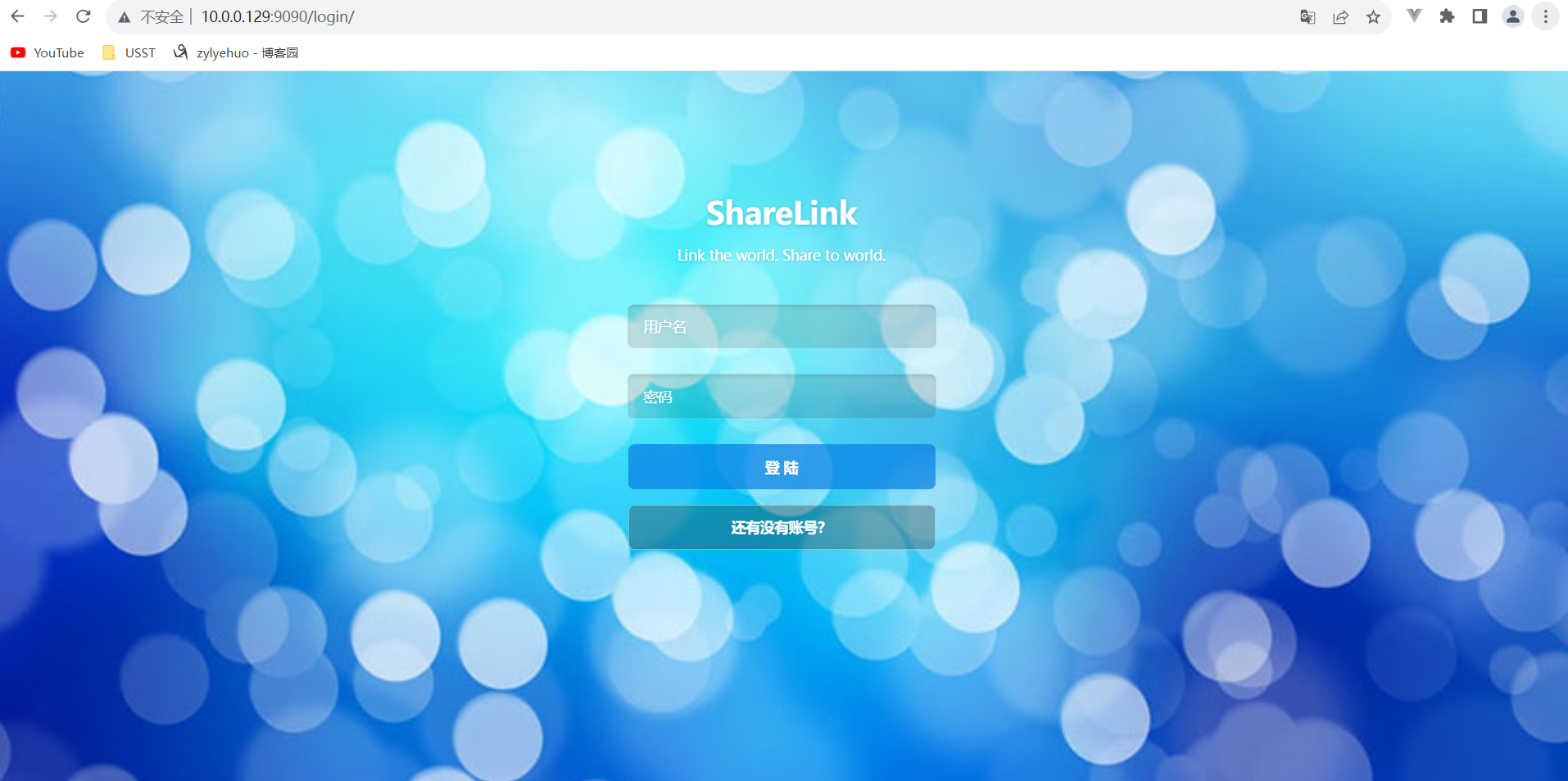
浏览器访问 10.0.0.129:9090/login/
4.在线上,是使用uwsgi结合uwsgi.ini配置文件,启动crm的,启动方式如下
安装uwsgi
pip3 install -i https://pypi.tuna.tsinghua.edu.cn/simple uwsgi
线上部署时,uwsgi.ini需要修改添加如下参数,关闭http参数
(s25_crm) [root@localhost tf_crm]# vim uwsgi.ini
注释版
[uwsgi]
# Django-related settings
# the base directory (full path)
# 填写crm项目的第一层绝对路径
chdir           = /s25crm/tf_crm/
# Django's wsgi file
# 填写crm项目第二层的相对路径,找到第二层目录下的wsgi.py
# 这里填写的不是路径,是以上一个参数为相对,找到第二层项目目录下的wsgi.py文件
module          = tf_crm.wsgi
# the virtualenv (full path)
# 填写虚拟环境解释器的第一层工作目录
home            = /s25crm/s25_crm
# process-related settings
# master
master          = true
# maximum number of worker processes
# 代表定义uwsgi运行的多进程数量,官网给出的优化建议是 2*cpu核数+1
# 如果是单进程,十万个请求,都丢给一个进程去处理
# 3个工作进程,十万个请求,就分给了3个进程去分摊处理
# 查看几核
# [root@localhost ~]# cat /proc/cpuinfo| grep "cpu cores"| uniq
# cpu cores	: 4
processes       = 9

# the socket (use the full path to be safe
# 使用此协议运行后台,就无法通过浏览器访问了,协议不一样
socket          = 0.0.0.0:8000
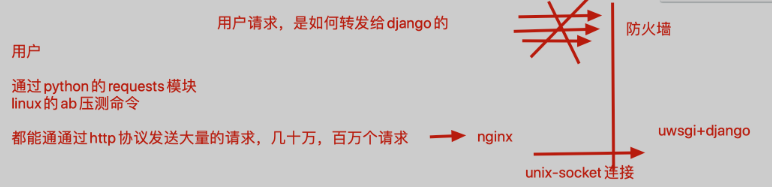
#  线上不会用http参数,因为对后端是不安全的,使用socket参数是安全的连接,用nginx反向代理去访问
# 后端程序是运行在防火墙内部,外网是无法直接访问的
# 临时使用http参数,便于我们用浏览器调试访问
#http =  0.0.0.0:8000

# ... with appropriate permissions - may be needed
# chmod-socket    = 664
# clear environment on exit
vacuum          = true
无注释版
[uwsgi]
chdir           = /s25crm/tf_crm/
module          = tf_crm.wsgi
home            = /s25crm/s25_crm
master          = true
processes       = 9
socket          = 0.0.0.0:8000
vacuum          = true
5.使用supervisor启动uwsgi进程,需要修改supervisord.conf配置文件,看好文件的名字
vim /etc/supervisord.conf #修改如下参数
[program:again_s25crm]
command=/s25crm/s25_crm/bin/uwsgi --ini  /s25crm/tf_crm/uwsgi.ini
autostart=true       ; 在supervisord启动的时候也自动启动
startsecs=10         ; 启动10秒后没有异常退出,就表示进程正常启动了,默认为1秒
autorestart=true     ; 程序退出后自动重启,可选值:[unexpected,true,false],默认为unexpected,表示进程意外杀死后才重启
stopasgroup=true     ;默认为false,进程被杀死时,是否向这个进程组发送stop信号,包括子进程
killasgroup=true     ;默认为false,向进程组发送kill信号,包括子进程
6.检查后台的状态,以及启动命令
【但凡supervisor这里无法正常启动,立即去检查 supervisord.conf里面定义的任务参数是否正确】

(s25_crm) [root@localhost tf_crm]# supervisord -c /etc/supervisord.conf
Unlinking stale socket /tmp/supervisor.sock

(s25_crm) [root@localhost tf_crm]# supervisorctl -c /etc/supervisord.conf
again_s25crm                     STARTING
supervisor>
supervisor>
supervisor> status
again_s25crm                     STARTING
supervisor> status
again_s25crm                     RUNNING   pid 64285, uptime 0:00:13
7.此时配置好nginx.conf就完事了,修改如下,配置nginx,请求转发给后台即可
    server {
        listen       80;
        server_name  localhost;
        #这是一个局部的变量,只对当前这个server{}代码块生效,编码设置为utf-8

        charset utf-8;
        error_page  404  /40x.html;
        # 这里的locaiton 路径匹配,如果你写的是root参数,就是一个web站点功能
        # 基于uwsgi协议的一个高性能的反向代理转发,新的参数
        location / {
        #当请求发送给  192.168.178.140:80的时候
        #通过uwsgi_pass把请求转发给后端的uwsgi服务器
        uwsgi_pass   0.0.0.0:8000;
        #这个参数,是固定的,是添加一些转发请求头内容
        include uwsgi_params;
        }

}
8.重启nginx
nginx -s reload


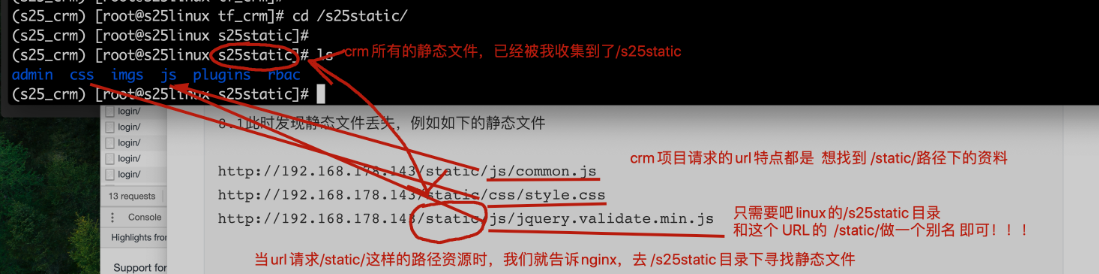
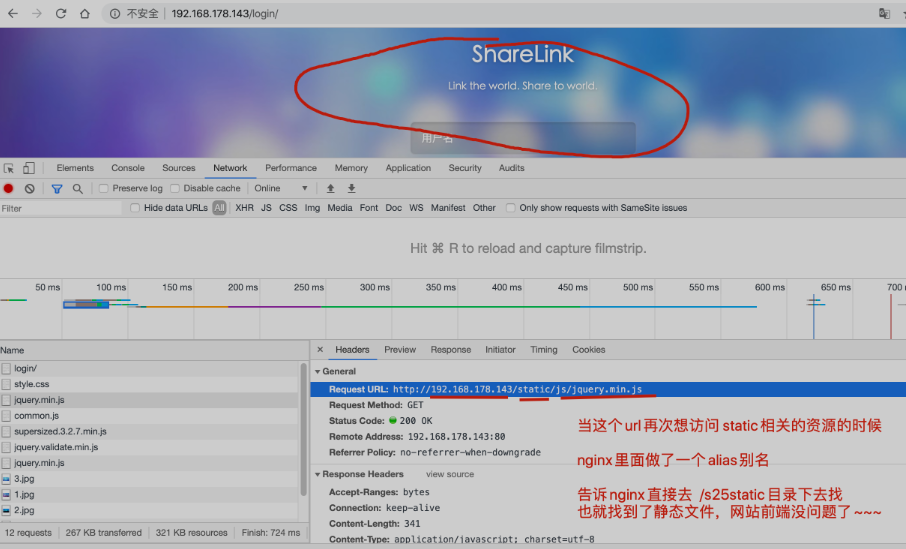
8.1  此时发现静态文件丢失,例如如下的静态文件

http://192.168.178.143/static/js/common.js
http://192.168.178.143/static/css/style.css
http://192.168.178.143/static/js/jquery.validate.min.js
9.还得配置nginx接收所有的django静态文件,修改命令如下
第一步:修改django的配置文件,收集所有的静态文件,放入一个统一管理的目录
vim settings.py  #添加如下内容
STATIC_ROOT='/s25static/'   #作用是定义一个统一管理的目录,收集所有crm的静态文件

第二步:用命令收集静态文件
python3 manage.py collectstiac
10.通过nginx去找到如下的静态文件即可
nginx找到crm的静态文件原理图