openweathermap.json
{
	"coord": {
		"lon": 114.0683, "lat":22.5455
	}

	,
	"weather":[ {
		"id": 803, "main":"Clouds", "description":"多云", "icon":"04d"
	}

	],
	"base":"stations",
	"main": {
		"temp": 299.1, "feels_like":299.1, "temp_min":296.39, "temp_max":300.29, "pressure":1018, "humidity":79, "sea_level":1018, "grnd_level":1017
	}

	,
	"visibility":10000,
	"wind": {
		"speed": 2.73, "deg":137, "gust":3.32
	}

	,
	"clouds": {
		"all": 82
	}

	,
	"dt":1702530001,
	"sys": {
		"type": 2, "id":2031340, "country":"CN", "sunrise":1702508106, "sunset":1702546869
	}

	,
	"timezone":28800,
	"id":1795565,
	"name":"Shenzhen",
	"cod":200
}
# This is a sample Python script.
# pip install requests
# python.exe -m pip install --upgrade pip
# pip install pandas
# Press Shift+F10 to execute it or replace it with your code.
# Press Double Shift to search everywhere for classes, files, tool windows, actions, and settings.
"""
程序原文件 © https://github.com/jksdou/tkinter-gui-application-examples
pyinstaller -i heart.ico -D main.py
1.conda list
2.conda update conda
3.conda create -n geovindu  #生成虚拟环境geovindu
4.activate geovindu  #激活虚拟环境
5.conda install pyinstaller
6.pyinstaller -D main.py
生成后,再修改main.spec 文件,再操作第7步,此项目的已经修改好了。不用再修改 直接第7步,不需要第6步
执行这步,必须路径需要到此项目的根目录下,如执行: cd
7.pyinstaller  main.spec
python.exe -m pip install --upgrade pip

pip install pymssql
pip install pymysql
pip install mysql-connector-python
pip install pyodbc
pip install DBUtils
pip install xlrd
pip install xlwt
pip install xlutils
pip install xlwings
pip install XlsxWriter
pip install openpyxl
pip install pandas
pip install pandasql

pip install win32com
pip install SQLAlchemy
pip install pyspark
pip install pyinstaller  打包执行exe文件的包
pip install fbs 打包库
pip install pdfplumber  pdf
pip install pillow   image
pip install zope.interface
pip install pyzbar 二维码
pip install pyqrcode
pip install qrcode

win:
Tkinter (自带)
PyQT
WxPython

pip install ttkbootstrap
pip install PyQt5
pip install PyQt5-tools
pip install wxPython

Web:
Django
Tomado
Flask

pip install sqlacodegen 使用逆向工程工具自动生成Sqlalchemy Mapping类
sqlacodegen mysql+mysqlconnector://root:password@localhost:3306/test --outfile geovindu.py
# 将本地test数据库逆向生成到geovindu.py代码中

https://pillow.readthedocs.io/en/stable/
九钟图片模式l,L,P,RGB,RGBA,CMYK,YCbCr,I,F
pip install pillow

json  Serialization and Deserialization
pip install marshmallow
pip install jsonstruct
pip install pykson

"""


import requests
import base64

import BLL.BaiduAIPlant

import json
import pickle
from typing import List
from typing import Any
from dataclasses import dataclass


@dataclass
class Clouds:
    all: int

    @staticmethod
    def from_dict(obj: Any) -> 'Clouds':
        _all = int(obj.get("all"))
        return Clouds(_all)


@dataclass
class Coord:
    lon: float
    lat: float

    @staticmethod
    def from_dict(obj: Any) -> 'Coord':
        _lon = float(obj.get("lon"))
        _lat = float(obj.get("lat"))
        return Coord(_lon, _lat)


@dataclass
class Main:
    temp: float
    feels_like: float
    temp_min: float
    temp_max: float
    pressure: int
    humidity: int
    sea_level: int
    grnd_level: int

    @staticmethod
    def from_dict(obj: Any) -> 'Main':
        _temp = float(obj.get("temp"))
        _feels_like = float(obj.get("feels_like"))
        _temp_min = float(obj.get("temp_min"))
        _temp_max = float(obj.get("temp_max"))
        _pressure = int(obj.get("pressure"))
        _humidity = int(obj.get("humidity"))
        _sea_level = int(obj.get("sea_level"))
        _grnd_level = int(obj.get("grnd_level"))
        return Main(_temp, _feels_like, _temp_min, _temp_max, _pressure, _humidity, _sea_level, _grnd_level)


@dataclass
class Sys:
    type: int
    id: int
    country: str
    sunrise: int
    sunset: int

    @staticmethod
    def from_dict(obj: Any) -> 'Sys':
        _type = int(obj.get("type"))
        _id = int(obj.get("id"))
        _country = str(obj.get("country"))
        _sunrise = int(obj.get("sunrise"))
        _sunset = int(obj.get("sunset"))
        return Sys(_type, _id, _country, _sunrise, _sunset)


@dataclass
class Weather:
    id: int
    main: str
    description: str
    icon: str

    @staticmethod
    def from_dict(obj: Any) -> 'Weather':
        _id = int(obj.get("id"))
        _main = str(obj.get("main"))
        _description = str(obj.get("description"))
        _icon = str(obj.get("icon"))
        return Weather(_id, _main, _description, _icon)


@dataclass
class Wind:
    speed: float
    deg: int
    gust: float

    @staticmethod
    def from_dict(obj: Any) -> 'Wind':
        _speed = float(obj.get("speed"))
        _deg = int(obj.get("deg"))
        _gust = float(obj.get("gust"))
        return Wind(_speed, _deg, _gust)

@dataclass
class OpenWeather:
    coord: Coord
    weather: List[Weather]
    base: str
    main: Main
    visibility: int
    wind: Wind
    clouds: Clouds
    dt: int
    sys: Sys
    timezone: int
    id: int
    name: str
    cod: int

    @staticmethod
    def from_dict(obj: Any) -> 'OpenWeather':
        _coord = Coord.from_dict(obj.get("coord"))
        _weather = [Weather.from_dict(y) for y in obj.get("weather")]
        _base = str(obj.get("base"))
        _main = Main.from_dict(obj.get("main"))
        _visibility = int(obj.get("visibility"))
        _wind = Wind.from_dict(obj.get("wind"))
        _clouds = Clouds.from_dict(obj.get("clouds"))
        _dt = int(obj.get("dt"))
        _sys = Sys.from_dict(obj.get("sys"))
        _timezone = int(obj.get("timezone"))
        _id = int(obj.get("id"))
        _name = str(obj.get("name"))
        _cod = int(obj.get("cod"))
        return OpenWeather(_coord, _weather, _base, _main, _visibility, _wind, _clouds, _dt, _sys, _timezone, _id, _name, _cod)


def print_hi(name):
    # Use a breakpoint in the code line below to debug your script.
    print(f'Hi, {name} world,geovindu,涂聚文')  # Press Ctrl+F8 to toggle the breakpoint.


# Press the green button in the gutter to run the script.
if __name__ == '__main__':
    print_hi('PyCharm,geovindu')

    #deserialization process:
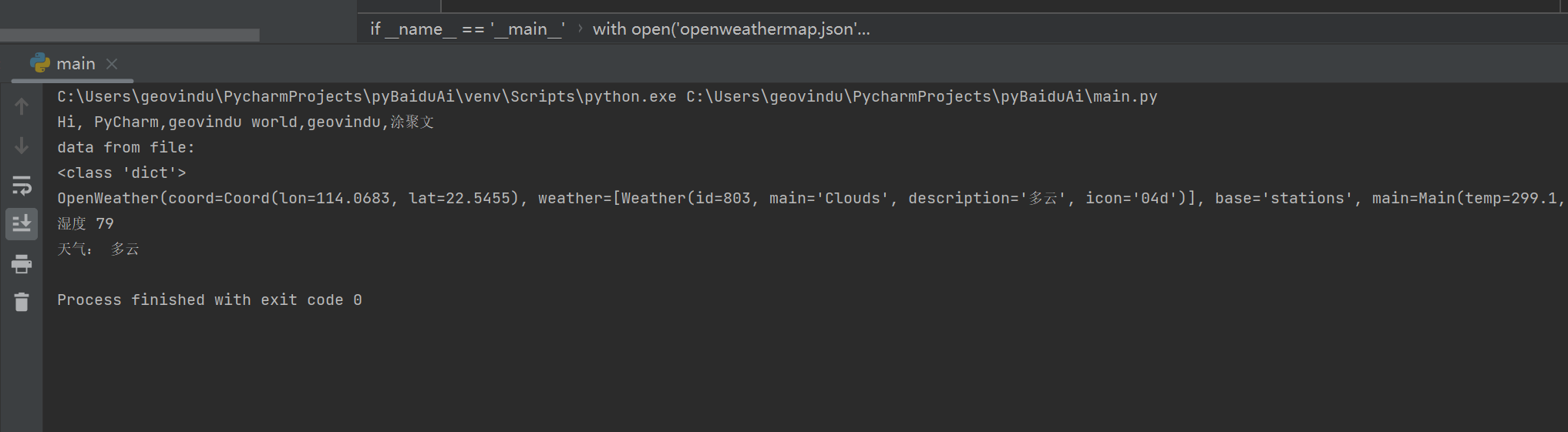
    with open('openweathermap.json',encoding='utf-8') as json_file:
        data = json.load(json_file)
        print("data from file:")
        print(type(data))
        root=OpenWeather.from_dict(data)
        print(root)
        print("湿度",root.main.humidity)
        print("天气:", root.weather[0].description)


    '''
    jp="p.jpg"
    pl=BLL.BaiduAIPlant.AIPlant()
    asstoke =pl.getAccessToken();
    ps=pl.getPlantPng(asstoke,"invoice/" +jp);
    print(ps);
    '''


# See PyCharm help at https://www.jetbrains.com/help/pycharm/