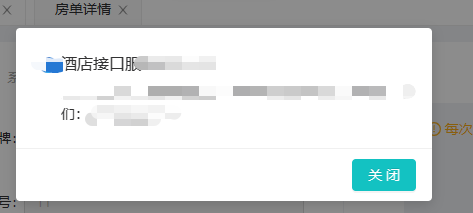
问题描述: vue 自定义类似 elementUI 的 this.$confirm
解决方案: 通过vue 的extend 方法实现 然后全局注入
代码实现:
- 展示的组件 (就是最基本的vue组件代码)
- <!-- * @Author: linchun linchun * @Date: 2023-09-18 10:14:24 * @LastEditors: linchun linchun * @LastEditTime: 2023-09-18 11:09:45 * @FilePath: \Alliance_Technical_Admin_1.4.0d:\WODE\cz_pms_admin\src\components\iHotelConfirm\iHotelConfirm.vue * @Description: iHotelConfirm 自定义弹窗 --> <template> <a-modal title="" :visible="dialogVisible" width="416px" @cancel="handleClose" :closable="false" > <div class="confirm-box"> <div class="confirm-title"> <img src="@/assets/img/ihotel.png" alt=""> <span>酒店接口服务V2.1.0.14</span> </div> <div class="confirm-context"> {{message}},请稍后重试,如持续未恢复正常,请联系我们:400-9696-978</div> </div> <div slot="footer" class="dialog-footer"> <a-button @click="handleClose" type="primary">关 闭</a-button> </div> </a-modal> </template> <script> export default { name: "iHotelConfirm", data() { return { }; }, methods:{ handleClose(){ this.dialogVisible = false } } }; </script> <style lang="less" scoped> .confirm-title{ color: #323233; font-weight: 500; font-size: 16px; line-height: 1.4; img{ width: 16px; height: 16px; margin-right: 5px; } } .confirm-context{ margin-top: 8px; color: #323233; font-size: 14px; padding-left: 21px; } </style>
2. 在同等文件夹下面创建index.js
import Vue from 'vue'
import confirm from './confirm.vue'
// const iHotelConfirm = Vue.extend(require('./confirm.vue'))
const iHotelConfirm = Vue.extend(confirm)
function showConfirm (detail){
    const _confirm = new iHotelConfirm({
        data(){
            return{
                message:detail.message,
                dialogVisible:true,

            }
        }
    })
    const element = _confirm.$mount().$el
    document.body.appendChild(element)
}
showConfirm.install = Vue => {
    Vue.prototype.$iHotelConfirm = showConfirm // 将Notice组件暴露出去,并挂载在Vue的prototype上
}
export default showConfirm
3. 在main.js中引入
//自定义tost iHotelConfirm
import iHotelConfirm from './components/iHotelConfirm/index.js'
Vue.use(iHotelConfirm)
在代码中使用 this.$iHotelConfirm({message:"我是extend测试成功"})
展示效果: