用于处理条件编译一些文件夹,防止小程序包过大,因为不同平台有些文件可能不需要
1、引入删除的npm包用于删除不需要的静态文件
npm install copy-webpack-plugin --save-dev
2、创建build.js配置文件,叫啥都行,为了引入直接写vue.config.js里面也可以
/**
 * 打包配置文件
 * 条件编译文件夹
 * 下面的数据在编译时会判断是否编译,mp-weixin平台只编译mp-weixin下的,其他都删除,如果不存在里面的是不会删除的
 */

const build = {
    // 微信小程序
    'mp-weixin': ['components/wxapp', 'static/images/wxapp'],
    // app
    'app': ['static/images/apk'],
    // h5
    'h5': ['static/images/h5'],
}

module.exports = build;
3、vue.config.js文件编写代码删除不需要的静态文件
const path = require('path')
const CopyWebpackPlugin = require('copy-webpack-plugin') //最新版本copy-webpack-plugin插件暂不兼容,推荐v5.0.0
const { CleanWebpackPlugin } = require('clean-webpack-plugin');
const BUILD = require('./build.js');

//获取package.json定义的模板变量
const PLATFORM = process.env.UNI_PLATFORM;

console.log(PLATFORM);//这个就是app mp-weixin h5

let clearDir = [];
for (let key in BUILD) {
    if (key != PLATFORM) {
        clearDir = clearDir.concat(BUILD[key]);
    }
}

// 打印一下需要删除的文件
console.log(clearDir);

module.exports = {
    configureWebpack: {
        plugins: [
            //删除未启用的模板对应的静态资源目录
            new CleanWebpackPlugin({ cleanAfterEveryBuildPatterns: clearDir }),
        ]
    }
}
4、静态资源目录
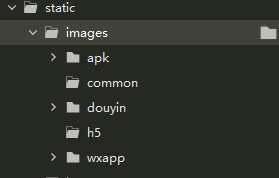
5、运行就可以看到在build中的一些文件就不编译了,减少了包的体积
6、参考 https://blog.csdn.net/eclothy/article/details/128741757