IO流概述和分类
I表示intput,是数据从硬盘进内存的过程,称之为读。
O表示output,是数据从内存到硬盘的过程。称之为写。
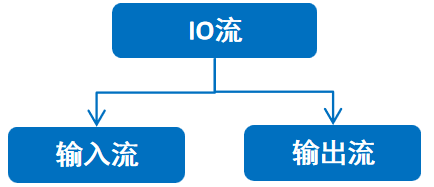
IO流的分类(一般IO流的分类是按照数据类型来分)
按流向分:
按数据类型分:
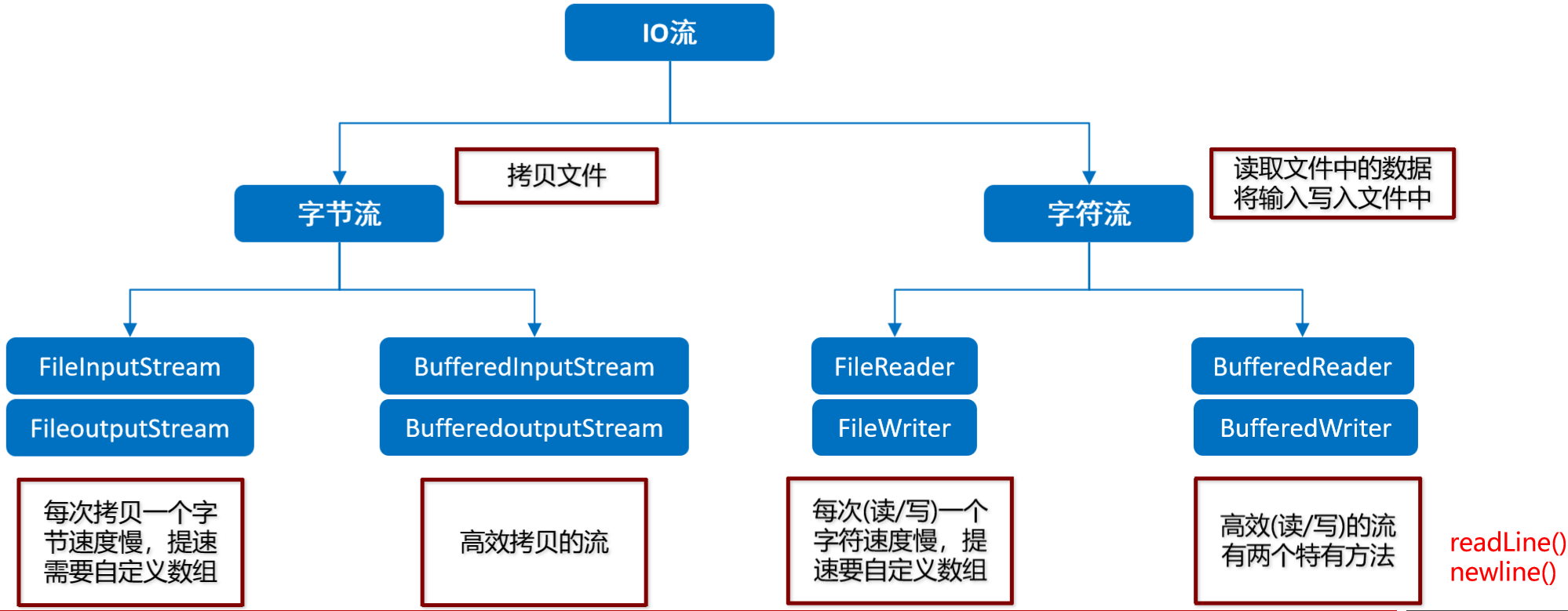
字节流
字节输出流(字节流写数据)
1、创建字节输出流对象
构造方法:
FileOutputStream(File file) 创建文件输出流以写入由指定的 File对象表示的文件。
FileOutputStream(String name) 创建文件输出流以写入具有指定名称的文件。
如果文件不存在,会帮我们自动创建出来.
如果文件存在,会把文件清空.(如不想被清空,在第二个参数加true)
2、写数据
字节流写数据的3种方式:
void write(int b) 一次写一个字节数据
void write(byte[] b) 一次写一个字节数组数据
void write(byte[] b, int off, int len) 一次写一个字节数组的部分数据。将从偏移量 off开始的指定字节数组中的 len字节写入此文件输出流。
3、释放资源
每次使用完流必须要释放资源。
 1 public static void main(String[] args) throws IOException {
 2     //1.创建字节输出流的对象
 3     FileOutputStream fos = new FileOutputStream("D:\\a.txt"); //底层调用new File,所以使用该简写就可以
 4     //FileOutputStream fos = new FileOutputStream(new File("D:\\a.txt"));
 5     //2.写数据(写出的整数,实际写出的是整数在码表上对应的字母)
 6     //void write(int b)    一次写一个字节数据
 7     fos.write(97);
 8     fos.write(98);
 9     //void write(byte[] b)    一次写一个字节数组数据
10     byte [] bys1 = {97,98,99};
11     fos.write(bys1);
12     //void write(byte[] b, int off, int len)    一次写一个字节数组的部分数据
13     byte [] bys2 = {97,98,99,100,101,102,103};
14     fos.write(bys2,1,2);
15     //3.释放资源
16     fos.close();
17 }
字节流写数据实现换行
写完数据后,加换行符
windows:\r\n
linux:\n
mac:\r
字节流写数据实现追加写入
public FileOutputStream(String name,boolean append)
创建文件输出流以指定的名称写入文件。如果第二个参数为true ,不会清空文件里面的内容
 1 public static void main(String[] args) throws IOException {
 2     //第二个参数就是续写开关,如果没有传递,默认就是false,表示不打开续写功能,那么创建对象的这行代码会清空文件
 3     //如果第二个参数为true,表示打开续写功能,那么创建对象的这行代码不会清空文件
 4     FileOutputStream fos = new FileOutputStream("D:\\a.txt",true);
 5
 6     fos.write(97);
 7     //加一个换行
 8     fos.write("\r\n".getBytes());
 9     fos.write(98);
10
11     fos.close();
12 }
字节流写数据加try…catch异常处理
finally:在异常处理时提供finally块来执行所有清除操作。比如说IO流中的释放资源
特点:被finally控制的语句一定会执行,除非JVM退出
异常处理标准格式:try….catch…finally
 1 public static void main(String[] args) {
 2     FileOutputStream fos = null;
 3     try {
 4         fos = new FileOutputStream("D:\\a.txt");
 5         fos.write(97);
 6     }catch(IOException e){
 7        e.printStackTrace();
 8     }finally {
 9         if(fos != null){
10             try {
11                 fos.close();
12             } catch (IOException e) {
13                 e.printStackTrace();
14             }
15         }
16     }
17 }
字节输入流(字节流读数据)
1、创建字节输入流对象
构造方法:
FileInputStream(File file) 通过打开与实际文件的连接来创建 FileInputStream ,该文件由文件系统中的 File对象 file命名。
FileInputStream(String name) 通过打开与实际文件的连接来创建 FileInputStream ,该文件由文件系统中的路径名 name命名。
如果文件不存在,就直接报错
2、读数据
int read() 从此输入流中读取一个字节的数据。
一次读取一个字节
返回值就是本次读到的那个字节数据。读出来的是文件中数据的码表值。 a->97。如果想要看到的是字符数据,要强转成char
读取多个字节
3、释放资源
每次使用完流必须要释放资源。
 1 public static void main(String[] args) throws IOException {
 2     FileInputStream fis = new FileInputStream("bytestream\\a.txt");
 3     //一次读取一个字节
 4     int read = fis.read();
 5     System.out.println((char)read); //如果想看到字符数据,需要强转成char
 6     //读取多个字节
 7     int b;
 8     while ((b = fis.read())!=-1){
 9         System.out.println((char) b);
10     }
11
12     //释放资源
13     fis.close();
14 }
提高拷贝速度的解决方案

为了解决速度问题,字节流通过创建字节数组,可以一次读写多个数据。
一次读一个字节数组的方法:
public int read(byte[] b):从输入流读取最多b.length个字节的数据
返回的是读入缓冲区的总字节数,也就是实际的读取字节个数
 1 public static void main(String[] args) throws IOException {
 2     //创建了字节输入流,准备读数据
 3     FileInputStream fis = new FileInputStream("C:\\a.avi");
 4     //创建了字节输出流,准备写数据
 5     FileOutputStream fos = new FileOutputStream("bytestream\\a.avi");
 6
 7     byte [] bytes = new byte[1024];
 8     int len; //本次读到的有效字节个数-这次读了几个字节
 9     while((len = fis.read(bytes))!=-1){
10         fos.write(bytes,0,len);
11     }
12     fis.close();
13     fos.close();
14 }
字节缓冲流
BufferOutputStream:缓冲输出流
BufferedInputStream:缓冲输入流
构造方法:
字节缓冲输出流:BufferedOutputStream(OutputStream out)
字节缓冲输入流:BufferedInputStream(InputStream in)
字节缓冲流仅仅提供缓冲区,而真正的读写数据还得依靠基本的字节流对象进行操作
一次操作一个字节
 1 public static void main(String[] args) throws IOException {
 2     //创建一个字节缓冲输入流
 3     //在底层创建了一个默认长度为8192的字节数组
 4     BufferedInputStream bis = new BufferedInputStream(new FileInputStream("D:\\a.txt"));
 5     //创建一个字节缓冲输出流
 6     //在底层也创建了一个默认长度为8192的字节数组
 7     BufferedOutputStream bos=new BufferedOutputStream(new FileOutputStream("D:\\copy.txt"));
 8
 9     int b;
10     while((b=bis.read())!=-1){
11         bos.write(b);
12     }
13     //方法的底层把字节流关闭
14     bis.close();
15     bos.close();
16 }
原理

内存中进行数据读写,内存运行速度非常快,减少了硬盘与内存数据的传递次数,从而提高性能。
一次操作一个字节数组
 1 public static void main(String[] args) throws IOException {
 2     //创建一个字节缓冲输入流
 3     //在底层创建了一个默认长度为8192的字节数组
 4     BufferedInputStream bis = new BufferedInputStream(new FileInputStream("D:\\a.txt"));
 5     //创建一个字节缓冲输出流
 6     //在底层也创建了一个默认长度为8192的字节数组
 7     BufferedOutputStream bos = new BufferedOutputStream(new FileOutputStream("D:\\copy.txt"));
 8
 9     byte[] bytes = new byte[1024];
10     int len;
11     while ((len = bis.read(bytes)) != -1) {
12         bos.write(bytes, 0, len);
13     }
14     //方法的底层把字节流关闭
15     bis.close();
16     bos.close();
17 }
原理:

字符流
字符串中的编码解码问题
windows默认使用码表为:GBK,一个字符两个字节。
idea和以后工作默认使用Unicode的UTF-8编解码格式,一个中文三个字节。
编码:
byte[] getBytes():使用平台的默认字符集将该 String编码为一系列字节,将结果存储到新的字节数组中
byte[] getBytes(String charsetName):使用指定的字符集将该 String编码为一系列字节,将结果存储到新的字节数组中
解码:
构造方法
String(byte[] bytes):通过使用平台的默认字符集解码指定的字节数组来构造新的 String
String(byte[] bytes, String charsetName):通过指定的字符集解码指定的字节数组来构造新的 String
 1 public static void main(String[] args) throws UnsupportedEncodingException {
 2         String s = "程序员";
 3
 4         // byte[] getBytes():使用平台的默认字符集将该 String编码为一系列字节,将结果存储到新的字节数组中
 5         //利用idea默认的UTF-8将中文编码为一系列的字节
 6         byte[] bytes1 = s.getBytes();
 7         System.out.println(Arrays.toString(bytes1)); //[-25, -88, -117, -27, -70, -113, -27, -111, -104]
 8
 9         // byte[] getBytes(String charsetName):使用指定的字符集将该 String编码为一系列字节,将结果存储到新的字节数组中
10         byte[] bytes2 = s.getBytes("GBK");
11         System.out.println(Arrays.toString(bytes2)); //[-77, -52, -48, -14, -44, -79]
12
13         // String(byte[] bytes):通过使用平台的默认字符集解码指定的字节数组来构造新的 String
14         byte [] bytes3 = {-25, -88, -117, -27, -70, -113, -27, -111, -104}; //UTF-8
15         //利用默认的UTF-8进行解码
16         String s1 = new String(bytes3);
17         System.out.println(s1);//程序员
18
19         // String(byte[] bytes, String charsetName):通过指定的字符集解码指定的字节数组来构造新的 String
20         byte [] bytes4 = {-77, -52, -48, -14, -44, -79};  //gbk
21         //利用指定的GBK进行解码
22         String s2 = new String(bytes4,"gbk");
23         System.out.println(s2);//程序员
24     }
注:字节流一次读一个字节,不管GBK还是UTF-8一个中文都是多个字节,用字节流每次只能读其中的一部分,所以会出现乱码问题。
字符流读取中文的过程
1.字符流 = 字节流 + 编码表
2.不管是在哪张码表中,中文的第一个字节一定是负数。
3.想要进行拷贝,一律使用字节流或者字节缓冲流
4.想要把文件中的数据读到内存中打印或者读到内存中运算,请使用字符输入流。
5.想要把集合,数组,键盘录入等数据写到文件中,请使用字符输出流
字符流写数据
1、创建字符输出流对象。
FileWriter(File file) 给 File写一个 FileWriter ,使用平台的 default charset
FileWriter(String fileName) 构造一个 FileWriter给出文件名,使用平台的 default charset
如果文件不存在,就创建。但是要保证父级路径存在。
如果文件存在就清空。
2、写数据
void write(int c) 写一个字符
void write(char[] cbuf) 写入一个字符数组
void write(char[] cbuf, int off, int len) 写入字符数组的一部分
void write(String str) 写一个字符串
void write(String str, int off, int len) 写一个字符串的一部分
写出int类型的整数,实际写出的是整数在码表上对应的字母。
写出字符串数据,是把字符串本身原样写出。
3、释放资源
每次使用完流必须要释放资源。
 1 public static void main(String[] args) throws IOException {
 2     //创建字符输出流的对象
 3     //FileWriter fw = new FileWriter(new File("charstream\\a.txt"));
 4     FileWriter fw = new FileWriter("charstream\\a.txt");
 5
 6     //写出数据
 7     //void write(int c)            写一个字符
 8     fw.write(97);
 9
10     //void write(char[] cbuf)      写出一个字符数组
11     char [] chars = {97,98,99,100,101};
12     fw.write(chars);
13
14     //void write(char[] cbuf, int off, int len)    写出字符数组的一部分
15     char [] chars1 = {97,98,99,100,101};
16     fw.write(chars1,0,3);
17
18     //void write(String str)       写一个字符串
19     String line = "程序员abc";
20     fw.write(line);
21
22     //void write(String str, int off, int len)     写一个字符串的一部分
23     String line1 = "程序员abc";
24     fw.write(line1,0,2);
25
26     //释放资源
27     fw.close();
28 }
flush和close方法
flush() 刷新流,刷新完毕之后,还可以继续写数据
close() 关闭流,释放资源。但是在关闭之前会先刷新流。一旦关闭,就不能再写数据
1 public static void main(String[] args) throws IOException {
2     FileWriter fw = new FileWriter("charstream\\a.txt");
3     fw.write("程序员");
4     //fw.flush();
5     fw.write("666");
6
7     fw.close();
8     fw.write("aaa");//报错:Stream closed
9 }
字符流读数据
1、创建字符输入流对象。
FileReader(File file) 使用平台FileReader ,在File读取时创建一个新的FileReader
FileReader(String fileName) 使用平台default charset创建一个新的FileReader,给定要读取的文件的名称 。
2、读数据
int read() 一次读一个字符数据
int read(char[] cbuf) 一次读一个字符数组数据
3、释放资源
每次使用完流必须要释放资源。
 1 public static void main(String[] args) throws IOException {
 2     //创建字符输入流的对象
 3     // FileReader fr = new FileReader(new File("charstream\\a.txt"));
 4     FileReader fr = new FileReader("charstream\\a.txt");
 5
 6     //读取数据
 7     //一次读取一个字符
 8     int ch;
 9     while((ch = fr.read()) != -1){
10         System.out.println((char) ch);
11     }
12
13     //一次读取多个字符
14     //创建一个数组
15     char [] chars = new char[1024];
16     int len;
17     //read方法还是读取,但是是一次读取多个字符,把读到的字符都存入到chars数组。
18     //返回值:表示本次读到了多少个字符。
19     while((len = fr.read(chars))!=-1){
20         System.out.println(new String(chars,0,len));
21     }
22
23     //释放资源
24     fr.close();
25 }
字符缓冲流
BufferedWriter:将文本写入字符输出流,缓冲字符,以提供单个字符,数组和字符串的高效写入,可以指定缓冲区大小,或者可以接受默认大小。默认值足够大,可用于大多数用途
BufferedReader:从字符输入流读取文本,缓冲字符,以提供字符,数组和行的高效读取,可以指定缓冲区大小,或者可以使用默认大小。 默认值足够大,可用于大多数用途
构造方法:
BufferedWriter(Writer out)
BufferedReader(Reader in)
 1 public static void main(String[] args) throws IOException {
 2     //字符缓冲输入流
 3     BufferedReader br = new BufferedReader(new FileReader("charstream\\a.txt"));
 4
 5     //读取数据
 6     char [] chars = new char[1024];
 7     int len;
 8     while((len = br.read(chars)) != -1){
 9         System.out.println(new String(chars,0,len));
10     }
11
12     br.close();
13 }
 1 public static void main(String[] args) throws IOException {
 2     //字符缓冲输出流
 3     BufferedWriter bw = new BufferedWriter(new FileWriter("charstream\\a.txt"));
 4
 5     //写出数据
 6     //实际写出的是97对应的字符a
 7     bw.write(97);
 8     bw.write("\r\n");
 9
10     //实际写出的是97 - 101 对应的字符 abcde
11     char [] chars = {97,98,99,100,101};
12     bw.write(chars);
13     bw.write("\r\n");
14
15     //实际写的是abc
16     bw.write(chars,0,3);
17     bw.write("\r\n");
18
19     //会把字符串的内容原样写出
20     bw.write("程序员");
21     bw.write("\r\n");
22
23     //会把字符串的一部分写出 abcde
24     String line = "abcdefg";
25     bw.write(line,0,5);
26
27     bw.flush();
28
29     bw.close();
30 }
字符缓冲流特有功能
BufferedWriter
void newLine():写一行行分隔符,行分隔符字符串由系统属性定义
 1 public static void main(String[] args) throws IOException {
 2     //创建对象
 3     BufferedWriter bw = new BufferedWriter(new FileWriter("D:\\a.txt"));
 4     //写出数据
 5     bw.write("程序员666");
 6     //跨平台的回车换行
 7     bw.newLine();
 8     bw.write("abcdef");
 9     //刷新流
10     bw.flush();
11     //释放资源
12     bw.close();
13 }
BufferedReader
public String readLine() :读一行文字。 结果包含行的内容的字符串,不包括任何行终止字符,如果流的结尾已经到达,则为null
public static void main(String[] args) throws IOException {
    //创建对象
    BufferedReader br = new BufferedReader(new FileReader("D:\\a.txt"));
    //使用循环来进行改进
    String line;
    //可以读取一整行数据。一直读,读到回车换行为止。不会读取回车换行符。
    while((line = br.readLine()) != null){
        System.out.println(line);
    }
    //释放资源
    br.close();
}