作业1
1. 要求:用requests和BeautifulSoup库方法定向爬取给定网址(http://www.shanghairanking.cn/rankings/bcur/2020 )的数据,屏幕打印爬取的大学排名信息。
2. 输出信息:
| 排名 | 学校名称 | 省市 | 学校类型 | 总分 |
|---|---|---|---|---|
| 1 | 清华大学 | 北京 | 综合 | 852.5 |
| 2 | .... | .... | .... | .... |
代码与结果
代码(版1)
点击查看代码
import urllib.request
from bs4 import BeautifulSoup
import bs4
def get(url):
    try:
        headers={"User-Agent":"Mozilla/5.0 (Windows NT 10.0; Win64; x64) AppleWebKit/537.36 (KHTML, like Gecko) Chrome/92.0.4515.131 Safari/537.36 SLBrowser/8.0.1.4031 SLBChan/11"}
        req = urllib.request.Request(url,headers=headers)
        data = urllib.request.urlopen(req).read().decode()
        return data
    except Exception as err:
        print(err)
def fill(ulist, html):
    soup = BeautifulSoup(html, "html.parser")
    for tr in soup.find('tbody').children:
        if isinstance(tr, bs4.element.Tag):
            a = tr('a')
            tds = tr('td')
            ulist.append([tds[0].text.strip(), a[0].string.strip(), tds[2].text.strip(),
                          tds[3].text.strip(), tds[4].text.strip()])
def printUnivList(ulist1, num):
    lt= "{0:^10}\t{1:^10}\t{2:^12}\t{3:^12}\t{4:^10}"
    print(lt.format("排名", "学校名称", "省份", "学校类型", "总分"))
    for i in range(num):
        u = ulist1[i]
        print(lt.format(u[0], u[1], u[2], u[3], u[4]))
def main():
    uinfo = []  # 将大学信息放到列表中
    url = "https://www.shanghairanking.cn/rankings/bcur/2020"
    html = get(url)
    fill(uinfo, html)
    printUnivList(uinfo, 30)  # 一个界面的数据
if __name__ == '__main__':
    main()
结果(版1)
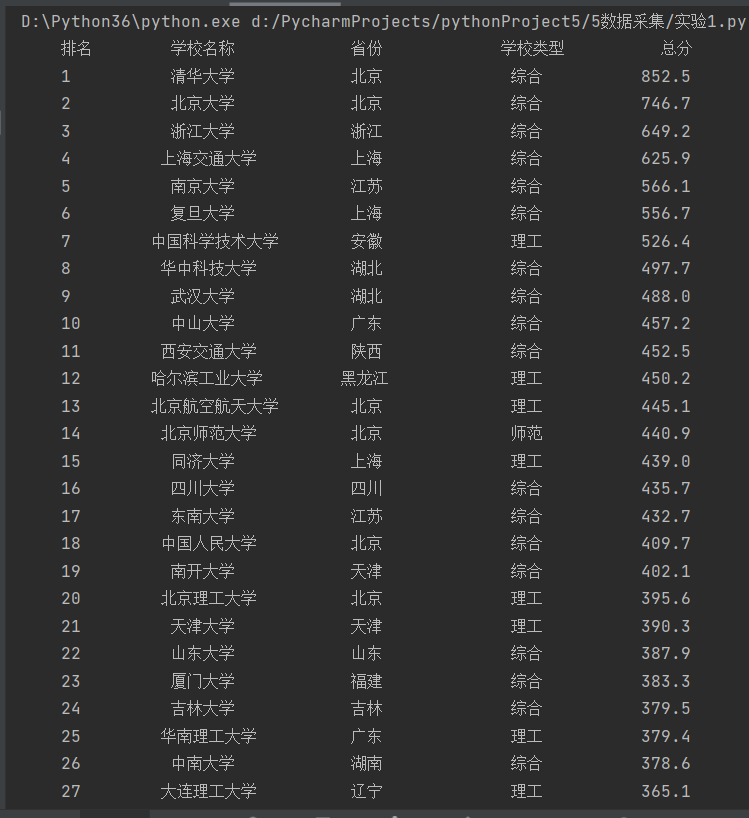
结果添加表格
代码(版2)
点击查看代码
import requests
from bs4 import BeautifulSoup
import bs4
from prettytable import PrettyTable


def scrape_data():
    res = requests.get("https://www.shanghairanking.cn/rankings/bcur/2020")
    html = res.content
    soup = BeautifulSoup(html, "html.parser")

    data_list = []
    table = PrettyTable()
    table.field_names = ["排名", "学校名称", "省份", "学校类型", "总分"]

    for tr in soup.find('tbody').children:
        if isinstance(tr, bs4.element.Tag):
            link = tr.find('a')
            tds = tr.find_all('td')
            data_list.append([tds[0].text.strip(), link.string.strip(), tds[2].text.strip(),
                              tds[3].text.strip(), tds[4].text.strip()])

    for i in range(30):
        data = data_list[i]
        table.add_row([data[0], data[1], data[2], data[3], data[4]])

    print(table)
scrape_data()
结果(版2)

心得体会
- 第一版输出是无表格的形式,但看老师的输出案例是有表格的,故想改个输出模式,于是调用了tabulate库,但是输出时会多输出两行,South China University of Technology,双一流/985/211,也会有一些多余的框线,改了挺久,但是没得到正确的格式。
- 后来又试了PrettyTable库,可以得到正确的格式,不过还有一个小问题,有些框线不是完全对齐,想之后看下有没有更好的方法。
作业2
1.要求:用requests和re库方法设计某个商城(自已选择)商品比价定向爬虫,爬取该商城,以关键词“书包”搜索页面的数据,爬取商品名称和价格
2. 输出信息:
| 序号 | 价格 | 商品名 |
|---|---|---|
| 1 | 65 | ××× |
| 2 | .... | .... |
代码与结果
代码
点击查看代码
import requests
from bs4 import BeautifulSoup

# 发送HTTP请求获取页面内容
base_url = 'http://search.dangdang.com/?key=%CA%E9%B0%FC&act=input'
page = 1
count = 0
line = 7

while count < 60:
    url = f'{base_url}&ddt-pit={line}'
    response = requests.get(url)

    # 使用Beautiful Soup解析页面内容
    soup = BeautifulSoup(response.text, 'html.parser')

    # 找到包含商品信息的HTML元素
    product_elements = soup.find_all('li', class_=f'line{line}')

    # 如果没有找到商品信息,结束循环
    if not product_elements:
        break

    # 遍历每个商品元素并提取商品名称和价格
    for product_element in product_elements:
        # 提取商品名称
        product_name = product_element.find('p', class_='name').a.get('title')

        # 提取商品价格
        product_price = product_element.find('p', class_='price').span.text.strip()

        # 输出商品序号、名称和价格
        count += 1
        print(f"商品序号: {count}")
        print(f"商品名称: {product_name}")
        print(f"商品价格: {product_price}")
        print()

        line += 1

        # 如果已经爬取了10个商品,翻页
        if count % 10 == 0:
           page+=1

    # 如果已经爬取了60个商品,结束循环
    if count >= 60:
        break
结果

心得体会
1.最开始爬的是淘宝网,但是好像爬不了,好像要模拟登陆之类的,比较复杂,后咨询了老师和助教,去爬了当当网。
2.一页的商品数量有限,爬取较多商品时,需要翻页,一开始不知道怎么修改代码去翻页,后看了b站视频,发现有个参数是page_index,修改page_index的数字即可,故写了个循环,每爬取十个商品,设置page+=1即可翻页,若爬取了60个商品,结束循环。
作业3
1. 要求:爬取一个给定网页( https://xcb.fzu.edu.cn/info/1071/4481.htm)或者自选网页的所有JPEG和JPG格式文件
2. 输出信息:将自选网页内的所有JPEG和JPG文件保存在一个文件夹中
代码与结果
代码
点击查看代码
import os
import requests
from bs4 import BeautifulSoup
from urllib.parse import urlparse, urljoin

# 定义要爬取的网页URL
url = "https://xcb.fzu.edu.cn/info/1071/4481.htm"

# 发送HTTP请求并获取网页内容
response = requests.get(url)
if response.status_code != 200:
    print("无法访问网页")
    exit()

# 创建一个文件夹来保存图片
output_folder = "downloaded_images"
os.makedirs(output_folder, exist_ok=True)

# 使用Beautiful Soup解析网页内容
soup = BeautifulSoup(response.text, "html.parser")

# 找到所有的图片标签(<img>)并获取它们的src属性
image_tags = soup.find_all("img")
for img_tag in image_tags:
    img_url = img_tag.get("src")

    # 如果img_url是相对链接,将其转换为绝对链接
    if not img_url.startswith("http"):
        img_url = urljoin(url, img_url)

    # 检查文件类型是否为JPEG或JPG
    if img_url.lower().endswith((".jpeg", ".jpg")):
        # 从URL中提取文件名
        img_name = os.path.basename(urlparse(img_url).path)

        # 下载图片并保存到文件夹中
        img_response = requests.get(img_url)
        if img_response.status_code == 200:
            with open(os.path.join(output_folder, img_name), "wb") as img_file:
                img_file.write(img_response.content)
                print(f"已下载并保存:{img_name}")

print("所有图片已下载完成。")
结果
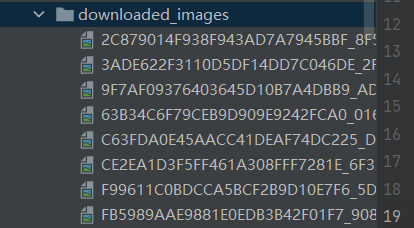
文件夹
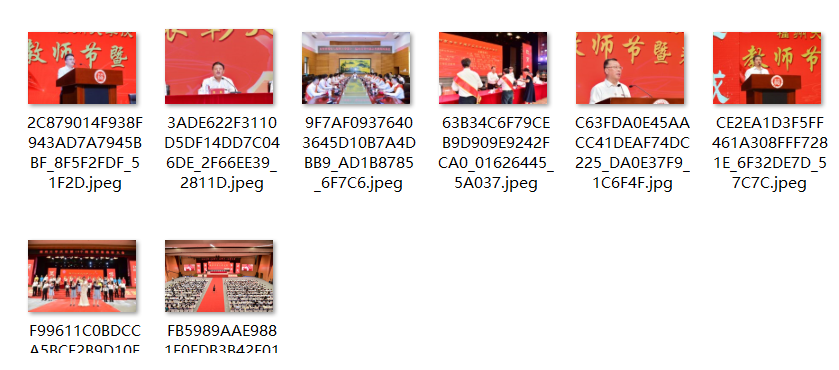
保存的图片
心得体会
这个网页较为简单,找到所有的图片标签()并获取它们的src属性再稍作处理即可。