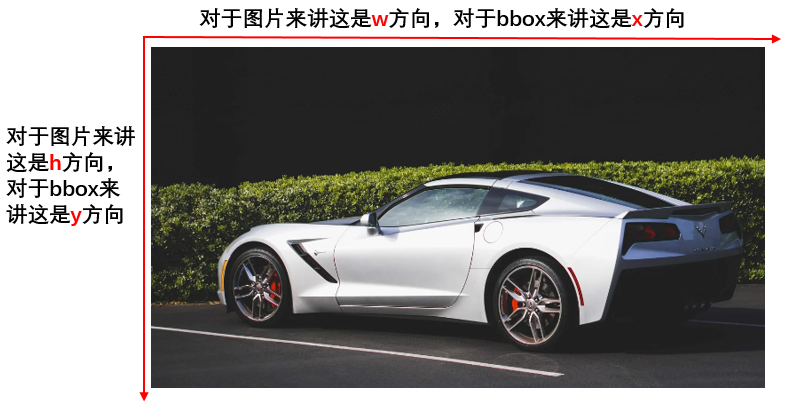
边界框的坐标方向:
python opencv画边界框程序:[程序摘自python OpenCV画 bounding box并标明数据类]
import cv2
import numpy as np

class_name = "car"
box_left_top = np.array([75, 35])       # bbox左上角坐标
box_right_bottom =np.array([475, 220])  # bbox右下角坐标

line_color = (0, 255, 0)
line_thickness = 2
line_type = 4

img = cv2.imread('./car_img.jpg')  # img is a np.array with shape (h, w, c)
print(img.shape)
cv2.rectangle(img, tuple(box_left_top), tuple(box_right_bottom), line_color, line_thickness, line_type)  # 画bbox

text_size = cv2.getTextSize(class_name, 1, cv2.FONT_HERSHEY_PLAIN, 1)[0]   # 获取文字区域框大小
text_right_bottom = box_left_top + np.array(list(text_size))   # 获取文字区域右下角坐标
cv2.rectangle(img, tuple(box_left_top), tuple(text_right_bottom),  line_color, -1)  # 绘制文字区域矩形框
box_left_top[1] = box_left_top[1] + (text_size[1]/2 + 4)    # 计算文字起始位置偏移
cv2.putText(img, class_name , tuple(box_left_top), cv2.FONT_HERSHEY_PLAIN, 1.0, (255, 0, 255), 1)  # 绘字

cv2.imwrite('./car_img_with_box.jpg', img)
cv2.imshow('Image', img)
cv2.waitKey(0)
cv2.destroyAllWindows()
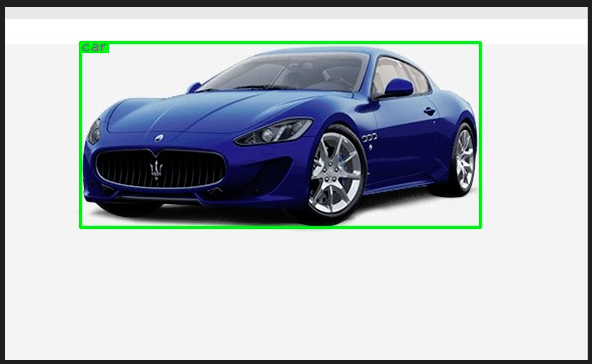
图片展示: