一、实验目的:
1.了解vlan的工作原理;
2.学习基于端口划分vlan的方法;
3.了解跨交换机的相同vlan之间的通信;
4.进一步学习交换机端口的配置命令。
二、实验原理:
VLAN(Virtual Local Area Network)即虚拟局域网,是一种通过将局域网内的设备逻辑地而不是物理地划分成一个个网段从而实现虚拟工作组的新兴技术。
VLAN技术允许网络管理者将一个物理的LAN逻辑地划分成不同的广播域(或称虚拟LAN,即VLAN),每一个VLAN都包含一组有着相同需求的计算机工作站,与物理上形成的LAN有着相同的属性。但由于它是逻辑地而不是物理地划分,所以同一个VLAN内的各个工作站无须被放置在同一个物理空间里,即这些工作站不一定属于同一个物理LAN网段。一个VLAN内部的广播和单播流量都不会转发到其他VLAN中,从而有助于控制流量、减少设备投资、简化网络管理、提高网络的安全性。
VLAN是为解决以太网的广播问题和安全性而提出的一种协议,它在以太网帧的基础上增加了VLAN头,用VLAN ID把用户划分为更小的工作组,限制不同工作组间的用户二层互访,每个工作组就是一个虚拟局域网。虚拟局域网的好处是可以限制广播范围,并能够形成虚拟工作组,动态管理网络。
三、实验设备:
计算机、交换机。
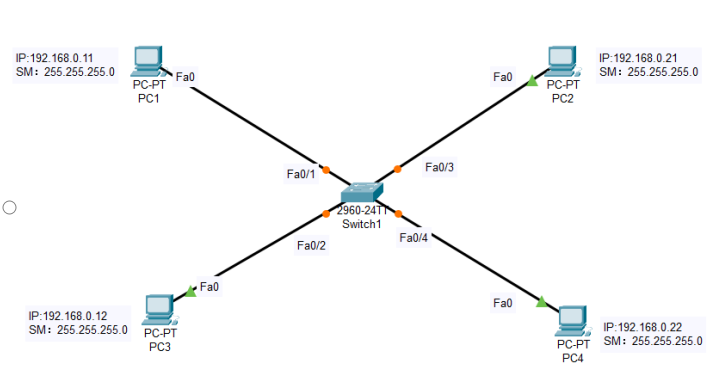
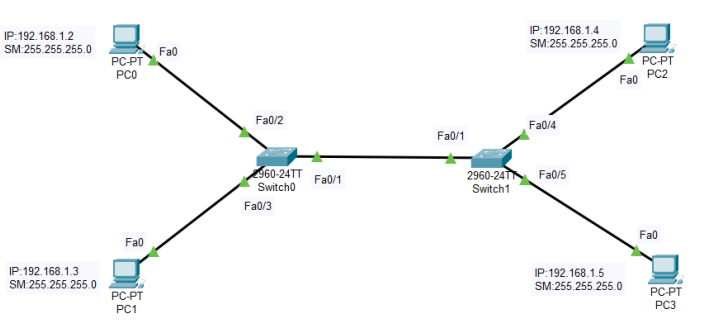
四、实验拓扑图(拓扑图上要标明所用交换机型号、所用交换机的端口号以及各主机配置的IP地址):
1.同一个交换机上的vlan划分:将四台计算机连接到一台交换机上,将其中两台计算机划分到一个vlan中,另两台计算机划分到另一个vlan中,验证同vlan中的计算机和不同vlan中的计算机之间的通信。注:vlan的名字不能用vlan1。
2.进行跨交换机的相同vlan之间的计算机的通信实验。
五、实验过程(配置过程):
  1 创建虚拟局域网VLAN11和VLAN22:
  2 Switch>enable
  3 Switch#config
  4 Configuring from terminal, memory, or network [terminal]?
  5 Enter configuration commands, one per line. End with CNTL/Z.
  6 Switch(config)#hostname S1
  7 S1(config)#vlan 22
  8 S1(config-vlan)#name T22
  9 S1(config-vlan)#exit
 10 S1(config)# vlan 11
 11 S1(config-vlan)#name T11
 12 S1(config-vlan)#exit
 13 S1(config)#exit
 14 S1#
 15 为局域网VLAN11和VLAN22分配端口
 16 S1#config
 17 Configuring from terminal, memory, or network [terminal]?
 18 Enter configuration commands, one per line. End with CNTL/Z.
 19 S1(config)#interface vlan 11
 20 S1(config-if)#
 21 %LINK-5-CHANGED: Interface Vlan11, changed state to up
 22 S1(config-if)#interface fastethernet 0/1
 23 S1(config-if)#switchport access vlan 11
 24 S1(config-if)#
 25 %LINEPROTO-5-UPDOWN: Line protocol on Interface Vlan11, changed state to up
 26 S1(config-if)#exit
 27 S1(config)#interface vlan 11
 28 S1(config-if)#interface fastethernet 0/2
 29 S1(config-if)#switchport access vlan 11
 30 S1(config-if)#exit
 31 S1(config)#interface vlan 22
 32 S1(config-if)#
 33 %LINK-5-CHANGED: Interface Vlan22, changed state to up
 34 S1(config-if)#interface fastethernet 0/3
 35 S1(config-if)#switchport access vlan 22
 36 S1(config-if)#
 37 %LINEPROTO-5-UPDOWN: Line protocol on Interface Vlan22, changed state to up
 38 S1(config-if)#exit
 39 S1(config)#interface vlan 22
 40 S1(config-if)#interface fastethernet 0/4
 41 S1(config-if)#switchport access vlan 22
 42 S1(config-if)#exit
 43
 44 2、进行跨交换机的相同vlan之间的计算机的通信实验。
 45 在S1上创建虚拟局域网VLAN11和VLAN22并为之分配端口
 46 Switch>enable
 47 Switch#config
 48 Configuring from terminal, memory, or network [terminal]?
 49 Enter configuration commands, one per line. End with CNTL/Z.
 50 Switch(config)#hostname S1
 51 S1(config)#vlan 11
 52 S1(config-vlan)#name T11
 53 S1(config-vlan)#exit
 54 S1(config)#interface fastethernet 0/2
 55 S1(config-if)#switchport access vlan 11
 56 S1(config-if)#exit
 57
 58 S1#show vlan id 11
 59 VLAN Name Status Ports
 60
 61 ---- -------------------------------- --------- -------------------------------
 62
 63 11 T11 active Fa0/2
 64
 65 VLAN Type SAID MTU Parent RingNo BridgeNo Stp BrdgMode Trans1 Trans2
 66 ---- ----- ---------- ----- ------ ------ -------- ---- -------- ------ -----
 67 11 enet 100011 1500 - - - - - 0 0
 68
 69 S1#config
 70 Configuring from terminal, memory, or network [terminal]?
 71 Enter configuration commands, one per line. End with CNTL/Z.
 72 S1(config)#vlan 22
 73 S1(config-vlan)#name T22
 74 S1(config-vlan)#exit
 75 S1(config)#interface fastethernet0/3
 76 S1(config-if)#switchport access vlan 22
 77 S1(config-if)#exit
 78
 79 S1(config)#exit
 80
 81 S1#
 82
 83 %SYS-5-CONFIG_I: Configured from console by console
 84
 85 S1#show vlan id 22
 86
 87
 88
 89 将S1的F0/1端口设置为trunk模式
 90
 91 S1#config
 92
 93 Configuring from terminal, memory, or network [terminal]?
 94
 95 Enter configuration commands, one per line. End with CNTL/Z.
 96 S1(config)#interface fastethernet0/1
 97 S1(config-if)#switchport mode trunk
 98 S1(config-if)#
 99
100 %LINEPROTO-5-UPDOWN: Line protocol on Interface FastEthernet0/1, changed state to down
101
102 %LINEPROTO-5-UPDOWN: Line protocol on Interface FastEthernet0/1, changed state to up
103 S1(config-if)#exit
104 S1(config)#exit
105 S1#
106 %SYS-5-CONFIG_I: Configured from console by console
107 S1#show interface fastethernet0/1 switchport
108
109 在S2上创建虚拟局域网VLAN11和VLAN22并为之分配端口
110 Switch>enable
111 Switch#config
112 Configuring from terminal, memory, or network [terminal]?
113 Enter configuration commands, one per line. End with CNTL/Z.
114 Switch(config)#host S2
115 S2(config)#vlan 11
116 S2(config-vlan)#name T11
117 S2(config-vlan)#exit
118 S2(config)#exit
119 S2#
120 %SYS-5-CONFIG_I: Configured from console by console
121 S2#config
122 Configuring from terminal, memory, or network [terminal]?
123 Enter configuration commands, one per line. End with CNTL/Z.
124 S2(config)#interface fastethernet0/4
125 S2(config-if)#switchport access vlan 11
126 S2(config-if)#exit
127 S2(config)#exit
128 S2#
129 %SYS-5-CONFIG_I: Configured from console by console
130
131 S2#show vlan id 11
132
133
134
135 S2#config
136 Configuring from terminal, memory, or network [terminal]?
137 Enter configuration commands, one per line. End with CNTL/Z.
138
139 S2(config)#vlan 22
140 S2(config-vlan)#name T22
141 S2(config-vlan)#exit
142 S2(config)#interface fastethernet0/5
143 S2(config-if)#switchport access vlan 22
144 S2(config-if)#exit
145 S2(config)#exit
146 S2#
147 %SYS-5-CONFIG_I: Configured from console by console
148 S2#show vlan id 22
149
150 将S2的F0/1端口设置为trunk模式
151 S2#config
152 Configuring from terminal, memory, or network [terminal]?
153 Enter configuration commands, one per line. End with CNTL/Z.
154 S2(config)#interface fastethernet0/1
155 S2(config-if)#switchport mode trunk
156 S2(config-if)#exit
157 S2(config)#exit
158 S2#show interfaces fastethernet 0/1 switchport