前段时间用Electron开发了一个图片压缩软件,使用起来很好,然后又想到何不再做一个视频压缩的?公司网站上视频蛮多,每月消耗流量也不是个小数目,这都是钱啦,在清晰度可接受的范围内把视频压缩下,有可能就省一半的流量费。
说干就干,开始查资料,首先找到的就是FFMPEG,它号称多媒体业界的瑞士军刀,暴风影音、qq影音、原来的快播等等都在用它,牛逼吧!
然后找到了npm下的fluent-ffmpeg,该包将ffmpeg的复杂命令做了抽象转换,我们可以直接用它的方法来执行ffmpeg命令。
1、下载ffmpeg
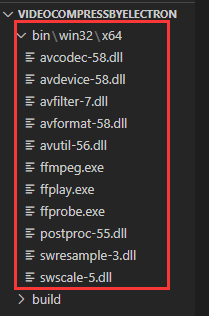
到ffmpeg官网(ffmpeg.org)下载对应系统dll,放到项目中,比如我下载的windows版本放置位置如下图
2、执行ffmpeg命令方法封装
此代码位置在preload.js中,将执行压缩命令,停止压缩命令两个方法暴露给渲染器
const { contextBridge, ipcRenderer, shell } = require('electron')
const fs = require('fs');
const path = require('path');
const os = require('os');
const ffmpeg = require('fluent-ffmpeg');

(function(){
  const platform = os.platform()
  const arch = os.arch()
  const basePath = path.resolve(
    __dirname.replace('app.asar', 'app.asar.unpacked'),
    'bin',
    platform,
    // arm64 is limit supported only for macOS
    platform === 'darwin' && arch === 'arm64'
      ? 'arm64'
      : 'x64',
  )
  var name='ffmpeg';
  var binPath = path.resolve(
    basePath,
    platform === 'win32' ? `${name}.exe` : name,
  )
  ffmpeg.setFfmpegPath(binPath);
})();

var ffmpegCommandArr=[];

contextBridge.exposeInMainWorld('electronAPI', {
  execFfmpeg: (input, output, opts, progressCallback,endCallback,errorCallback) => {
    try{
      ffmpegCommand = ffmpeg(input)
      if(opts.frameRate!=null){
        ffmpegCommand = ffmpegCommand.fps(opts.frameRate);
      }
      if(opts.resolution[0]!=null || opts.resolution[1]!=null){
        ffmpegCommand=ffmpegCommand
          .size((opts.resolution[0]!=null?opts.resolution[0]:'?')+'x'+(opts.resolution[1]!=null?opts.resolution[1]:'?'))
          .autopad();
      }
      if(opts.crf!=null){
        ffmpegCommand=ffmpegCommand.outputOptions('-crf '+opts.crf);
      }
      if(opts.bitRate!=null){
        ffmpegCommand=ffmpegCommand.outputOptions(['-b:v',opts.bitRate+'k']);
      }
      ffmpegCommand = ffmpegCommand
        .on('progress', function (progress) {
          if(progressCallback!=null){
            progressCallback(progress);
          }
        })
        .on('end', function (stdout, stderr) {
          if(endCallback!=null){
            endCallback();
          }
        })
        .on('error', function (err, stdout, stderr) {
          console.log('Cannot process: ', err);
          if(errorCallback!=null){
            errorCallback();
          }
        })
        .save(output);
        ffmpegCommandArr.push(ffmpegCommand);
    }catch(e){
      console.log(e);
      if(errorCallback!=null){
        errorCallback();
      }
    }
  },

  killFfmpegCommand:()=>{
    for(var i=ffmpegCommandArr.length-1;i>=0;i--){
      ffmpegCommandArr[i].kill();
      ffmpegCommandArr.splice(i,1);
    }
  }
})
其他就是写UI方面和ffmpeg命令的东东了,详情看源码。
3、最后附上效果图和源码地址
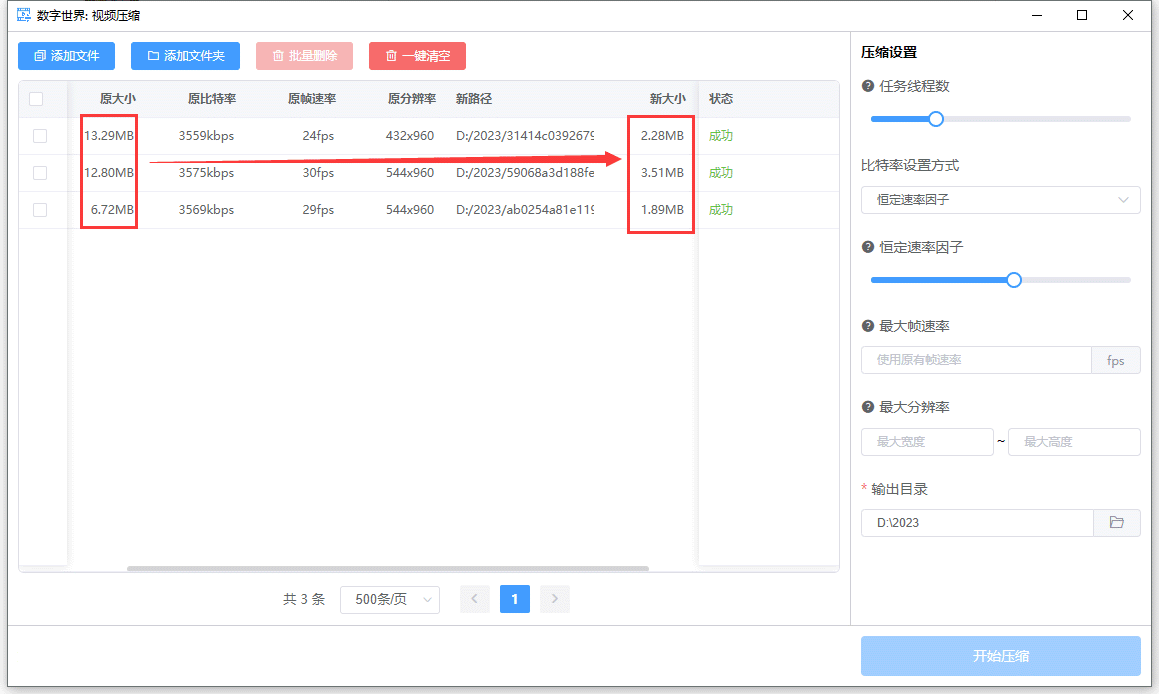
压缩效果不要不要的