Kubernetes学习目录
1、安装metrics-server
1.1、项目地址
https://github.com/kubernetes-sigs/metrics-server

当前版本:v0.6.3

主要用于获取资源的参数,不然HPA无法使用
1.2、下载yaml资源配置清单
wget https://github.com/kubernetes-sigs/metrics-server/releases/download/v0.6.3/components.yaml
1.3、修改配置文件
1.3.1、准备离线镜像并且修改yaml
docker pull registry.k8s.io/metrics-server/metrics-server:v0.6.3
docker tag registry.k8s.io/metrics-server/metrics-server:v0.6.3 192.168.10.33:80/k8s/hpa/metrics-server:v0.6.3
docker push 192.168.10.33:80/k8s/hpa/metrics-server:v0.6.3


]# sed -i 's#registry.k8s.io/metrics-server/metrics-server:v0.6.3#192.168.10.33:80/k8s/hpa/metrics-server:v0.6.3#g' components.yaml

]# grep 'image' components.yaml
        image: 192.168.10.33:80/k8s/hpa/metrics-server:v0.6.3
        imagePullPolicy: IfNotPresent
1.3.2、修改启动命令
]# vi components.yaml
      - args:
        - --cert-dir=/tmp
        - --secure-port=4443
        - --kubelet-preferred-address-types=InternalIP,ExternalIP,Hostname
        - --kubelet-use-node-status-port
        - --metric-resolution=15s
        - --kubelet-insecure-tls  # 增加此行参数
        image: 192.168.10.33:80/k8s/hpa/metrics-server:v0.6.3
        imagePullPolicy: IfNotPresent
1.4、应用资源配置清单
]# kubectl apply -f components.yaml
serviceaccount/metrics-server created
clusterrole.rbac.authorization.k8s.io/system:aggregated-metrics-reader created
clusterrole.rbac.authorization.k8s.io/system:metrics-server created
rolebinding.rbac.authorization.k8s.io/metrics-server-auth-reader created
clusterrolebinding.rbac.authorization.k8s.io/metrics-server:system:auth-delegator created
clusterrolebinding.rbac.authorization.k8s.io/system:metrics-server created
service/metrics-server created
deployment.apps/metrics-server created
apiservice.apiregistration.k8s.io/v1beta1.metrics.k8s.io created
1.5、查询运行状态
]# kubectl -n kube-system get pods -o wide | grep metrics
metrics-server-5b7dc79d77-6cfzv            1/1     Running   0                4m29s   10.244.4.124    node2     <none>           <none>

]# kubectl -n kube-system get svc
NAME             TYPE        CLUSTER-IP     EXTERNAL-IP   PORT(S)                  AGE
kube-dns         ClusterIP   10.96.0.10     <none>        53/UDP,53/TCP,9153/TCP   7d13h
metrics-server   ClusterIP   10.97.76.234   <none>        443/TCP                  86m
2、HPA-实践
2.1、基本知识
2.1.1、HPA工作机制
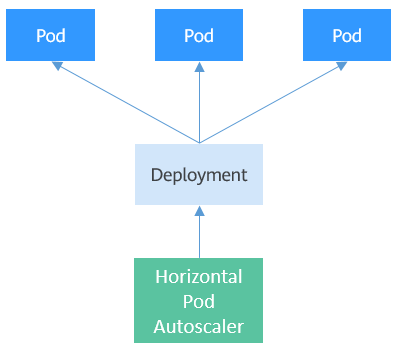
2.1.2、前提需知
1、报错信息
]# kubectl describe hpa scalar
Events:
  Type     Reason                        Age                From                       Message
  ----     ------                        ----               ----                       -------
  Warning  FailedGetResourceMetric       12s (x2 over 27s)  horizontal-pod-autoscaler  failed to get cpu utilization: unable to get metrics for resource
cpu: unable to fetch metrics from resource metrics API: the server could not find the requested resource (get pods.metrics.k8s.io)
  Warning  FailedComputeMetricsReplicas  12s (x2 over 27s)  horizontal-pod-autoscaler  invalid metrics (1 invalid out of 1), first error is: failed to get cpu
resource metric value: failed to get cpu utilization: unable to get metrics for resource cpu: unable to fetch metrics from resource metrics API: the server could not
find the requested resource (get pods.metrics.k8s.io)

2、报错信息,TARGETS显示unknown
]# kubectl get hpa
NAME             REFERENCE                   TARGETS   MINPODS   MAXPODS   REPLICAS   AGE
deployment-hpa   Deployment/deployment-hpa   <unknown>/50%    1         10        1          106m


以上原因:没有安装metrics-server导致的。
2.2、创建deployment资源
2.2.1、定义资源配置清单且应用
kubectl apply -f - <<EOF
apiVersion: apps/v1
kind: Deployment
metadata:
  name: deployment-hpa
  namespace: default
spec:
  replicas: 1
  selector:
    matchLabels:
      app: rs-test
  template:
    metadata:
      labels:
        app: rs-test
    spec:
      containers:
      - name: nginxpod-test
        image: 192.168.10.33:80/k8s/pod_test:v0.1
        resources:
          limits:
            cpu: 100m
            memory: 200Mi
          requests:
            cpu: 100m
            memory: 200Mi
EOF
2.2.2、查询运行情况
]# kubectl get deployments.apps
NAME             READY   UP-TO-DATE   AVAILABLE   AGE
deployment-hpa   1/1     1            1           114m

]# kubectl get pods
NAME                             READY   STATUS    RESTARTS   AGE
deployment-hpa-88878d778-d8hn9   1/1     Running   0          114m
2.3、创建HPA资源
2.3.1、参考官方文档
2.3.2、v2版本语法-定义资源配置清单且应用
kubectl apply -f - <<EOF
apiVersion: autoscaling/v2
kind: HorizontalPodAutoscaler
metadata:
  name: scale
  namespace: default
spec:
  maxReplicas: 10
  minReplicas: 1
  metrics:
  - type: Resource
    resource:
      name: cpu
      target:
        type: Utilization
        averageUtilization: 50
  scaleTargetRef:
    apiVersion: apps/v1
    kind: Deployment
    name: deployment-hpa
EOF

# 注意:autoscaling/v2beta2 在v1.23之后不可以用,1.23+需要使用autoscaling/v2
2.3.3、v1版本语法-定义资源配置清单且应用
kubectl apply -f - <<EOF
apiVersion: autoscaling/v1
kind: HorizontalPodAutoscaler
metadata:
  name: deployment-hpa
  namespace: default
spec:
  maxReplicas: 10
  minReplicas: 1
  scaleTargetRef:
    apiVersion: apps/v1
    kind: Deployment
    name: deployment-hpa
  targetCPUUtilizationPercentage: 50
EOF
2.3.4、怎么写hpa yaml
]# kubectl autoscale deployment deployment-hpa --cpu-percent=50 --min=1 --max=10 --dry-run=client -o yaml
apiVersion: autoscaling/v1
kind: HorizontalPodAutoscaler
metadata:
  creationTimestamp: null
  name: deployment-hpa
spec:
  maxReplicas: 10
  minReplicas: 1
  scaleTargetRef:
    apiVersion: apps/v1
    kind: Deployment
    name: deployment-hpa
  targetCPUUtilizationPercentage: 50
status:
  currentReplicas: 0
  desiredReplicas: 0
2.3.5、查询运行结果
]# kubectl get hpa
NAME    REFERENCE                   TARGETS   MINPODS   MAXPODS   REPLICAS   AGE
scale   Deployment/deployment-hpa   1%/50%    1         10        1          3m49s
2.4、压力测试pod
2.4.1、开启监控hpa
]# kubectl get hpa -w
NAME    REFERENCE                   TARGETS   MINPODS   MAXPODS   REPLICAS   AGE
scale   Deployment/deployment-hpa   1%/50%    1         10        1          4m32s
2.4.2、进入pod进行压测
]# kubectl exec -it deployment-hpa-88878d778-d8hn9 -- /bin/sh -c "while sleep 0.01; do wget -q -O- http://php-apache; done"
2.4.3、观察hpa状态
]# kubectl get hpa -w
NAME    REFERENCE                   TARGETS   MINPODS   MAXPODS   REPLICAS   AGE
scale   Deployment/deployment-hpa   1%/50%    1         10        1          4m32s
scale   Deployment/deployment-hpa   50%/50%   1         10        1          6m46s
scale   Deployment/deployment-hpa   100%/50%   1         10        1          7m1s

# 此时cpu跑到50+
2.4.4、查询deployment状态
]# kubectl  get deployments.apps
NAME             READY   UP-TO-DATE   AVAILABLE   AGE
deployment-hpa   2/2     2            2           140m
2.4.5、查询pod
]# kubectl  get pods
NAME                             READY   STATUS    RESTARTS   AGE
deployment-hpa-88878d778-d8hn9   1/1     Running   0          140m
deployment-hpa-88878d778-s5p5f   1/1     Running   0          19s
# 发现pod已经自动创建多一个出来了
2.5、自动缩容
# CPU负载下来,隔一段时间后,会自动缩容
]# kubectl get hpa
NAME    REFERENCE                   TARGETS   MINPODS   MAXPODS   REPLICAS   AGE
scale   Deployment/deployment-hpa   1%/50%    1         10        1          13m