随着ChatGPT的大火,越来越多的人习惯于用ChatGPT搞一些有趣的事。对于一个资深的爬虫程序来说,体验下ChatGPT做爬虫程序也是很有意思的事情。
首先想想我们的问题域,我想到几个问题:
不能用HTTP请求去爬,如果我直接用HTTP请求去抓的话,一个我要花太多精力在登录上了,而我的数据又不多,另一个,现在都是单页引用,你HTTP爬下来的根本就不对啊。
所以最好是自动化测试的那种方式,启动浏览器去爬。
但是我又不能保证一次把代码写成功,反复登录的话,会被网站封号,就几个数据,不值当的。
所以总的来说我需要一个这样的流程:
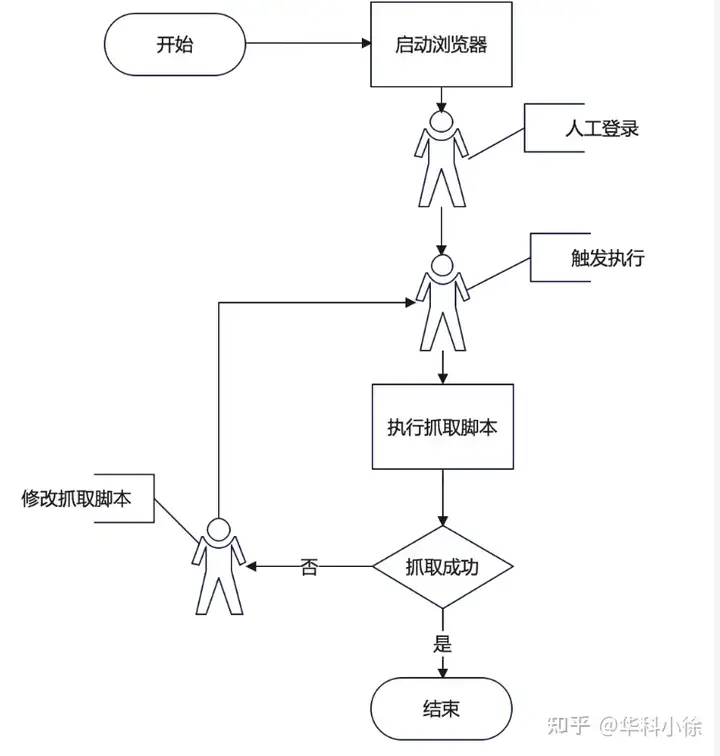
从流程上我们是不是可以看出,这个流程跟我们用WebConsole试验一段代码的过程很像?
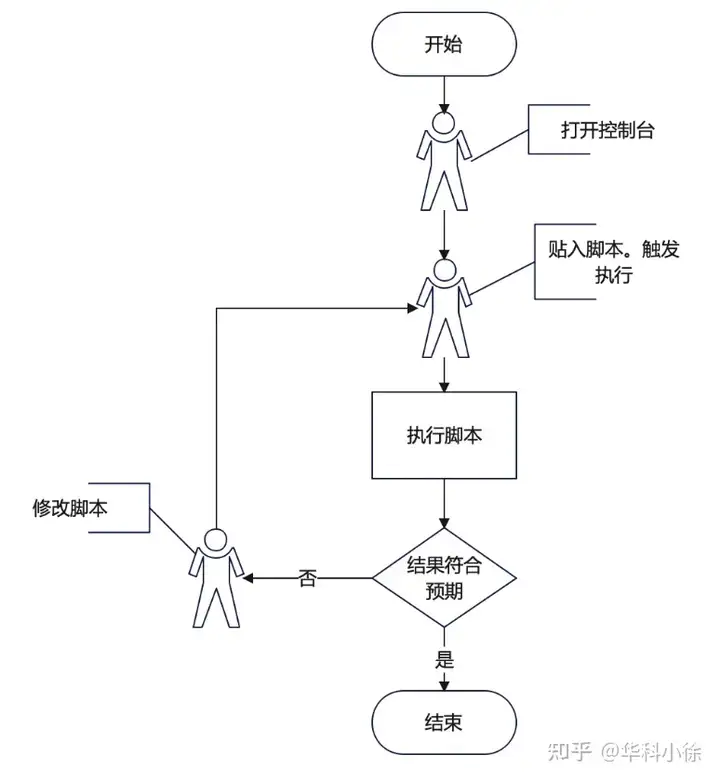
从这种相似性可以看出,我需要一个类似WebConsole的东西来实现我要的效果,这个东西学名叫REPL(Read–eval–print loop),不过你不知道这个名字也无所谓,不影响。
而且还不止,我需要从文件读入我的代码,毕竟没有代码高亮,我可写不好程序。从文件读入的话,我就可以用vscode给我提供代码高亮,这岂不是美滋滋。
想到这,如果是以前,我已经一个头两个大了,我只是想抓点东西,你让我搞个REPL,这玩意听着就不科学,我一天就晚上有一个小时的时间写点代码,这玩意太复杂了,乍一看也不是我业余时间能写出来的。
但是现在,我们有了ChatGPT,那么我接下来可以用ChatGPT开始写,简单做一个任务分解:
1、写一个框架,可以最大限度的帮我们提高开发效率
2、在这个框架上,一个场景一个场景的开发爬虫
用ChatGPT写一个爬虫
1、先写一个框架
首先,我可能不知道这个东西叫REPL,但是我知道控制台,那我就这么问:
如何用nodejs做一个命令行交互控制台,执行输入的js代码
然后我就得到了下面的代码:
const readline = require('readline');

const rl = readline.createInterface({
input: process.stdin,
output: process.stdout,
prompt: '>> '
});

rl.prompt();

rl.on('line', (line) => {
try {
    const result = eval(line);
    console.log(result);
} catch (err) {
    console.error(err);
}
rl.prompt();
});

rl.on('close', () => {
console.log('Exiting...');
process.exit(0);
});
但是这个代码还不够我用的,我需要文件输入,所以我可以问:
如果是读入文件作为输入呢?
然后我得到了下面的代码:
const fs = require('fs');

const fileName = 'path/to/file.js';
const fileContent = fs.readFileSync(fileName, 'utf8');

try {
const result = eval(fileContent);
console.log(result);
} catch (err) {
console.error(err);
}
第一反应,这个不是async/await模式调用的呀,我后面代码写起来会很麻烦,于是我就说:
我要用fs/promises库实现上面逻辑怎么写呢?
然后我就得到了下面的代码:
const fs = require('fs').promises;

const fileName = 'path/to/file.js';
const fileContent = await fs.readFile(fileName, 'utf8');

try {
const result = eval(fileContent);
console.log(result);
} catch (err) {
console.error(err);
}
这个点算是令我满意了,但马上我又意识到不对劲,我需要执行完之后 hang 在那里等待下一次输入的,他这执行完就退出了,于是我又改进了的问题:
我要实现的效果是,启动后在命令行里打印一个“>”然后等待输入,我敲击回车,程序就会读入代码中写死的目标文件,并执行其中的js,然后重新打印一个“>“等待下一次输入,无限循环。
然后我得到了下面的代码:
const readline = require('readline');
const fs = require('fs').promises;

const rl = readline.createInterface({
input: process.stdin,
output: process.stdout,
prompt: '> '
});

let filePath = 'path/to/target/file.js';
rl.prompt();

rl.on('line', async () => {
try {
    const fileContent = await fs.readFile(filePath, 'utf8');
    const result = eval(fileContent);
    console.log(result);
} catch (err) {
    console.error(err);
}
rl.prompt();
});

rl.on('SIGINT', () => {
console.log('Exiting...');
rl.close();
process.exit(0);
});
注意,我再第一次的时候忘记了写”无限循环“,所以他写的代码就只执行两次,仔细一看,确实这样实现也符合我说的逻辑,他没有猜测我要无限循环,所以在使用的时候要注意,有时候没得到你想要的结果可能是你没说清楚。
那么看起来到此为止就差不多了,没想到也不复杂。那我测试一下。
我建立了一个下面的工程结构:
.
├── index.js
└── input
    └── input.js
把文件名写死为input/input.js
执行 node index.js
彩蛋:其中有一次执行的代码在后续执行发现错误
发现下面错误:
  ```
  /Volumes/MyLab/chatgpt-show/crawler/workspace/v1/index.js:15
  const input = await new Promise(resolve => rl.question('', resolve));
                  ^^^^^
  SyntaxError: await is only valid in async functions and the top level bodies of modules
      at internalCompileFunction (node:internal/vm:73:18)
      at wrapSafe (node:internal/modules/cjs/loader:1149:20)
      at Module._compile (node:internal/modules/cjs/loader:1190:27)
      at Module._extensions..js (node:internal/modules/cjs/loader:1280:10)
      at Module.load (node:internal/modules/cjs/loader:1089:32)
      at Module._load (node:internal/modules/cjs/loader:930:12)
      at Function.executeUserEntryPoint [as runMain] (node:internal/modules/run_main:81:12)
      at node:internal/main/run_main_module:23:47
  ```
原来是await用错了,不过没关系,直接拷给他:
上面的代码执行报错: SyntaxError: await is only valid in async functions and the top level bodies of modules
于是得到了修改后的代码
2、在这个框架上,开发爬虫
那么接下来,我可以试着抓取一下列表了,这部分GPT3.5就不能胜任了,我切换到GPT4,然后问:
我用puppeteer打开一个网页,可以直接用document DOM API操作,然后返回数据,请抓取这个网页的列表,HTML如下:
.....
下面省略是openAI的页面代码,但是呢,因为他太大了,我不得不手动做了点删减,比如我列表很长,我就减到只剩3个元素,其他无关的元素的代码我都删掉。
经过几次询问,他给出了我代码:
const puppeteer = require('puppeteer');

(async () => {
    const browser = await puppeteer.launch();
    const page = await browser.newPage();
    await page.goto('你的网址'); // 将'你的网址'替换为您要打开的页面的实际URL

    const list = await page.evaluate(() => {
        const anchors = document.querySelectorAll('a');
        const items = [];

        for (const anchor of anchors) {
            const itemText = anchor.querySelector('div.flex-1.text-ellipsis.max-h-5.overflow-hidden.break-all.relative');
            if (itemText) {
                const itemTitle = itemText.textContent.trim();
                const itemLink = anchor.href;
                items.push({ title: itemTitle, link: itemLink });
            }
        }

        return items;
    });

    console.log(list);

    await browser.close();
})();
3、回到任务1的问题域
真到执行的时候又发现新问题,这个puppeteer我希望他一直开着,就不能在input.js里启动,我需要在REPL代码里就执行,所以我需要稍微修改下代码,我说:
我需要在控制台启动的时候用puppeteer启动一个浏览器,然后每次回车可以让文件中的代码可以通过puppeteer访问启动的这个浏览器
然后得到了代码:
async function main() {
const readline = require('readline');
const fs = require('fs').promises;
const puppeteer = require('puppeteer-core');

const rl = readline.createInterface({
    input: process.stdin,
    output: process.stdout,
    prompt: '> '
});

const browser = await puppeteer.launch({
    executablePath: '/Applications/Google\ Chrome.app/Contents/MacOS/Google\ Chrome'
});

let filePath = 'path/to/target/file.js';
rl.prompt();

async function executeWithBrowser(browser) {
    const fileContent = await fs.readFile(filePath, 'utf8');

    return eval(`async function (browser) { ${fileContent} }`)(browser);
}

rl.on('line', async () => {
    try {
    const result = await executeWithBrowser(browser);
    console.log(result);
    } catch (err) {
    console.error(err);
    }
    rl.prompt();
});

rl.on('SIGINT', async () => {
    console.log('Exiting...');
    await browser.close();
    rl.close();
    process.exit(0);
});
}

main();
这代码还是不令我满意,我又接连问了下面几个问题:
我需要browser是GUI可见的
把path/to/target/file.js 改为 input/input.js
我需要在进入input/input.js之前直接启动一个page,里直接访问page而不是browser
这行代码: return eval(async function (page) { ${fileContent} })(page);
报错:
xxxx 能不能不用eval?
报错: /Volumes/MyLab/chatgpt-show/crawler/workspace/v1/index.js:11
const browser = await puppeteer.launch({
^^^^^
SyntaxError: await is only valid in async functions and the top level bodies of modules
最后得到了我可以执行的代码。不过实际执行中还出现了防抓机器人的问题,经过一些列的查找解决了这个问题,为了突出重点,这里就不贴解决过程了,最终代码如下:
const readline = require('readline');
const fs = require('fs').promises;
// const puppeteer = require('puppeteer-core');
const puppeteer = require('puppeteer-extra')

// add stealth plugin and use defaults (all evasion techniques)
const StealthPlugin = require('puppeteer-extra-plugin-stealth');
puppeteer.use(StealthPlugin());

(async () => {
const rl = readline.createInterface({
    input: process.stdin,
    output: process.stdout,
    prompt: '> '
});

const browser = await puppeteer.launch({
    executablePath: '/Applications/Google\ Chrome.app/Contents/MacOS/Google\ Chrome',
    headless: false,
    args: ['--no-sandbox', '--disable-setuid-sandbox', '--disable-web-security']
});

const page = await browser.newPage();

let filePath = 'input/input.js';
rl.prompt();

async function executeWithPage(page) {
    const fileContent = await fs.readFile(filePath, 'utf8');

    const func = new Function('page', fileContent);
    return func(page);
}

rl.on('line', async () => {
    try {
    const result = await executeWithPage(page);
    console.log(result);
    } catch (err) {
    console.error