JZTXT
  • 首页
  • Ai
  • Java
  • Python
  • Android
  • Mysql
  • JavaScript
  • Html
  • CSS

Git:Vscode提交报错Make sure you configure your "user.name" and "user.email" in git

发布时间 2023-08-14 13:49:18作者: coderjim

使用VScode编辑代码后,Push到云端报错:Make sure you configure your "user.name" and "user.email" in git
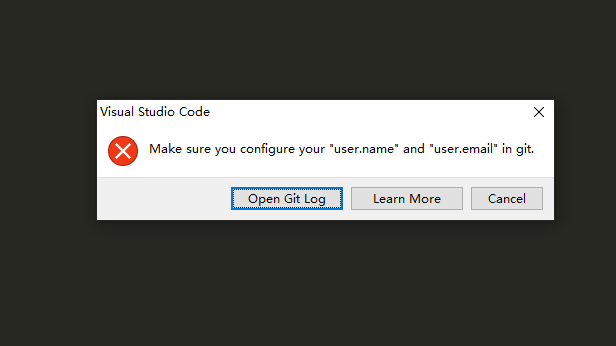
解决步骤:

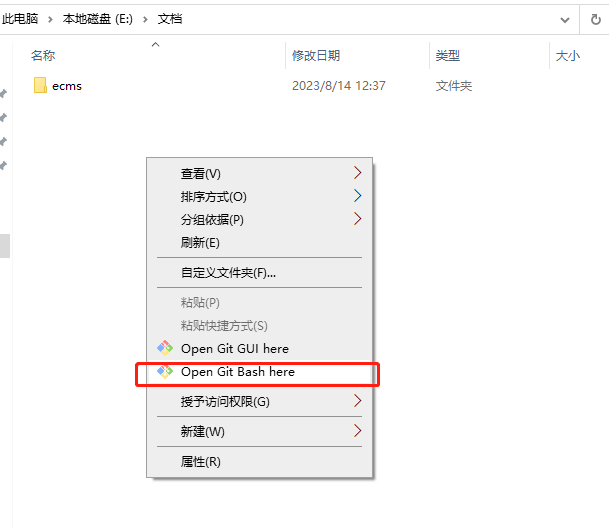
1.进入本地端的文件夹,右键Git Bash;
 

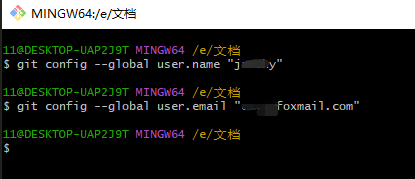
2.输入命令:

$ git config --global user.name "your_username"  # 配置用户名
$ git config --global user.email "your_email"  # 配置邮箱


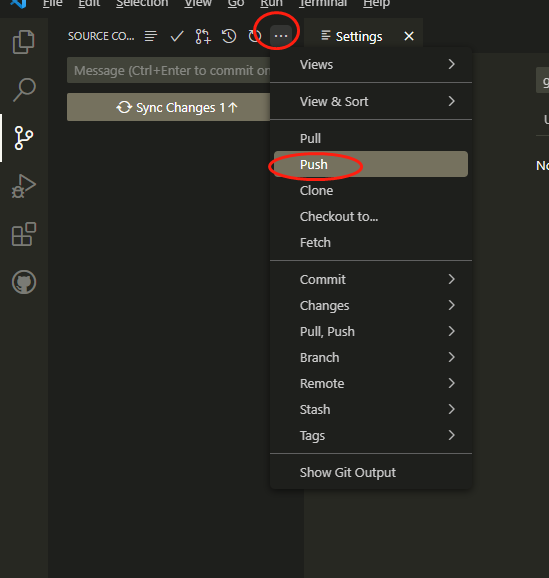
3.重新提交测试即可。
 

    本栏目推荐文章
  • vscode错误:Unable to connect to VS Code server: Error in request.
  • 【Leetcode1949. 坚定的友谊】使用MySQL在无向图中寻找{"CompleteTripartite", {1, 1, 3}}这个pattern
  • Python中出现"No module named 'requests'"的图文解决办法
  • QT开发 2024最新版本优雅的使用vscode开发QT
  • 在Windows上出现"localhost拒绝连接”的问题
  • mysql> GRANT ALL PRIVILEGES ON *.* TO 'root'@'%' WITH GRANT OPTION; ERROR 1410 (42000): You are not allowed to create a user with GRANT
  • "nginx.conf" E514 : write error (file system full?)
  • 加了@SessionAttributes("uid")退出登陆后如何清除session
  • VSCode配置C开发环境
  • cdn引入vue后报错无法识路径 Uncaught TypeError: Failed to resolve module specifier "vue". Relative references must start with either "/", "./", or "../".
版权声明:本网站为非赢利性站点,本网站所有内容均来源于互联网相关站点自动搜索采集信息,相关链接已经注明来源。
联系我们