一、数据预处理(缺失、重复等,步骤略)
二、标注平台搭建
(1)搭建标注环境(建议使用虚拟环境)
- python使用3.9.12版本,其他依赖如下(建议完全按照文中python版本及依赖版本安装,否则可能会出现依赖冲突或不兼容问题):
appdirs                        1.4.4
asgiref                        3.7.2
attr                           0.3.1
attrs                          23.1.0
azure-core                     1.29.4
azure-storage-blob             12.18.3
bleach                         5.0.1
boto                           2.49.0
boto3                          1.16.28
botocore                       1.19.28
boxing                         0.1.4
cachetools                     5.3.1
certifi                        2023.7.22
cffi                           1.16.0
charset-normalizer             3.3.0
click                          8.1.7
colorama                       0.4.6
cryptography                   41.0.4
defusedxml                     0.7.1
Django                         3.2.20
django-annoying                0.10.6
django-cors-headers            3.6.0
django-debug-toolbar           3.2.1
django-environ                 0.10.0
django-extensions              3.1.0
django-filter                  2.4.0
django-model-utils             4.1.1
django-ranged-fileresponse     0.1.2
django-rq                      2.5.1
django-storages                1.12.3
django-user-agents             0.4.0
djangorestframework            3.13.1
drf-dynamic-fields             0.3.0
drf-flex-fields                0.9.5
drf-generators                 0.3.0
expiringdict                   1.2.2
google-api-core                2.11.0
google-auth                    2.14.1
google-cloud-appengine-logging 1.1.0
google-cloud-audit-log         0.2.0
google-cloud-core              2.3.2
google-cloud-logging           2.7.2
google-cloud-storage           2.5.0
google-crc32c                  1.5.0
google-resumable-media         2.3.3
googleapis-common-protos       1.56.4
grpc-google-iam-v1             0.12.4
grpcio                         1.59.0
grpcio-status                  1.48.2
htmlmin                        0.1.12
humansignal-drf-yasg           1.21.9
idna                           3.4
ijson                          3.2.3
inflection                     0.5.1
isodate                        0.6.1
jmespath                       0.10.0
joblib                         1.3.2
jsonschema                     3.2.0
label-studio                   1.9.1.post0
label-studio-converter         0.0.57
label-studio-tools             0.0.3
launchdarkly-server-sdk        7.5.0
lockfile                       0.12.2
lxml                           4.9.3
nltk                           3.6.7
numpy                          1.24.3
ordered-set                    4.0.2
packaging                      23.2
pandas                         2.1.1
Pillow                         10.1.0
pip                            23.3
proto-plus                     1.22.3
protobuf                       3.20.3
psycopg2-binary                2.9.6
pyasn1                         0.5.0
pyasn1-modules                 0.3.0
pycparser                      2.21
pydantic                       1.10.13
pyRFC3339                      1.1
pyrsistent                     0.19.3
python-dateutil                2.8.2
python-json-logger             2.0.4
pytz                           2022.7.1
PyYAML                         6.0.1
redis                          3.5.3
regex                          2023.10.3
requests                       2.31.0
rq                             1.10.1
rsa                            4.9
rules                          2.2
s3transfer                     0.3.7
semver                         2.13.0
sentry-sdk                     1.32.0
setuptools                     68.2.2
six                            1.16.0
sqlparse                       0.4.4
tqdm                           4.66.1
typing_extensions              4.8.0
tzdata                         2023.3
ua-parser                      0.18.0
ujson                          5.8.0
uritemplate                    4.1.1
urllib3                        1.26.16
user-agents                    2.2.0
webencodings                   0.5.1
wheel                          0.40.0
xmljson 0.2.0- 启动label_studio
label-studio start(2)进入浏览器页面,注册登录,开始标注
- 准备数据,将需要标注的文本数据集按每行一条的格式整理成txt文件,注意不要有多余的空格、回车等特殊符号。
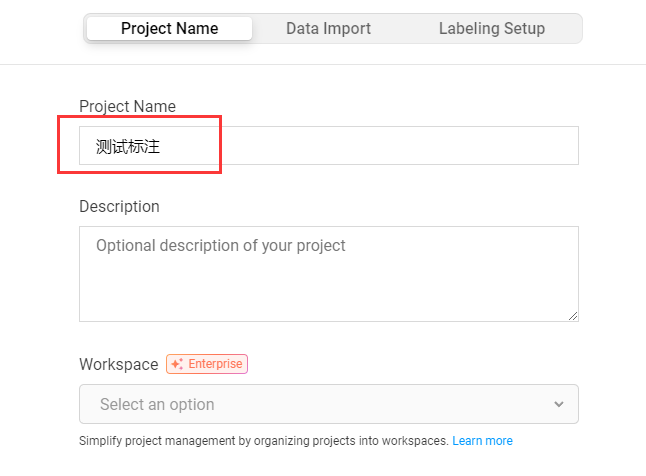
- 点击
Create按钮创建一个新的标注项目,填写项目名称。
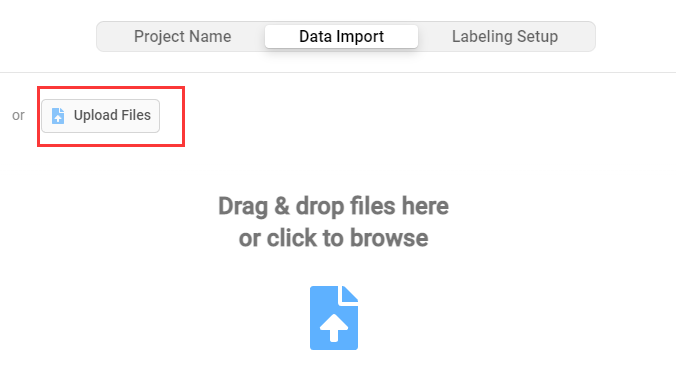
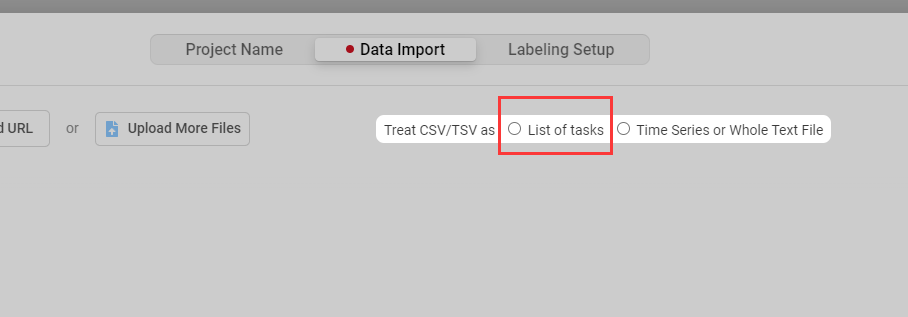
- 在
Data Import页面导入标注数据,并选择List of tasks
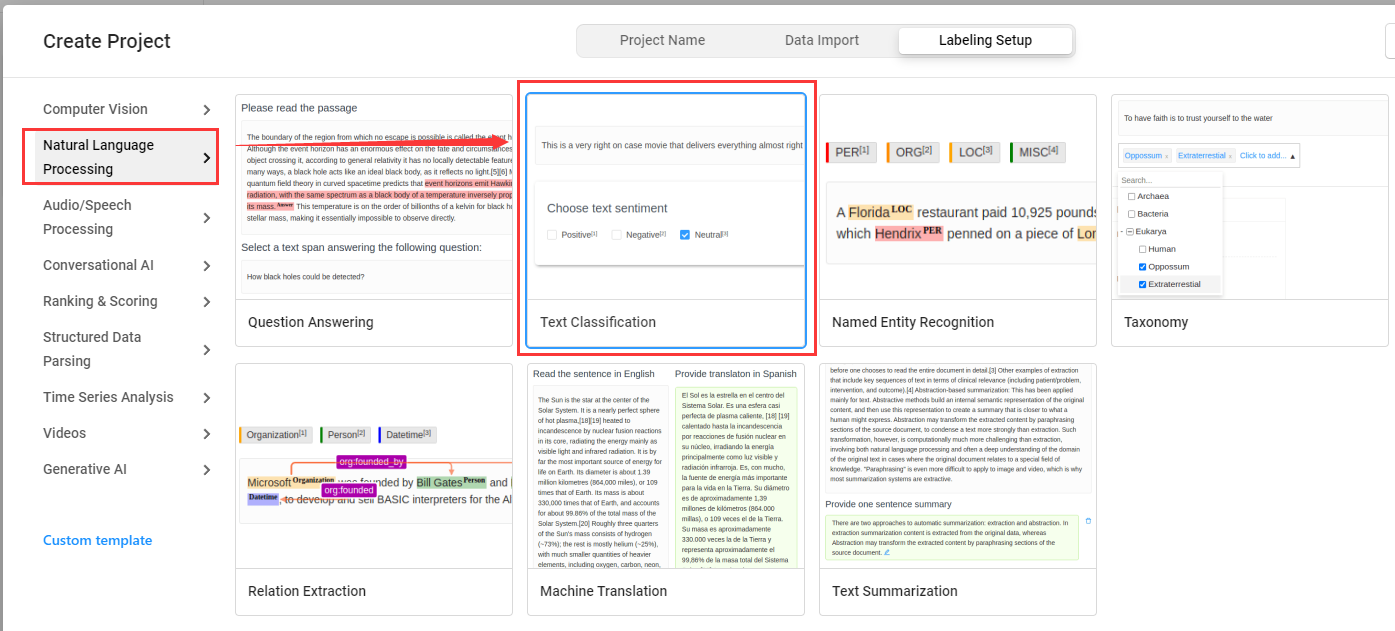
- 在
Labeling Setup中选择Text Classification,表示文本分类任务标注
- 在设置标签页面,先删除默认标签,再添加需要使用的新标签,添加完成后点击
Save保存
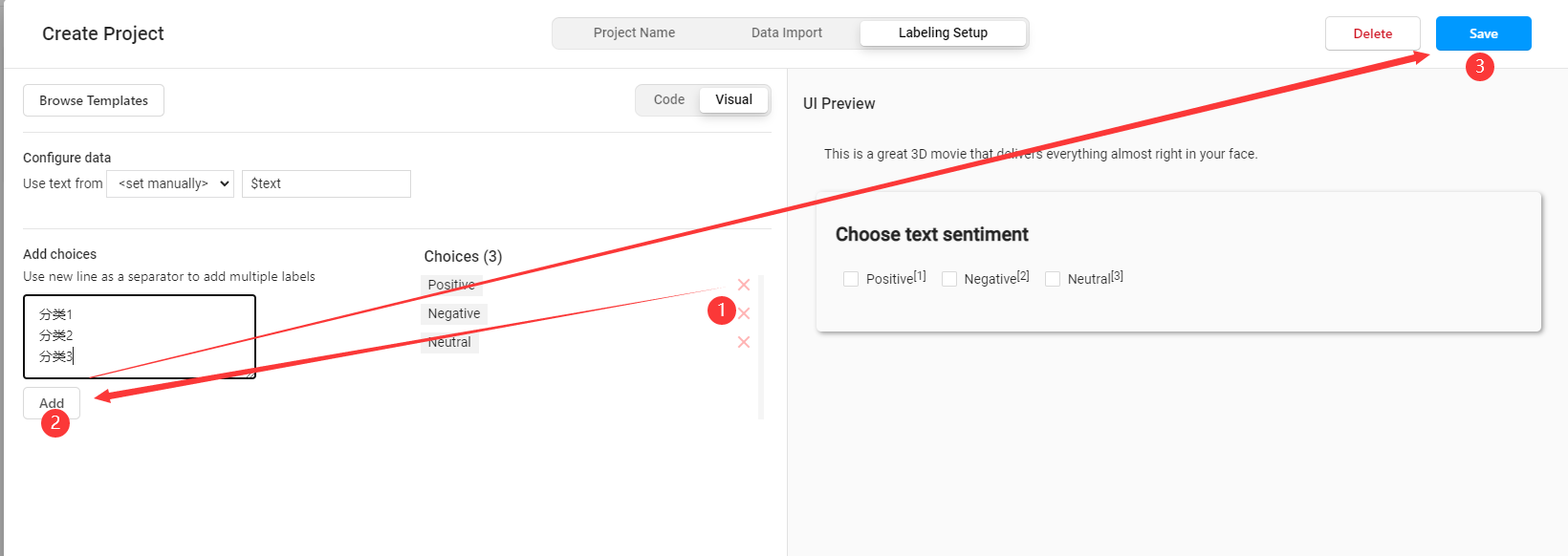
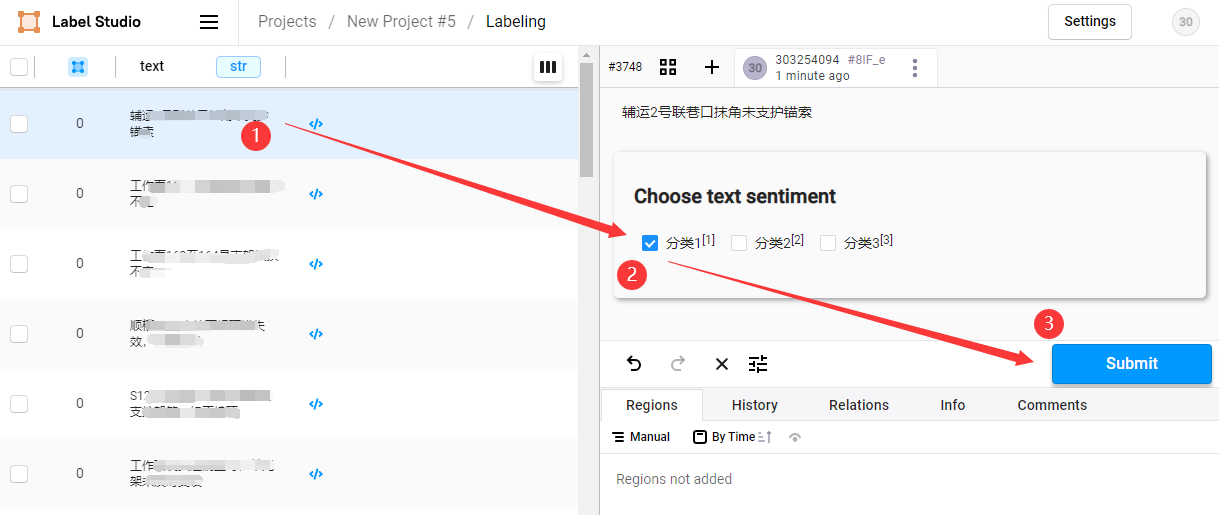
- 进入项目,开始标注,点击待标注数据,选择标签,点击
Submit保存标注结果
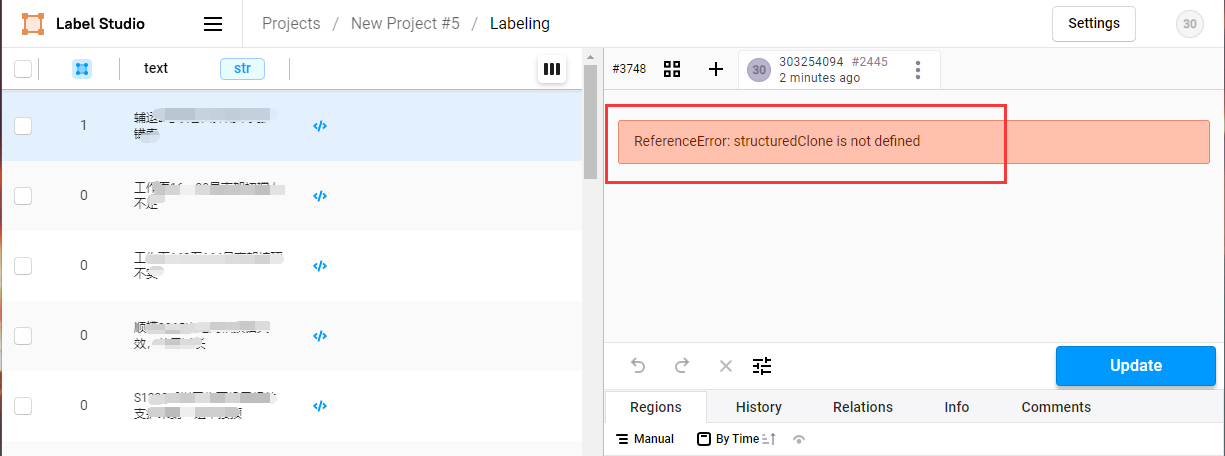
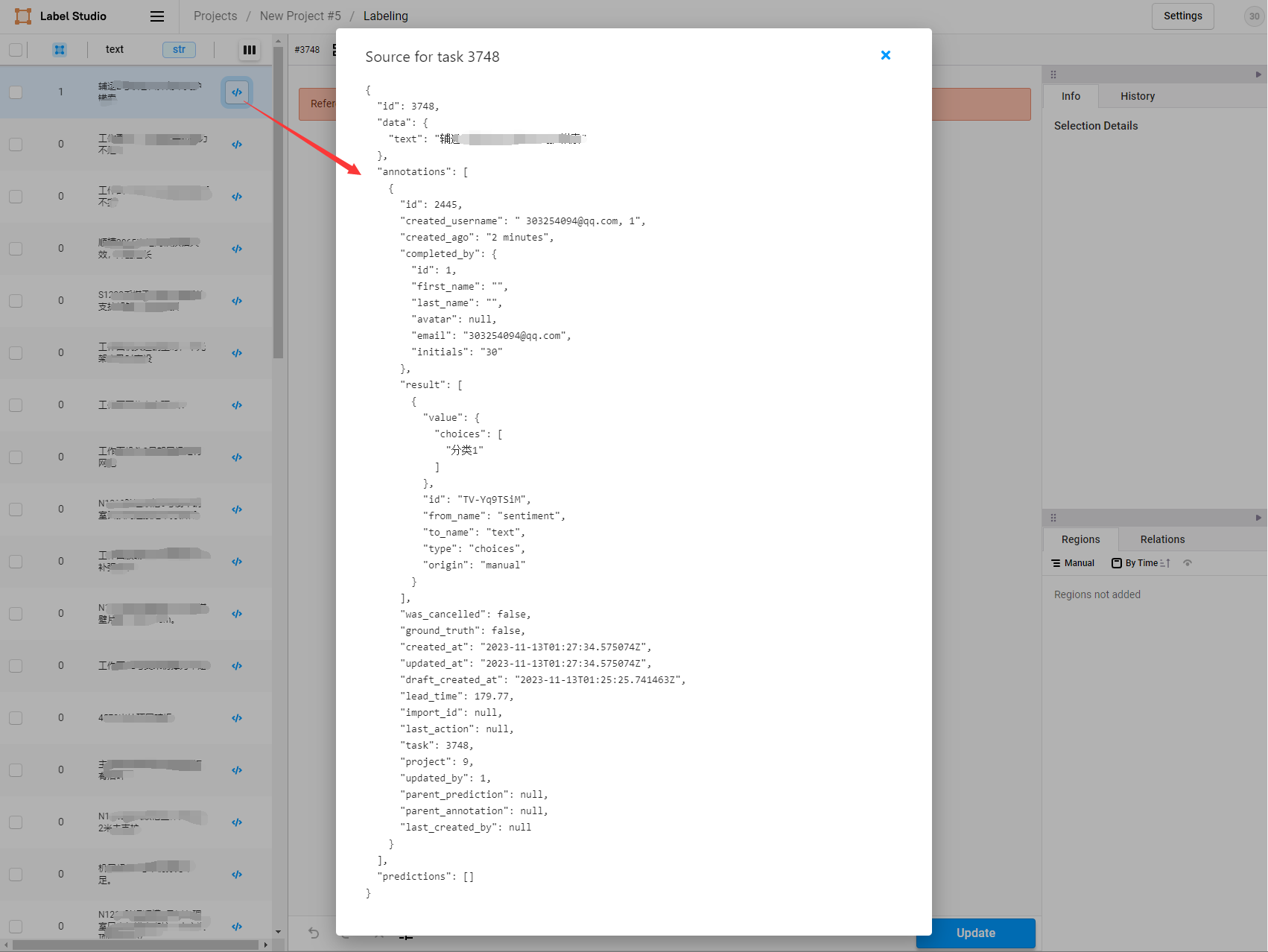
- 标注完成后,再次点击数据,标注结果显示位置报JS错误,无法显示,但不影响标注工作,可以点击</>符号查询标注结果
- 所有数据标注完成后,勾选(全选)已标注文本ID,选择导出的文件类型为
JSON,导出数据,重命名为label_studio.json,待使用
三、搭建PaddleNLP环境
- 搭建文档详见官网:https://github.com/PaddlePaddle/PaddleNLP
- 将
label_studio.json放入./data目录下。通过label_studio.py脚本可转为UTC的数据格式 - 转换命令:
python label_studio.py \
    --label_studio_file ./data/label_studio.json \
    --save_dir ./data \
    --splits 0.8 0.1 0.1 \
    --options ./data/label.txt
label_studio_file: 从label studio导出的数据标注文件。
save_dir: 训练数据的保存目录,默认存储在data目录下。
splits: 划分数据集时训练集、验证集所占的比例。默认为[0.8, 0.1, 0.1]表示按照8:1:1的比例将数据划分为训练集、验证集和测试集。
options: 指定分类任务的类别标签。若输入类型为文件,则文件中每行一个标签。
is_shuffle: 是否对数据集进行随机打散,默认为True。
seed: 随机种子,默认为1000.四、测试
# -*- coding:utf-8  -*-

from pprint import pprint
from paddlenlp import Taskflow
from conf.db_config import pool as dbpool

schema = ['分类1', '分类2', '分类3']
my_cls = Taskflow("zero_shot_text_classification", model="utc-base", schema=schema, task_path='./checkpoint/model_best/plm', precision="fp8")
pprint(my_cls('中国银河证券澄清合并重组传闻'))
[{
'predictions': [{
'label': '分类1',
'score': 0.9991679502941138
}],
'text_a': '中国银河证券澄清合并重组传闻'
}]