SSH
-
Secure Shell 是linux管理员最常用的远程管理linux的协议。
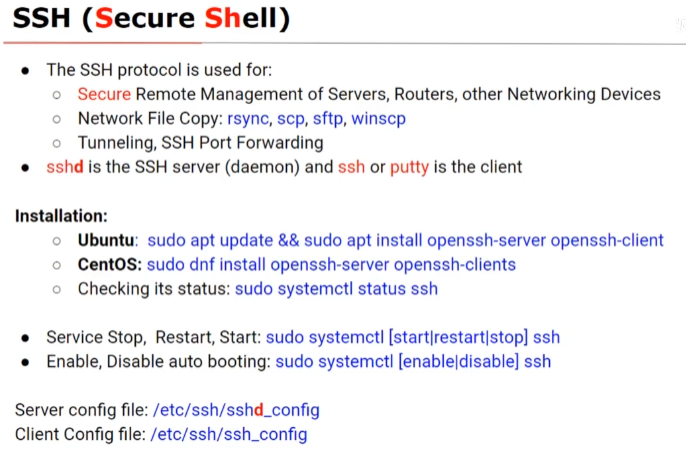
systemctl status ssh● ssh.service - OpenBSD Secure Shell server
Loaded: loaded (/lib/systemd/system/ssh.service; enabled; vendor preset: enabled)
Active: active (running) since Thu 2023-07-27 15:33:52 CST; 37s ago
Docs: man:sshd(8)
man:sshd_config(5)
Process: 668 ExecStartPre=/usr/sbin/sshd -t (code=exited, status=0/SUCCESS)
Main PID: 685 (sshd)
Tasks: 1 (limit: 4599)
Memory: 2.3M
CGroup: /system.slice/ssh.service
└─685 sshd: /usr/sbin/sshd -D [listener] 0 of 10-100 startupsputty,openssh是最常用的ssh
ssh 用户名@ssh服务器的ip地址
or
ssh -l 用户名 ssh服务器的ip地址
ssh client has its own configuration file,which is /etc/ssh/ssh_config
cat /etc/ssh/ssh_config...
-
troubleshoot SSH
可用命令
telnet测试ssh服务器的端口22。telnet 10.13.118.77 22Trying 10.13.118.77...
Connected to 10.13.118.77.
Escape character is '^]'.
SSH-2.0-OpenSSH_8.0
Connection closed by foreign host.nmap -p 22 10.13.118.77Starting Nmap 7.80 ( https://nmap.org ) at 2023-07-27 21:37 CST
Note: Host seems down. If it is really up, but blocking our ping probes, try -Pn
Nmap done: 1 IP address (0 hosts up) scanned in 0.03 secondsnmap -p 22 10.13.118.77 -PnStarting Nmap 7.80 ( https://nmap.org ) at 2023-07-28 10:41 CST
Nmap scan report for 10.13.118.77
Host is up.PORT STATE SERVICE
22/tcp filtered sshNmap done: 1 IP address (1 host up) scanned in 2.10 seconds
查看有无防火墙:
sudo iptables -vnL[sudo] password for vboxuser:
Chain INPUT (policy ACCEPT 0 packets, 0 bytes)
pkts bytes target prot opt in out source destinationChain FORWARD (policy ACCEPT 0 packets, 0 bytes)
pkts bytes target prot opt in out source destinationChain OUTPUT (policy ACCEPT 0 packets, 0 bytes)
pkts bytes target prot opt in out source destination -
ufw= uncompilated fire wall ,默认是被禁止的,但是可以查看它的状态。sudo ufw status verboseStatus: inactive
开启ufw:
sudo ufw enableFirewall is active and enabled on system startup
禁止ufw:
sudo ufw disableFirewall stopped and disabled on system startup
you can list all application profiles available on your server by running ufw
app list.Available applications:
CUPS
Openssh使防火墙允许ssh:
sudo ufw allow sshRules updated
Rules updated (v6)run the ssh client in verbose mode by using the -v option like this:
ssh -v lyy@10.13.118.70 #verbose模式 debug模式 详细的,冗长的it causes ssh to print degubbing messages about it progress.
this is helpful in debugging connection,authentication and configuration problems.
如果问题依然存在,查看服务器日志:
如下:
sudo tail -f /var/log/auth.logJul 28 12:30:01 lyy CRON[6353]: pam_unix(cron:session): session closed for user root
Jul 28 13:17:01 lyy CRON[6932]: pam_unix(cron:session): session opened for user root by (uid=0)
Jul 28 13:17:01 lyy CRON[6932]: pam_unix(cron:session): session closed for user root
Jul 28 13:30:01 lyy CRON[6939]: pam_unix(cron:session): session opened for user root by (uid=0)
Jul 28 13:30:01 lyy CRON[6939]: pam_unix(cron:session): session closed for user root
Jul 28 13:39:30 lyy sudo: vboxuser : TTY=pts/0 ; PWD=/home/vboxuser ; USER=root ; COMMAND=/usr/bin/tail -f /war/log/auth.log
Jul 28 13:39:30 lyy sudo: pam_unix(sudo:session): session opened for user root by (uid=0)
Jul 28 13:39:30 lyy sudo: pam_unix(sudo:session): session closed for user root
Jul 28 13:39:55 lyy sudo: vboxuser : TTY=pts/0 ; PWD=/home/vboxuser ; USER=root ; COMMAND=/usr/bin/tail -f /var/log/auth.log
Jul 28 13:39:55 lyy sudo: pam_unix(sudo:session): session opened for user root by (uid=0)跟ssh服务器有关的配置可以在以下文件中配置:
ls -l /etc/ssh/-rw-r--r-- 1 root root 535195 4月 4 06:47 moduli
-rw-r--r-- 1 root root 1603 3月 30 2022 ssh_config
drwxr-xr-x 2 root root 4096 3月 30 2022 ssh_config.d
-rw-r--r-- 1 root root 3289 4月 4 06:47 sshd_config
drwxr-xr-x 2 root root 4096 4月 4 06:47 sshd_config.d
-rw------- 1 root root 505 7月 16 23:21 ssh_host_ecdsa_key
-rw-r--r-- 1 root root 170 7月 16 23:21 ssh_host_ecdsa_key.pub
-rw------- 1 root root 399 7月 16 23:21 ssh_host_ed25519_key
-rw-r--r-- 1 root root 90 7月 16 23:21 ssh_host_ed25519_key.pub
-rw------- 1 root root 2590 7月 16 23:21 ssh_host_rsa_key
-rw-r--r-- 1 root root 562 7月 16 23:21 ssh_host_rsa_key.pub
-rw-r--r-- 1 root root 342 7月 16 23:21 ssh_import_id如果想要修改sshd_config,最好先备份一份,如果你是一个新手的话。
-
一般默认安装的ssh并不是最安全的,这里有几个简单的步骤可以显著提高ssh的安全性,保护开放的ssh服务器。
服务器配置文件位于/etc/ssh中,名为sshd_config,编辑文件后必须重启服务器以应用服务。
此文件中的默认选项会保留注释,想要覆盖默认值,则必须取消注释改行并更改选项。
如果想了解更多关于选项的信息,可以查看sshd_config的手册页:
man sshd_config1.当使用非默认端口,而不是默认端口port 22时,黑客将不会扫描到该端口。
2.禁止以root身份直接登陆。
3.完全禁止用密码身份验证
4.添加AllowUsers选项只允许部分管理员利用ssh远程登录。
AllowUsers user1 user2 user35.如果仅有少数管理员登录,那么登录源的ip地址将是有限的,可以使用以下命令只允许少数ip地址和网络登录。
 iptables -A INPUT -p tcp --dport 2278 -s 2.2.4.5 -j Accept

 iptables -A INPUT -p tcp --dport 2278 -s 2.45.6.100 -j Accept

 iptables -A INPUT -p tcp --dport 2278 -j DROP
6.可以设置一个空闲超时间隔(idle timeout internal),这是以秒为单位的时间间隔,如果没有从客户端受到数据,sshd守护进程将通过加密渠道发送消息以请求客户端的响应。
如果你设置的空闲超时间间隔是300秒,一旦超过时间间隔空闲用户(idle user)将会被自动注销。
可以设置ClientAliveInterval来设置空闲超时间间隔。
其他选项比如MaxAuthTries制定了每个连接允许的最大身份验证尝试次数,MaxStartups,LoginGraceTime等。
-
scp命令可以在客户端和远端服务器之间、远端服务器和远端服务器之间相互复制文件。
for example:
  ip add show > ip.txt

  scp -P 22 ip.txt student@192.168.0.20:~
如果想拷贝到其他路径中,更改冒号后的目标路径即可:
scp -P 22 ip.txt student@192.168.0.20:~/ip_centos.txt/