手把手搭建一个完整的javaweb项目
本案例使用Servlet+jsp制作,用MyEclipse和Mysql数据库进行搭建,详细介绍了搭建过程及知识点。
下载地址:http://download.csdn.net/detail/qq_23994787/9904842 点击下载
主要功能有:
1.用户注册
2.用户登录
3.用户列表展示
4.用户信息修改
5.用户信息删除
涉及到的知识点有:
1.JDBC
2.Servlet
3.过滤器
4..EL与JSTL表达式
1.首先打开mysql数据库 新建一个数据库test,然后生成对应的表结构
-
CREATE TABLE `user` (
-
`id` int(11) NOT NULL auto_increment,
-
`name` varchar(255) NOT NULL,
-
`pwd` varchar(255) NOT NULL,
-
`sex` varchar(255) NOT NULL,
-
`home` varchar(255) NOT NULL,
-
`info` varchar(255) NOT NULL,
-
PRIMARY KEY (`id`)
-
) ENGINE=InnoDB AUTO_INCREMENT=5 DEFAULT CHARSET=utf8;
-
-
-
INSERT INTO `user` VALUES ('3', '123', '123', '123', '123', '123');
-
INSERT INTO `user` VALUES ('4', '123123', '123123', '男', '北京', '123123');
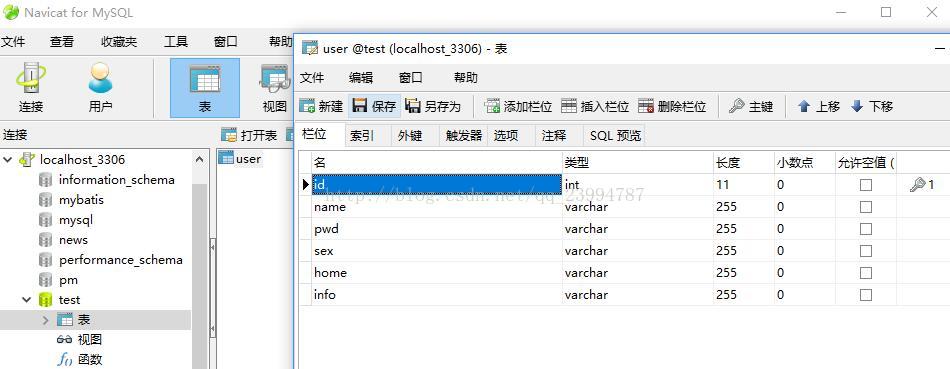
这里使用到了navicat for mysql 这是一种mysql的图形界面化工具,后期可以非常方便的操作数据库。
需要的童鞋 给你们个连接 http://download.csdn.net/download/qq_23994787/10168988
2.然后打开MyEclipse新建一个web项目
3.在webroot下的WEB-INF下的lib中导入mysql的驱动jar包
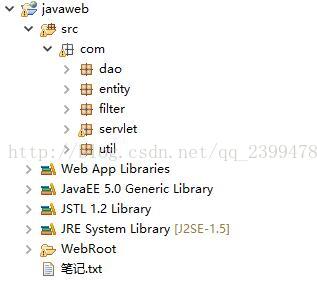
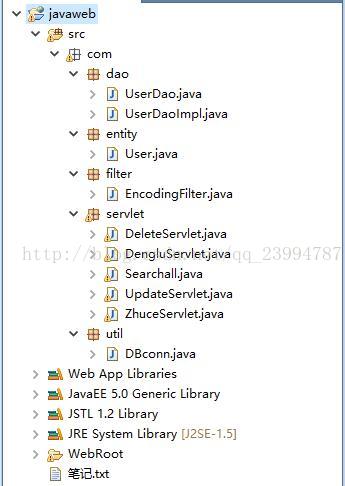
4.建立对应的包结构
com.filter //过滤器 解决中文字符集乱码
com.util //数据库连接工具类
com.entity //实体类
com.dao //数据操作类
com.servlet //servlet类
5.在filter下新建一个EncodingFilter用来解决中文字符集乱码,它需要实现Filter接口,并重写doFilter函数
-
package com.filter;
-
-
import java.io.IOException;
-
-
import javax.servlet.Filter;
-
import javax.servlet.FilterChain;
-
import javax.servlet.FilterConfig;
-
import javax.servlet.ServletException;
-
import javax.servlet.ServletRequest;
-
import javax.servlet.ServletResponse;
-
-
public class EncodingFilter implements Filter{
-
public EncodingFilter(){
-
System.out.println("过滤器构造");
-
}
-
public void destroy() {
-
System.out.println("过滤器销毁");
-
}
-
public void doFilter(ServletRequest request, ServletResponse response,FilterChain chain) throws IOException, ServletException {
-
request.setCharacterEncoding("utf-8"); //将编码改为utf-8
-
response.setContentType("text/html;charset=utf-8");
-
chain.doFilter(request, response);
-
}
-
-
public void init(FilterConfig arg0) throws ServletException {
-
System.out.println("过滤器初始化");
-
}
-
-
}

6.到web.xml下进行对EncodingFilter相应的配置
-
-
<web-app version="2.5"
-
xmlns="http://java.sun.com/xml/ns/javaee"
-
xmlns:xsi="http://www.w3.org/2001/XMLSchema-instance"
-
xsi:schemaLocation="http://java.sun.com/xml/ns/javaee
-
http://java.sun.com/xml/ns/javaee/web-app_2_5.xsd">
-
<display-name></display-name>
-
-
<filter>
-
<filter-name>EncodingFilter</filter-name>
-
<filter-class>com.filter.EncodingFilter</filter-class><!--全路径 从根包开始一直到类名-->
-
</filter>
-
<filter-mapping>
-
<filter-name>EncodingFilter</filter-name>
-
<url-pattern>/*</url-pattern> <!--*即为过滤所有-->
-
</filter-mapping>
-
-
-
<welcome-file-list>
-
<welcome-file>denglu.jsp</welcome-file>
-
</welcome-file-list>
-
</web-app>
7.在util下新建一个DBconn类用来处理对数据库的连接操作(用户名或密码按照自己的数据库更改)
-
package com.util;
-
-
import java.sql.*;
-
-
public class DBconn {
-
static String url = "jdbc:mysql://localhost:3306/test?useunicuee=true& characterEncoding=utf8";
-
static String username = "root";
-
static String password = "root";
-
static Connection conn = null;
-
static ResultSet rs = null;
-
static PreparedStatement ps =null;
-
public static void init(){
-
try {
-
Class.forName("com.mysql.jdbc.Driver");
-
conn = DriverManager.getConnection(url,username,password);
-
} catch (Exception e) {
-
System.out.println("init [SQL驱动程序初始化失败!]");
-
e.printStackTrace();
-
}
-
}
-
public static int addUpdDel(String sql){
-
int i = 0;
-
try {
-
PreparedStatement ps = conn.prepareStatement(sql);
-
i = ps.executeUpdate();
-
} catch (SQLException e) {
-
System.out.println("sql数据库增删改异常");
-
e.printStackTrace();
-
}
-
-
return i;
-
}
-
public static ResultSet selectSql(String sql){
-
try {
-
ps = conn.prepareStatement(sql);
-
rs = ps.executeQuery(sql);
-
} catch (SQLException e) {
-
System.out.println("sql数据库查询异常");
-
e.printStackTrace();
-
}
-
return rs;
-
}
-
public static void closeConn(){
-
try {
-
conn.close();
-
} catch (SQLException e) {
-
System.out.println("sql数据库关闭异常");
-
e.printStackTrace();
-
}
-
}
-
}
8.在entity下新建一个User实体类(实体即抽象出来的用户对象,对应数据库中的user表,表中每个字段在实体中为一个属性,也可以理解为一个User对象对应数据库中的user表一条记录)
-
package com.entity;
-
-
public class User {
-
private int id;
-
private String name;
-
private String pwd;
-
private String sex;
-
private String home;
-
private String info;
-
public int getId() {
-
return id;
-
}
-
public void setId(int id) {
-
this.id = id;
-
}
-
public String getName() {
-
return name;
-
}
-
public void setName(String name) {
-
this.name = name;
-
}
-
public String getPwd() {
-
return pwd;
-
}
-
public void setPwd(String pwd) {
-
this.pwd = pwd;
-
}
-
public String getSex() {
-
return sex;
-
}
-
public void setSex(String sex) {
-
this.sex = sex;
-
}
-
public String getHome() {
-
return home;
-
}
-
public void setHome(String home) {
-
this.home = home;
-
}
-
public String getInfo() {
-
return info;
-
}
-
public void setInfo(String info) {
-
this.info = info;
-
}
-
-
}
9.在dao下新建一个UserDao接口 以及对应的方法实现类(使用接口类是为了规范开发)
UserDao.java
-
package com.dao;
-
-
import java.util.List;
-
-
import com.entity.User;
-
-
public interface UserDao {
-
public boolean login(String name,String pwd);//登录
-
public boolean register(User user);//注册
-
public List<User> getUserAll();//返回用户信息集合
-
public boolean delete(int id) ;//根据id删除用户
-
public boolean update(int id,String name, String pwd,String sex, String home,String info) ;//更新用户信息
-
}
新建UserDaoImpl.java 实现UserDao接口,及未实现的方法 (SQL语句建议在mysql中测试以下,没有问题然后在拿到实现类中使用,可以避免无必要的麻烦)
本例子SQL使用字符串拼接的方式,其实还有一种预加载的方式,有兴趣的童鞋可以参考我的博客,了解预加载的方式处理SQL语句与字符串拼接方式的区别。
-
package com.dao;
-
-
import java.sql.ResultSet;
-
import java.sql.SQLException;
-
import java.util.ArrayList;
-
import java.util.List;
-
-
import com.entity.User;
-
import com.util.DBconn;
-
-
public class UserDaoImpl implements UserDao{
-
-
public boolean register(User user) {
-
boolean flag = false;
-
DBconn.init();
-
int i =DBconn.addUpdDel("insert into user(name,pwd,sex,home,info) " +
-
"values('"+user.getName()+"','"+user.getPwd()+"','"+user.getSex()+"','"+user.getHome()+"','"+user.getInfo()+"')");
-
if(i>0){
-
flag = true;
-
}
-
DBconn.closeConn();
-
return flag;
-
}
-
public boolean login(String name, String pwd) {
-
boolean flag = false;
-
try {
-
DBconn.init();
-
ResultSet rs = DBconn.selectSql("select * from user where name='"+name+"' and pwd='"+pwd+"'");
-
while(rs.next()){
-
if(rs.getString("name").equals(name) && rs.getString("pwd").equals(pwd)){
-
flag = true;
-
}
-
}
-
DBconn.closeConn();
-
} catch (SQLException e) {
-
e.printStackTrace();
-
}
-
return flag;
-
}
-
public List<User> getUserAll() {
-
List<User> list = new ArrayList<User>();
-
try {
-
DBconn.init();
-
ResultSet rs = DBconn.selectSql("select * from user");
-
while(rs.next()){
-
User user = new User();
-
user.setId(rs.getInt("id"));
-
user.setName(rs.getString("name"));
-
user.setPwd(rs.getString("pwd"));
-
user.setSex(rs.getString("sex"));
-
user.setHome(rs.getString("home"));
-
user.setInfo(rs.getString("info"));
-
list.add(user);
-
}
-
DBconn.closeConn();
-
return list;
-
} catch (SQLException e) {
-
e.printStackTrace();
-
}
-
return null;
-
}
-
public boolean update(int id,String name, String pwd,String sex, String home,String info) {
-
boolean flag = false;
-
DBconn.init();
-
String sql ="update user set name ='"+name
-
+"' , pwd ='"+pwd
-
+"' , sex ='"+sex
-
+"' , home ='"+home
-
+"' , info ='"+info+"' where id = "+id;
-
int i =DBconn.addUpdDel(sql);
-
if(i>0){
-
flag = true;
-
}
-
DBconn.closeConn();
-
return flag;
-
}
-
public boolean delete(int id) {
-
boolean flag = false;
-
DBconn.init();
-
String sql = "delete from user where id="+id;
-
int i =DBconn.addUpdDel(sql);
-
if(i>0){
-
flag = true;
-
}
-
DBconn.closeConn();
-
return flag;
-
}
-
-
}
10.在servlet下创建DengluServlet用来实现对用户登录的操作(Servlet有两种方式创建,一种手工创建。另一种程序自动生成。前者自己创建java类,实现Servlet具体内容,然后需要去WEB_INF下的web.xml去配置servlet . 而后者则直接由程序替我们配置好了Servlet)本例子使用第二种方式生成Servlet
DengluServlet.java
-
package com.servlet;
-
-
import java.io.IOException;
-
import java.io.PrintWriter;
-
-
import javax.servlet.ServletException;
-
import javax.servlet.http.HttpServlet;
-
import javax.servlet.http.HttpServletRequest;
-
import javax.servlet.http.HttpServletResponse;
-
-
import com.dao.UserDao;
-
import com.dao.UserDaoImpl;
-
-
public class DengluServlet extends HttpServlet { //需要继承HttpServlet 并重写doGet doPost方法
-
public void doGet(HttpServletRequest request, HttpServletResponse response)
-
throws ServletException, IOException {
-
doPost(request, response); //将信息使用doPost方法执行 对应jsp页面中的form表单中的method
-
}
-
public void doPost(HttpServletRequest request, HttpServletResponse response)
-
throws ServletException, IOException {
-
-
String name = request.getParameter("name"); //得到jsp页面传过来的参数
-
String pwd = request.getParameter("pwd");
-
-
UserDao ud = new UserDaoImpl();
-
-
if(ud.login(name, pwd)){
-
request.setAttribute("xiaoxi", "欢迎用户"+name); //向request域中放置信息
-
request.getRequestDispatcher("/success.jsp").forward(request, response);//转发到成功页面
-
}else{
-
response.sendRedirect("index.jsp"); //重定向到首页
-
}
-
}
-
-
}
有两点要注意的地方:
一:getParameter与getAttribute两者的区别
request.setAttribute("xiaoxi", "欢迎用户"+name);//向request域中放置信息 ( 键值对的形式) 名字为xiaoxi 内容为"欢迎用户"+name
request.getAttribute("xiaoxi");//得到request域中放置名字为xiaoxi的信息
request.getParameter("name");//得到request域的参数信息(得到jsp页面传过来的参数)
getAttribute表示从request范围取得设置的属性,必须要先setAttribute设置属性,才能通过getAttribute来取得,设置与取得的为Object对象类型 。
getParameter表示接收参数,参数为页面提交的参数,包括:表单提交的参数、URL重写(就是xxx?id=1中的id)传的参数等,因此这个并没有设置参数的方法(没有setParameter),而且接收参数返回的不是Object,而是String类型
二:转发与重定向的区别
(1).重定向的执行过程:Web服务器向浏览器发送一个http响应--》浏览器接受此响应后再发送一个新的http请求到服务器--》服务器根据此请求寻找资源并发送给浏览器。它可以重定向到任意URL,不能共享request范围内的数据。
(2).重定向是在客户端发挥作用,通过新的地址实现页面转向。
(3).重定向是通过浏览器重新请求地址,在地址栏中可以显示转向后的地址。
(4).转发过程:Web服务器调用内部方法在容器内部完成请求和转发动作--》将目标资源发送给浏览器,它只能在同一个Web应用中使用,可以共享request范围内的数据。
(5).转发是在服务器端发挥作用,通过forward()方法将提交信息在多个页面间进行传递。
(6).转发是在服务器内部控制权的转移,客户端浏览器的地址栏不会显示出转向后的地址。
11.在servlet下创建一个ZhuceServlet用来实现用户注册的操作
ZhuceServlet.java
-
package com.servlet;
-
-
import java.io.IOException;
-
import java.io.PrintWriter;
-
-
import javax.servlet.ServletException;
-
import javax.servlet.http.HttpServlet;
-
import javax.servlet.http.HttpServletRequest;
-
import javax.servlet.http.HttpServletResponse;
-
import com.dao.UserDao;
-
import com.dao.UserDaoImpl;
-
import com.entity.User;
-
-
public class ZhuceServlet extends HttpServlet {
-
public void doGet(HttpServletRequest request, HttpServletResponse response)
-
throws ServletException, IOException {
-
doPost(request, response);
-
}
-
public void doPost(HttpServletRequest request, HttpServletResponse response)
-
throws ServletException, IOException {
-
-
String name = request.getParameter("name"); //获取jsp页面传过来的参数
-
String pwd = request.getParameter("pwd");
-
String sex = request.getParameter("sex");
-
String home = request.getParameter("home");
-
String info = request.getParameter("info");
-
-
User user = new User(); //实例化一个对象,组装属性
-
user.setName(name);
-
user.setPwd(pwd);
-
user.setSex(sex);
-
user.setHome(home);
-
user.setInfo(info);
-
-
UserDao ud = new UserDaoImpl();
-
-
if(ud.register(user)){
-
request.setAttribute("username", name); //向request域中放置参数
-
//request.setAttribute("xiaoxi", "注册成功");
-
request.getRequestDispatcher("/denglu.jsp").forward(request, response); //转发到登录页面
-
}else{
-
-
response.sendRedirect("index.jsp");//重定向到首页
-
}
-
}
-
}
12.在servlet下创建SearchallServlet用来返回数据库中所有用户信息
Searchall.java
-
package com.servlet;
-
-
import java.io.IOException;
-
import java.io.PrintWriter;
-
import java.util.List;
-
-
import javax.servlet.ServletException;
-
import javax.servlet.http.HttpServlet;
-
import javax.servlet.http.HttpServletRequest;
-
import javax.servlet.http.HttpServletResponse;
-
-
import com.dao.UserDao;
-
import com.dao.UserDaoImpl;
-
import com.entity.User;
-
-
public class Searchall extends HttpServlet {
-
public void doGet(HttpServletRequest request, HttpServletResponse response)
-
throws ServletException, IOException {
-
doPost(request, response);
-
}
-
public void doPost(HttpServletRequest request, HttpServletResponse response)
-
throws ServletException, IOException {
-
-
UserDao ud = new UserDaoImpl();
-
List<User> userAll = ud.getUserAll();
-
request.setAttribute("userAll", userAll);
-
request.getRequestDispatcher("/showall.jsp").forward(request, response);
-
}
-
}
13.在servlet下创建DeleteServlet用来删除用户操作
DeleteServlet.java
-
package com.servlet;
-
-
import java.io.IOException;
-
import java.io.PrintWriter;
-
-
import javax.servlet.ServletException;
-
import javax.servlet.http.HttpServlet;
-
import javax.servlet.http.HttpServletRequest;
-
import javax.servlet.http.HttpServletResponse;
-
-
import com.dao.UserDao;
-
import com.dao.UserDaoImpl;
-
-
public class DeleteServlet extends HttpServlet {
-
public void doGet(HttpServletRequest request, HttpServletResponse response)
-
throws ServletException, IOException {
-
doPost(request, response);
-
}
-
public void doPost(HttpServletRequest request, HttpServletResponse response)
-
throws ServletException, IOException {
-
-
String id = request.getParameter("id");
-
int userId = Integer.parseInt(id);
-
-
UserDao ud = new UserDaoImpl();
-
-
if(ud.delete(userId)){
-
request.setAttribute("xiaoxi", "删除成功");
-
request.getRequestDispatcher("/Searchall").forward(request, response);
-
}else{
-
response.sendRedirect("index.jsp");
-
}
-
}
-
-
}
14.在servlet下创建UpdateServlet操作用来更新用户信息
UpdateServlet.java
-
package com.servlet;
-
-
import java.io.IOException;
-
import java.io.PrintWriter;
-
-
import javax.servlet.ServletException;
-
import javax.servlet.http.HttpServlet;
-
import javax.servlet.http.HttpServletRequest;
-
import javax.servlet.http.HttpServletResponse;
-
-
import com.dao.UserDao;
-
import com.dao.UserDaoImpl;
-
import com.entity.User;
-
-
public class UpdateServlet extends HttpServlet {
-
-
public void doGet(HttpServletRequest request, HttpServletResponse response)
-
throws ServletException, IOException {
-
doPost(request, response);
-
}
-
public void doPost(HttpServletRequest request, HttpServletResponse response)
-
throws ServletException, IOException {
-
-
String id = request.getParameter("id");
-
int userId = Integer.parseInt(id);
-
-
String name = request.getParameter("name");
-
String pwd = request.getParameter("pwd");
-
String sex = request.getParameter("sex");
-
String home = request.getParameter("home");
-
String info = request.getParameter("info");
-
-
System.out.println("------------------------------------"+userId);
-
-
UserDao ud = new UserDaoImpl();
-
-
if(ud.update(userId, name, pwd, sex, home, info)){
-
request.setAttribute("xiaoxi", "更新成功");
-
request.getRequestDispatcher("/Searchall").forward(request, response);
-
}else{
-
response.sendRedirect("index.jsp");
-
}
-
}
-
}
-
15.配置servlet 如果非手打而用MyEclipse生成则不用配置 附完整web.xml
-
-
<web-app version="2.5"
-
xmlns="http://java.sun.com/xml/ns/javaee"
-
xmlns:xsi="http://www.w3.org/2001/XMLSchema-instance"
-
xsi:schemaLocation="http://java.sun.com/xml/ns/javaee
-
http://java.sun.com/xml/ns/javaee/web-app_2_5.xsd">
-
<display-name></display-name>
-
-
<filter><!--过滤器配置-->
-
<filter-name>EncodingFilter</filter-name>
-
<filter-class>com.filter.EncodingFilter</filter-class>
-
</filter>
-
<filter-mapping>
-
<filter-name>EncodingFilter</filter-name>
-
<url-pattern>/*</url-pattern>
-
</filter-mapping>
-
-
-
-
<servlet><!--servlet类路径配置-->
-
<servlet-name>DengluServlet</servlet-name>
-
<servlet-class>com.servlet.DengluServlet</servlet-class>
-
</servlet>
-
<servlet>
-
<servlet-name>ZhuceServlet</servlet-name>
-
<servlet-class>com.servlet.ZhuceServlet</servlet-class>
-
</servlet>
-
<servlet>
-
<servlet-name>Searchall</servlet-name>
-
<servlet-class>com.servlet.Searchall</servlet-class>
-
</servlet>
-
<servlet>
-
<servlet-name>DeleteServlet</servlet-name>
-
<servlet-class>com.servlet.DeleteServlet</servlet-class>
-
</servlet>
-
<servlet>
-
<servlet-name>UpdateServlet</servlet-name>
-
<servlet-class>com.servlet.UpdateServlet</servlet-class>
-
</servlet>
-
-
-
-
<servlet-mapping><!--servlet类映射配置-->
-
<servlet-name>DengluServlet</servlet-name>
-
<url-pattern>/DengluServlet</url-pattern>
-
</servlet-mapping>
-
<servlet-mapping>
-
<servlet-name>ZhuceServlet</servlet-name>
-
<url-pattern>/ZhuceServlet</url-pattern>
-
</servlet-mapping>
-
<servlet-mapping>
-
<servlet-name>Searchall</servlet-name>
-
<url-pattern>/Searchall</url-pattern>
-
</servlet-mapping>
-
<servlet-mapping>
-
<servlet-name>DeleteServlet</servlet-name>
-
<url-pattern>/DeleteServlet</url-pattern>
-
</servlet-mapping>
-
<servlet-mapping>
-
<servlet-name>UpdateServlet</servlet-name>
-
<url-pattern>/UpdateServlet</url-pattern>
-
</servlet-mapping>
-
-
-
-
<welcome-file-list><!--默认首页地址-->
-
<welcome-file>denglu.jsp</welcome-file>
-
</welcome-file-list>
-
</web-app>
16.新建jsp页面
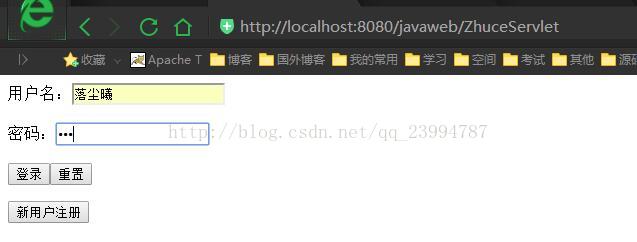
denglu.jsp 用户登录页面 默认页面进入项目后 先进入该页面(web.xml中配置)
form表单中需要注意的是<form action="DengluServlet" method="post">
其中action即为要跳转的servlet路径(即在web.xml中配置的servlet-mapping :<url-pattern>/DengluServlet</url-pattern> ,)写 / 后的内容。
method="post"为传递值得方法类型有两种,第一种get,第二种post。网上介绍这两种的区别有很多,阐述的又是百家争鸣。而我觉得那个方便就用那个,一般使用post传递,可避免乱码。
另一个需要注意的是 用户名:<input type="text" name="name" value=""> input标签 一定要起个名字 如name="name"
起名的作用就是让后台通过request.getParterment("name");来取值
<%@ page language="java" import="java.util.*" pageEncoding="utf-8"%>
<!DOCTYPE HTML PUBLIC "-//W3C//DTD HTML 4.01 Transitional//EN">
<html>
  <head>
    <title>登录注册页面</title>
  </head>
  <body >
         <form action="DengluServlet"  method="post"  style="padding-top:-700px;">
		用户名:<input type="text" name="name"value=""><br><br>
 		密码:  <input type="password" name="pwd"value=""><br><br>
	                <input type="submit"value="登录"name="denglu"><input type="reset"value="重置"><br>
	 </form>
	 <form action="zhuce.jsp">
	 	<input type="submit"value="新用户注册">
         </form>

  </body>
</html>
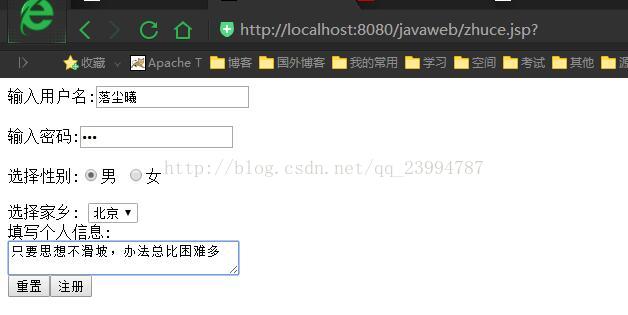
zhuce.jsp 用户注册页面
<%@ page language="java" import="java.util.*" pageEncoding="utf-8"%>
<%
String path = request.getContextPath();
String basePath = request.getScheme()+"://"+request.getServerName()+":"+request.getServerPort()+path+"/";
%>
<!DOCTYPE HTML PUBLIC "-//W3C//DTD HTML 4.01 Transitional//EN">
<html>
  <head>
    <title>My JSP 'BB.jsp' starting page</title>
  </head>
  <body >
  <form action="ZhuceServlet"method="post" style="padding-top:-700px;">
	   输入用户名:<input name="name" type="text"><br><br>
	   输入密码:<input name="pwd" type="password"><br><br>
	   选择性别:<input type="radio"name="sex"value="男"checked>男
	        <input type="radio"name="sex"value="女">女<br><br>
	   选择家乡:
	   <select name="home">
		   <option value="上海">上海</option>
		   <option value="北京" selected>北京</option>
		   <option value="纽约">纽约</option>
   		</select><br>
               填写个人信息:<br>
	   <textarea name="info" row="5"cols="30"></textarea><br>
	   <input type="reset"value="重置"><input type="submit"value="注册">
   </form>
  </body>
</html>
index.jsp 失败页面
<%@ page language="java" import="java.util.*" pageEncoding="UTF-8"%>
<%
String path = request.getContextPath();
String basePath = request.getScheme()+"://"+request.getServerName()+":"+request.getServerPort()+path+"/";
%>
<!DOCTYPE HTML PUBLIC "-//W3C//DTD HTML 4.01 Transitional//EN">
<html>
  <head>
    <title>My JSP 'index.jsp' starting page</title>
  </head>
  <body>
    		<h1>失敗</h1>
  </body>
</html>
success.jsp 成功页面
${xiaoxi}为EL表达式 获取request域中的键名为xiaoxi的值
<%@ page language="java" import="java.util.*" pageEncoding="utf-8"%>
<%
String path = request.getContextPath();
String basePath = request.getScheme()+"://"+request.getServerName()+":"+request.getServerPort()+path+"/";
%>

<!DOCTYPE HTML PUBLIC "-//W3C//DTD HTML 4.01 Transitional//EN">
<html>
  <head>
    <title>My JSP 'success.jsp' starting page</title>
  </head>
  <body>
			${xiaoxi} <br>
			<a href="Searchall">查看所有用户</a>
  </body>
</html>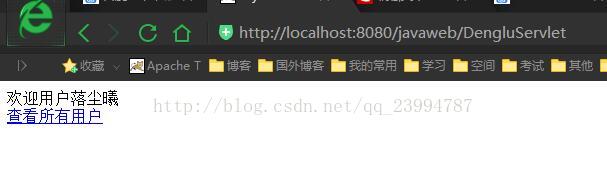
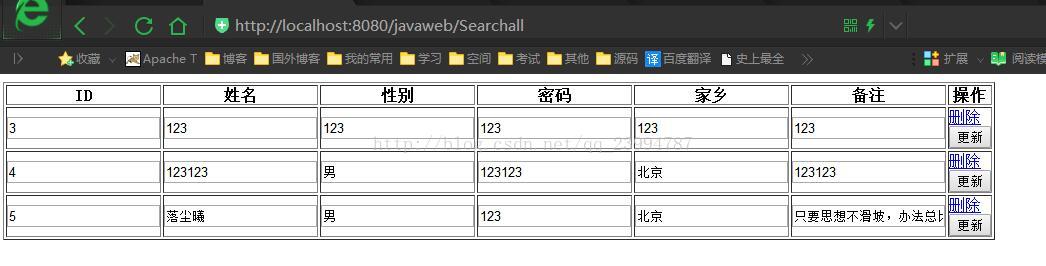
showall.jsp 展现所有用户页面
页面使用的到JSTL表达式 即c标签。使用c标签需要引入头文件<%@ taglib prefix="c" uri="http://java.sun.com/jsp/jstl/core"%> 。
需要注意的的是El标签配合JSTl标签的使用,<c:forEach var="U" items="${userAll}" > 例子foeEach标签的遍历内容即为EL表达式获取的${userAll}
而且当指定别名后var="U" ,别名可以随便起,为了方便一般是小写类名命名。
C标签内遍历的属性也是需要用${ }获取。此时别名U即为当前集合中的User对象,想得到属性只需要用 ${ U.属性名 } 即可
<%@ page language="java" import="java.util.*" pageEncoding="UTF-8"%>
<%@ taglib prefix="c" uri="http://java.sun.com/jsp/jstl/core"%>
<%
String path = request.getContextPath();
String basePath = request.getScheme()+"://"+request.getServerName()+":"+request.getServerPort()+path+"/";
%>

<!DOCTYPE HTML PUBLIC "-//W3C//DTD HTML 4.01 Transitional//EN">
<html>
  <head>
    <base href="<%=basePath%>">
    <title>所有用户页面</title>
  </head>

  <body>
  <h1>${xiaoxi}</h1>
  <table  width="600" border="1" cellpadding="0" >
  		<tr>
  			<th>ID</th>
	  		<th>姓名</th>
	  		<th>性别</th>
	  		<th>密码</th>
	  		<th>家乡</th>
	  		<th>备注</th>
	  		<th>操作</th>
  		</tr>
     <c:forEach var="U" items="${userAll}"  >
      <form action="UpdateServlet" method="post">
       <tr>
	       <td><input type="text" value="${U.id}" name="id" ></td>
	       <td><input type="text" value="${U.name}" name="name"></td>
	       <td><input type="text" value="${U.sex}" name="sex"></td>
	       <td><input type="text" value="${U.pwd}" name="pwd"></td>
	       <td><input type="text" value="${U.home}" name="home"></td>
	       <td><input type="text" value="${U.info}" name="info"></td>
	       <td><a href="DeleteServlet?id=${U.id}">删除</a>  <input type="submit" value="更新"/></td>
	   </tr>
    </form>
    </c:forEach>
    </table>
  </body>
</html>
项目结构
最后要说的话
1.编程不是看会的,是敲会的。只要敲敲敲,才可以深刻的记忆,当然这只能称之为会用,之后深入了解其实现原理才能将其吸收融会贯通。
2.要养成良好的代码习惯,整洁干净,命名规范,以及详细的注释。这对帮助你成长都大有裨益。
3.要阅读大牛写的代码,一个人的力量终究是有限的,经常阅读高质量的源码,无形之中就会改变我们的思路,就好比自己琢磨武功,与拥有武林秘籍者相比...
-----------附------------------2018.8.12-------------------------------------------------------
该文是我几年前进行编辑的一篇文章,其中不乏出现一些不规整的错误,比如命名规范,代码冗余等,可能对于一些小伙伴们来说造成了一些困扰,不过相对来说,本文在一定程度上对javaweb的入门还是具有一定程度上的帮助。但是作为一名严谨的Java开发工程师(码猿)为了大家不再入门时就走弯路,顾我决定重新讲解javaweb方面的知识与内容,并以企业开发规范为标准来实现一个基于javaweb的小系统给大家进行参考。系统开发以完成后续我会整理发布到我的博客中。