JZTXT
  • 首页
  • Ai
  • Java
  • Python
  • Android
  • Mysql
  • JavaScript
  • Html
  • CSS

Keil5 打开 Debug ST-Link 卡死闪退

发布时间 2023-04-01 20:47:22作者: Himmelbleu

点击 Download 烧录程序或者打开魔法棒 Debug ST-Link 都出现了 Keil5 卡死闪退问题。

  1. 确保目录是全英文;
  2. 确保电脑上有 ST-Link 驱动;

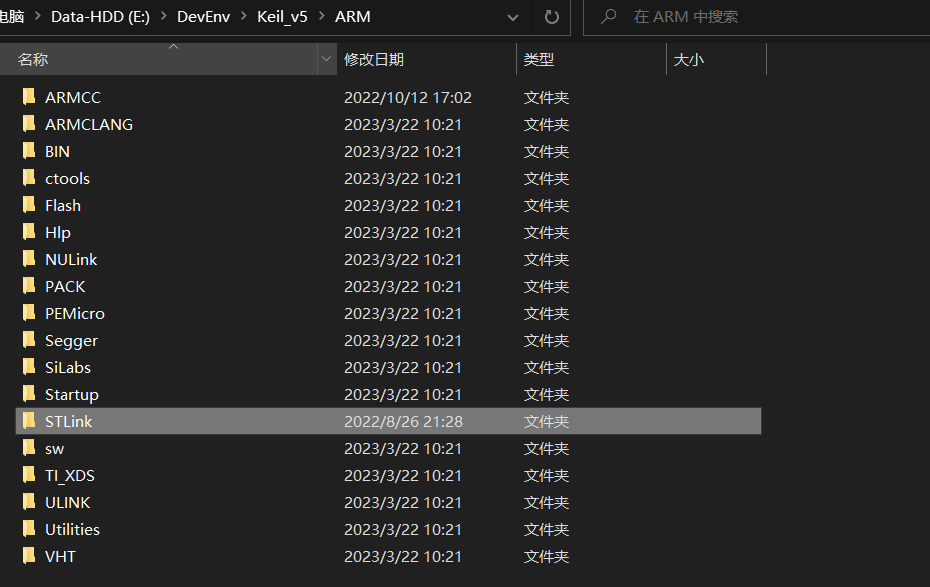
如果以上都没有问题,可能 Keil 5.38 ST-Link 的版本可能与你安装的驱动版本不一致。请重新安装 ST-Link 驱动程序,并替换 Keil 5.38 根目录下的 STLink 文件夹(所有文件):

  1. ST-Link 驱动程序:ST-Link.zip
  2. 替换 Keil5 根目录下的 STLink 文件:STLink.7z

把 STLink.7z 压缩到 ARM 文件夹,替换 STLink 文件夹所有内容

    本栏目推荐文章
  • mysql发生连接异常Cause: com.mysql.jdbc.exceptions.jdbc4.CommunicationsException: Communications link failure
  • One Dynamics One Platform : Analytics - Delta Lake Synapse Link
  • IntelliJ IDEA Debug模式下结束后继续执行代码问题
  • 工程从keil移植到cube ide 无法进入stop mode的问题
  • IDEA Debug 调试技巧(基础版)
  • 解决mac arm 中 goland 无法 debug 问题
  • 报错 To run and debug the Harmony device, configure the HarmonyOS runtime.
  • CC-Link IE转EthernetIP网关在造纸行业中的应用
  • Jax框架 —— 如何在没有GPU和TPU的设备上debug代码 —— 在CPU上使用GPU仿真设置 —— Jax框架在多卡设备上的自动并行特性的仿真体验
  • 鸿蒙开发 ERROR: Failed to find the incremental input file: C:\Users\admin\.ohos\config\auto_debug_MyApplication2_com.example.myapplication2_2850086000448618441.cer.
版权声明:本网站为非赢利性站点,本网站所有内容均来源于互联网相关站点自动搜索采集信息,相关链接已经注明来源。
联系我们