Linux shell command ln All In One
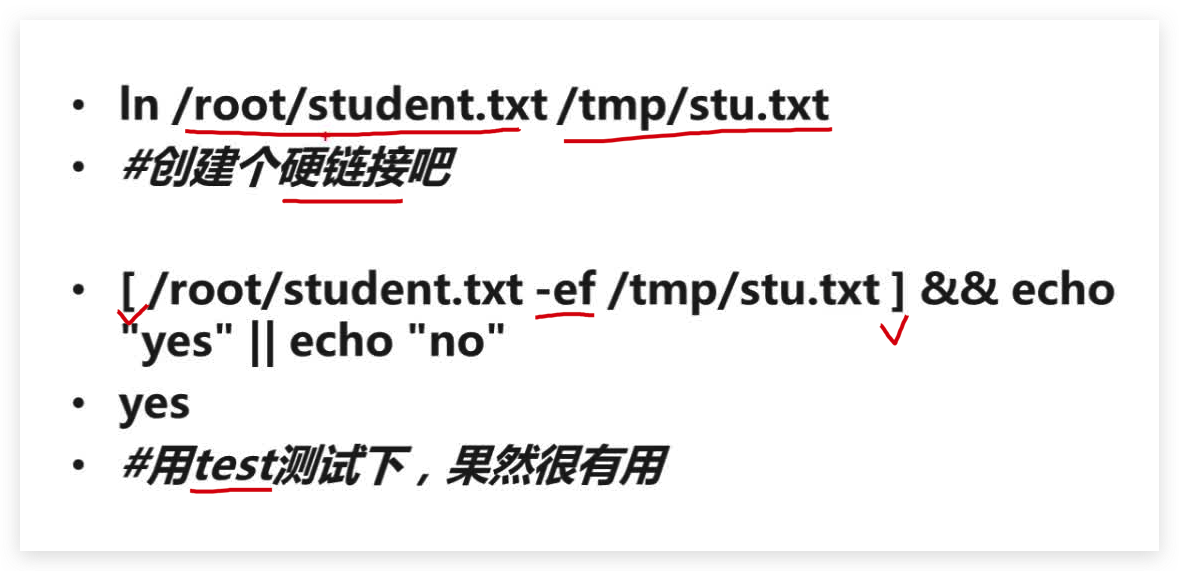
硬连接 vs 软连接
ln
$ man ln > ./man-docs/ln.md
$ cat ./man-docs/ln.md
$ man ln > ./man-docs/ln.md
$ cat ./man-docs/ln.md
LN(1)                                             User Commands                                            LN(1)

NAME
       ln - make links between files

SYNOPSIS
       ln [OPTION]... [-T] TARGET LINK_NAME
       ln [OPTION]... TARGET
       ln [OPTION]... TARGET... DIRECTORY
       ln [OPTION]... -t DIRECTORY TARGET...

DESCRIPTION
       In the 1st form, create a link to TARGET with the name LINK_NAME.  In the 2nd form, create a link to TAR‐
       GET in the current directory.  In the 3rd and 4th forms, create links to each TARGET in DIRECTORY.   Cre‐
       ate  hard  links  by  default, symbolic links with --symbolic.  By default, each destination (name of new
       link) should not already exist.  When creating hard links, each TARGET must exist.   Symbolic  links  can
       hold  arbitrary  text; if later resolved, a relative link is interpreted in relation to its parent direc‐
       tory.

       Mandatory arguments to long options are mandatory for short options too.

       --backup[=CONTROL]
              make a backup of each existing destination file

       -b     like --backup but does not accept an argument

       -d, -F, --directory
              allow the superuser to attempt to hard link directories (note: will probably fail  due  to  system
              restrictions, even for the superuser)

       -f, --force
              remove existing destination files

       -i, --interactive
              prompt whether to remove destinations

       -L, --logical
              dereference TARGETs that are symbolic links

       -n, --no-dereference
              treat LINK_NAME as a normal file if it is a symbolic link to a directory

       -P, --physical
              make hard links directly to symbolic links

       -r, --relative
              create symbolic links relative to link location

       -s, --symbolic
              make symbolic links instead of hard links

       -S, --suffix=SUFFIX
              override the usual backup suffix

       -t, --target-directory=DIRECTORY
              specify the DIRECTORY in which to create the links

       -T, --no-target-directory
              treat LINK_NAME as a normal file always

       -v, --verbose
              print name of each linked file

       --help display this help and exit

       --version
              output version information and exit

       The  backup  suffix is '~', unless set with --suffix or SIMPLE_BACKUP_SUFFIX.  The version control method
       may be selected via the --backup option or through the VERSION_CONTROL environment  variable.   Here  are
       the values:

       none, off
              never make backups (even if --backup is given)

       numbered, t
              make numbered backups

       existing, nil
              numbered if numbered backups exist, simple otherwise

       simple, never
              always make simple backups

       Using  -s  ignores  -L and -P.  Otherwise, the last option specified controls behavior when a TARGET is a
       symbolic link, defaulting to -P.

AUTHOR
       Written by Mike Parker and David MacKenzie.

REPORTING BUGS
       GNU coreutils online help: <https://www.gnu.org/software/coreutils/>
       Report any translation bugs to <https://translationproject.org/team/>

COPYRIGHT
       Copyright  ©  2020  Free  Software  Foundation,  Inc.   License  GPLv3+:  GNU  GPL  version  3  or  later
       <https://gnu.org/licenses/gpl.html>.
       This  is  free software: you are free to change and redistribute it.  There is NO WARRANTY, to the extent
       permitted by law.

SEE ALSO
       link(2), symlink(2)

       Full documentation <https://www.gnu.org/software/coreutils/ln>
       or available locally via: info '(coreutils) ln invocation'

GNU coreutils 8.32                               September 2020                                            LN(1)
demos
(? 反爬虫测试!打击盗版⚠️)如果你看到这个信息, 说明这是一篇剽窃的文章,请访问 https://www.cnblogs.com/xgqfrms/ 查看原创文章!
refs
https://www.imooc.com/video/7948
©xgqfrms 2012-2021
www.cnblogs.com/xgqfrms 发布文章使用:只允许注册用户才可以访问!
原创文章,版权所有©️xgqfrms, 禁止转载 ?️,侵权必究⚠️!