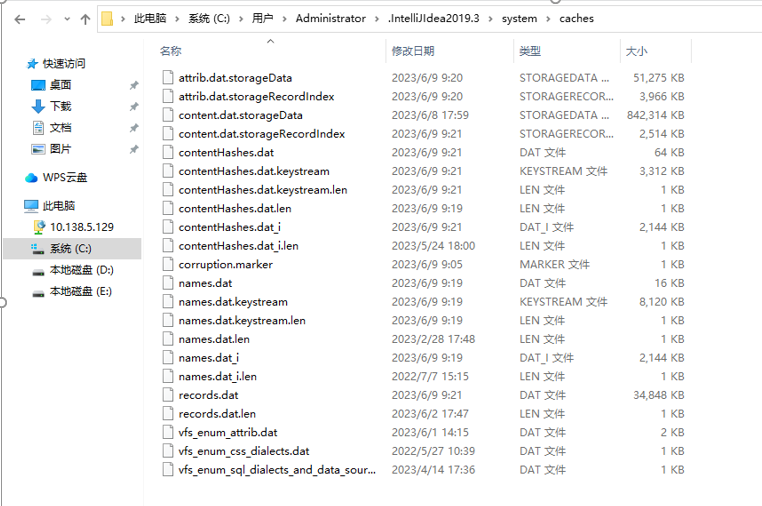
原因:IDEA没有退出就关闭了电脑, 在删除了caches的文件之后重进IDEA就没有报错了
解决方法:清空caches文件。
- 安装npm install报错npm ERR! code ETIMEDOUT npm ERR! errno ETIMEDOUT npm ERR! network request to https://registry.npmjs.org/webpack-subresource-integrity failed, reason
- 【GDKOI 2024 TG Day2】染色(set) 题解
- Solution Set【2024.1.13】
- Unity3d_Rewired官方文档翻译:要点(二):Rewired Editor->Setting、Tools
- scp 出现 subsystem request failed on channel 0 scp: Connection closed 的解决方法
- Docker 数据库连接见解异常 SQLSTATE[HY000] [2002] php_network_getaddresses: getaddrinfo failed: Try again
- dlv调试时访问不可达函数报错please use a line with a statement
- Solution Set【2024.1.11】
- cdn引入vue后报错无法识路径 Uncaught TypeError: Failed to resolve module specifier "vue". Relative references must start with either "/", "./", or "../".
- SpringBoot配置报错:Description: Failed to configure a DataSource: 'url' attribute is not specified and no embedded datasource could be configured. Reason: Failed to determine a suitable driver class
本栏目推荐文章