本文是为了使用 git 拉取和推送时,能够免密同步远程服务器
ps:
首先要有一台远程服务器
其次是远程服务器和本地,都安装了git
生成密钥
ssh-keygen参数说明
使用 ssh-keygen 生成密钥,几个主要使用的参数
-t指定加密算法-C指定密钥注释 (相当于对密钥添加一个名字)-f指定要保存的密钥文件的路径和文件名
生成密钥
ssh-keygen -t rsa -C "test@qq.com" -f ./sign/my_git_rsa
为了方便后续操作,这里的
.就是仓库所在目录
公钥复制到服务器
确认公钥鉴权
查看服务器 ssh 是否开启公钥鉴权
cat /etc/ssh/sshd_config | grep PubkeyAuthentication
出现 yes ,表示开启了公钥鉴权
PubkeyAuthentication yes
出现 no,表示未开启公钥鉴权
PubkeyAuthentication no
启用公钥鉴权
使用 root 用户编辑配置文件
vim /etc/ssh/sshd_config
输入下列内容,然后回车,搜索到该配置行,然后输入 i 进入输入模式,把 no 改成 yes 完成配置文件修改
/PubkeyAuthentication
重启 ssh 服务,使配置生效 (使用的是 centos 7 的命令)
systemctl restart sshd
复制公钥到远程服务器
在仓库目录中,打开 git bash ,使用 ssh-copy-id 复制指定密钥到远程服务器
ssh-copy-id -i ./your_path/your_publich_key user@ip_address
打开 git bash
鼠标右键
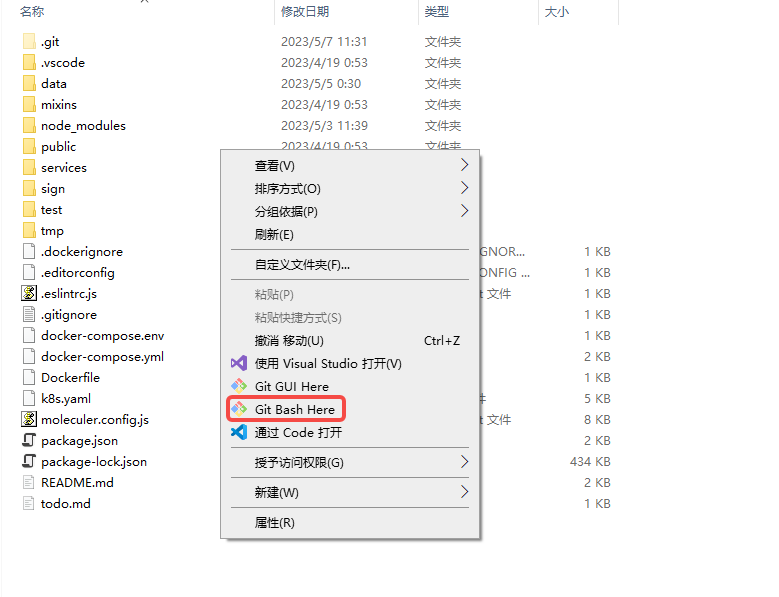
ssh-copy-id 复制指定密钥到远程服务器
ssh-copy-id -i ./sign/my_git_rsa.pub git@192.168.1.244
配置本地仓库使用的密钥
在当前仓库中,输入
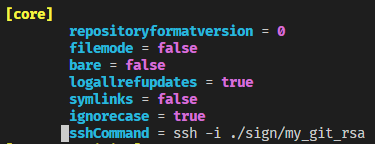
git config --local -e
进入文件后,在英文输入法下,输入 i ,进入输入模式;在 [core] 下添加一行配置(指定 git 使用的私钥)
sshCommand = ssh -i ./sign/my_git_rsa
验证公钥生效情况
在仓库目录,输入 git pull 和 git push 都可进行验证
