(一)requireJs 的整体结构:
requireJS 源码 前192行,是一些 变量的声明,工具函数的实现 以及 对 三个全局变量(requirejs,require,define)若被占用后的具体处理。
从 194行到 1674行,整整 1480行,是 实例化上下文 函数 newContext() 。
在 在req({ } ) 调用时执行 newContext函数,而且只会执行一次。
从1690行开始,便是对外API require/requirejs/define 的具体实现。
(二)简单的demo 层级。
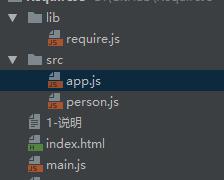
 main.js app.js person.js index.html
从index.html 中,我们看到<script data-main="main" src="lib/require.js"></script>
采用了 data-main 这样一个自定义属性,指定了入口js文件。跟着这条线,我们可以进入requireJS的大门。

(三)源码分析
  1762行会创建 默认上下文执行环境


  使用 require('person'),便是调用了这个函数。
  首次调用时,便会创建 default context,

  这是因为req() ===>  调用了 function newContext()。
  在1922行代码处,开始处理 data-main 属性值,去加载我们这里的main.js文件。

 1 //Look for a data-main script attribute, which could also adjust the baseUrl.
 2     /**
 3      * 判断是否在浏览器中运行(requireJS不止用在浏览器中)
 4      * */
 5     if (isBrowser && !cfg.skipDataMain) {
 6         //Figure out baseUrl. Get it from the script tag with require.js in it.
 7         /**
 8         * 通过 document.getElementsByTagName('script') 拿到所有 script 的标签集合(HTMLCollection)
 9         * */
10         eachReverse(scripts(), function (script) {
11
12             /**然后使用 eachRevers() 倒序 script 里面的内容
13              * head = 如果不存在 base标签 ? head 标签元素 : base.parentNode
14              * 如果head不存在,拿到script里面的父元素
15              */
16             if (!head) {
17                 head = script.parentNode;
18             }
19
20             dataMain = script.getAttribute('data-main'); /**dataMain= main.js*/
21             if (dataMain) {
22                 //Preserve dataMain in case it is a path (i.e. contains '?')
23                 mainScript = dataMain;
24
25                 //Set final baseUrl if there is not already an explicit one.
26                 if (!cfg.baseUrl) {
27                     /**
28                      * src 已经变成数组,出队列,mainScript=main.js
29                      * */
30                     src = mainScript.split('/');
31                     mainScript = src.pop();
32                     subPath = src.length ? src.join('/') + '/' : './';
33
34                     /***
35                      *  src.length=0,cfg.baseUrl='./'
36                      *  目的是与 main.js 统一目录
37                      *  */
38                     cfg.baseUrl = subPath;
39                 }
40
41                 /** 正则匹配,mainScript=main,此时去掉 .js 后缀,看起来更像是一个 module */
42                 mainScript = mainScript.replace(jsSuffixRegExp, '');
43
44                 //If mainScript is still a path, fall back to dataMain
45                 if (req.jsExtRegExp.test(mainScript)) {
46                     mainScript = dataMain;
47                 }
48
49                 /** 将主入口js文件放入 加载的配置文件列表中,将对 main.js 进行加载 ---req(cfg) */
50                 cfg.deps = cfg.deps ? cfg.deps.concat(mainScript) : [mainScript];
51
52                 return true;
53             }
54         });
55     }
经过上述代码的处理,cfg.deps值已经发生改变,已包括 main.js,接下来便要去获取 main.js中的内容,以及与它相关联的内容。
