一、shell函数
- 将命令序列按格式写在一起
- 可方便重复使用命令序列
- shell函数的定义
- 调用函数的方法
注意事项
-
直接写 函数中调用函数 直接写函数名
-
同名函数 后一个生效
-
调用函数一定要先定义
-
只要先定义了调用的 其他函数定义顺序无关
1.1函数的定义
三种定义方法
###方法1
function 函数名{
  命令序列
}

##例子
[root@localhost /]#function test { hostname;hostname -I; }
[root@localhost /]#test
localhost.localdomain
192.168.174.102 192.168.122.1
###方法2
函数名(){
  命令序列
}

##例子
[root@localhost /]#test1 (){ hostname;hostname -I; }
[root@localhost /]#test1
localhost.localdomain
192.168.174.102 192.168.122.1
###方法3
function 函数名(){
  命令序列
}

##例子
[root@localhost ~]#function test2 () { ls; cd /opt;}
[root@localhost ~]#test2
anaconda-ks.cfg  initial-setup-ks.cfg  公共  模板  视频  图片  文档  下载  音乐  桌面
[root@localhost opt]#
使用return或exit可以显式地结束函数
help declare
declare -F #查看系统中已经定义的函数名
declare -f #查看系统中已经定义的函数及函数内容
unset 函数名 #删除函数
判断系统函数
[root@localhost opt]#vim jb.sh

[root@localhost opt]#cat jb.sh
#!/bin/bash

os(){
 if grep -qi 'centos' /etc/os-release
 then
 echo "centos"
 elif grep -qi 'centos' /etc/os-release
 then
 echo "ubuntu"
 else
 echo "this system not support"
 fi
}

os

if [ `os` = centos ]
then
yum install httpd -y
elif [ `os` = ubuntu ]
then
apt install apache2 -y
else
echo "no support"
fi

#执行脚本
[root@localhost opt]#bash jb.sh
centos
已加载插件:fastestmirror, langpacks
已安装:
  httpd.x86_64 0:2.4.6-99.el7.centos.1

作为依赖被安装:
  httpd-tools.x86_64 0:2.4.6-99.el7.centos.1            mailcap.noarch 0:2.1.41-2.el7

完毕!


#传给另外一台服务器使用该脚本函数
[root@localhost opt]#scp jb.sh 192.168.174.100:/opt/
The authenticity of host '192.168.174.100 (192.168.174.100)' can't be established.
ECDSA key fingerprint is SHA256:zt5hRECDzjZzQjMgJS/+w2geN0XXa+naT4TmVxfXqB8.
ECDSA key fingerprint is MD5:6a:d6:8e:e4:91:82:2c:9d:50:1c:ed:d1:47:d2:05:93.
Are you sure you want to continue connecting (yes/no)? yes
Warning: Permanently added '192.168.174.100' (ECDSA) to the list of known hosts.
root@192.168.174.100's password:
jb.sh                                                         100%  313    82.0KB/s   00:00
###直接调用func方法
[root@localhost ~]#vim func
[root@localhost ~]#cat func
os(){
 if grep -qi 'centos' /etc/os-release
 then
 echo "centos"
 elif grep -qi 'centos' /etc/os-release
 then
 echo "ubuntu"
 else
 echo "this system not support"
 fi
}
[root@localhost ~]#. func
[root@localhost ~]#os
centos

###在别的脚本中使用
[root@localhost ~]#vim test.sh
[root@localhost ~]#bash test.sh
centos
[root@localhost ~]#vim test.sh
[root@localhost ~]#cat test.sh
#!/bin/bash
. /root/func

os
[root@localhost ~]#bash test.sh
centos
###调用位置
[root@localhost opt]#vim test1.sh
[root@localhost opt]#cat test1.sh
#!/bin/bash
h () {

echo "hello"

}
nihao () {
echo `h`  `w`

}

w () {
echo "world"
}

nihao

[root@localhost opt]#bash test1.sh
hello world
[root@localhost opt]#bash -x test1.sh
+ nihao
++ h
++ echo hello
++ w
++ echo world
+ echo hello world
hello world
###同名函数调用后面的
[root@localhost opt]#vim test1.sh
[root@localhost opt]#cat test1.sh
#!/bin/bash
h () {

echo "hello"

}
nihao () {
echo `h`  `w`

}

w () {
echo "world"
}

w () {
echo "China"
}

nihao

[root@localhost opt]#bash test1.sh
hello China
[root@localhost opt]#bash -x test1.sh
+ nihao
++ h
++ echo hello
++ w
++ echo China
+ echo hello China
hello China
[root@localhost ~]#echo -e "\E[1;31m123\E[0m123"
123123

[root@localhost ~]#vim func
[root@localhost ~]#cat func
color () {
RED="echo -e \E[31m"
GREEN="echo -e \E[32m"
END="\E[0m"
}
[root@localhost ~]#. func
[root@localhost ~]#color
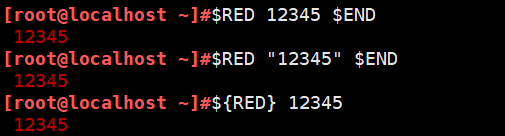
[root@localhost ~]#$RED 12345 $END
 12345
[root@localhost ~]#$RED "12345" $END
 12345
[root@localhost ~]#${RED} 12345
 12345
[root@localhost ~]#rpm -e httpd
[root@localhost ~]#vim function.sh
[root@localhost ~]#cat function.sh
#!/bin/bash
. /root/func

os

if [ `os` = centos ]
then
yum install httpd -y
elif [ `os` = ubuntu ]
then
apt install apache2 -y
else
echo "no support"
fi

color
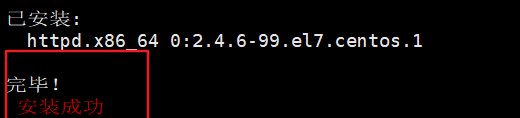
$RED 安装成功 $END

[root@localhost ~]#bash function.sh
centos
已加载插件:fastestmirror, langpacks

已安装:
  httpd.x86_64 0:2.4.6-99.el7.centos.1

完毕!
 安装成功
[root@localhost opt]#cat test4.sh
#!/bin/bash
sum(){
	echo $1
	echo $2
}

sum $2 $1
[root@localhost opt]#bash test4.sh 1 2
2
1
###判断ip地址是否合法
函数递归
调用自己的函数
阶乘
[root@localhost opt]#vim for.sh
[root@localhost opt]#cat for.sh
#!/bin/bash
read -p "请输入你想要计算的阶乘数值(正整数)" num
sum=1
for i in `seq $num`
do
sum=$[i*sum]

done

echo $sum
[root@localhost opt]#bash for.sh
请输入你想要计算的阶乘数值(正整数)3
6
二、数组
- 普通数组
- 关联数组
###1
[root@localhost ~]#a=(10 20 30 40 50)
[root@localhost ~]#echo $a
10
[root@localhost ~]#echo ${a[*]}
10 20 30 40 50
[root@localhost ~]#echo ${a[0]}
10
[root@localhost ~]#echo ${#a[*]}
5
[root@localh


#看下标
[root@localhost ~]#echo ${!a[*]}
0 1 2 3 4
###2
[root@localhost ~]#b=( [0]=apple [1]=banana [2]=pear [3]=grape)
[root@localhost ~]#echo ${b[0]}
apple
###3
[root@localhost ~]#c="10 20 30 40 50"
[root@localhost ~]#d=$c
[root@localhost ~]#echo ${d[*]}
10 20 30 40 50
定义 数组名字=(0 1 2 3 4 5)
echo $a
for i in ${b[*]};do echo $i;done
### 随机选人
[root@localhost ~]#vim sz.sh
[root@localhost ~]#cat sz.sh
#!/bin/bash
a=( messi lionel lam neymar ronaldo  cristiano)

j=`echo $[RANDOM%6]`

n=$[j+1]

echo "选中的人是$n"
echo ${a[$j]}

[root@localhost ~]#bash sz.sh
选中的人是2
lionel
###关联数组
[root@localhost ~]#declare -A f
[root@localhost ~]#f[name]=tom
[root@localhost ~]#f[address]=China
[root@localhost ~]#echo ${f[name]}
tom
[root@localhost ~]#echo ${f[address]}
China
###切片
[root@localhost ~]#echo ${a[*]}
10 20 30 40 50
[root@localhost ~]#echo ${a[*]:2:3}
30 40 50
[root@localhost ~]#echo ${a[*]:1}
20 30 40 50
###数组替换
#${数组名[@或*]/查找字符/替换字符}
#并不会替换数组原有内容
[root@localhost ~]#echo ${b[*]}
apple banana pear grape
[root@localhost ~]#echo ${b[*]/pear/orange}
apple banana orange grape
###数组删除
###追加
[root@localhost ~]#echo ${b[*]}
apple banana pear grape
[root@localhost ~]#b[5]=orange
[root@localhost ~]#echo ${b[*]}
apple banana pear grape orange
三、冒泡
[root@localhost opt]#vim mp.sh
[root@localhost opt]#cat mp.sh
#!/bin/bash
a=( 10 50 20 30 90 40 70 60 80 100)

#取出上面的数组的最大值

max=${a[0]}

length=${#a[@]}

for ((i=0;i<$length-1;i++))
do
if [[ $max -lt ${a[$i+1]} ]]
then
max=${a[$i+1]}
fi
done
echo $max
[root@localhost opt]#bash mp.sh
100