Minicom All In One
minicom bugs / minicom errors
Minicom 2.8
# 0000000000001 ❌
$ minicom -b 115200 -o -D /dev/tty.usbmodem0000000000001

# tty ❌
$ minicom -b 115200 -o -D /dev/tty.usbmodem14601

# cu ✅
$ minicom -b 115200 -o -D /dev/cu.usbmodem14601
MicroPython REPL ✅
MicroPython
v1.19.1-994-ga4672149b on 2023-03-29;Raspberry Pi PicowithRP2040
>>> pin25 = machine.Pin(25)
>>> print("pin25 =", type(pin25))
>>> pin25 = <class 'Pin'>

>>> import time
>>> from time import sleep
>>>
>>> GPIO_PIN = 25
>>> led = machine.Pin(GPIO_PIN, machine.Pin.OUT)
>>>
>>> led.value(1)
>>> time.sleep(1)
>>> led.value(0)
>>>
>>> led.high()
>>> time.sleep(1)
>>> led.low()
>>>
MPY: soft reboot
MicroPython v1.19.1-994-ga4672149b on 2023-03-29; Raspberry Pi Pico with RP2040
Type "help()" for more information.
>>> help()
Welcome to MicroPython!

For online help please visit https://micropython.org/help/.

For access to the hardware use the 'machine' module.  RP2 specific commands
are in the 'rp2' module.

Quick overview of some objects:
  machine.Pin(pin) -- get a pin, eg machine.Pin(0)
  machine.Pin(pin, m, [p]) -- get a pin and configure it for IO mode m, pull mode p
    methods: init(..), value([v]), high(), low(), irq(handler)
  machine.ADC(pin) -- make an analog object from a pin
    methods: read_u16()
  machine.PWM(pin) -- make a PWM object from a pin
    methods: deinit(), freq([f]), duty_u16([d]), duty_ns([d])
  machine.I2C(id) -- create an I2C object (id=0,1)
    methods: readfrom(addr, buf, stop=True), writeto(addr, buf, stop=True)
             readfrom_mem(addr, memaddr, arg), writeto_mem(addr, memaddr, arg)
  machine.SPI(id, baudrate=1000000) -- create an SPI object (id=0,1)
    methods: read(nbytes, write=0x00), write(buf), write_readinto(wr_buf, rd_buf)
  machine.Timer(freq, callback) -- create a software timer object
    eg: machine.Timer(freq=1, callback=lambda t:print(t))

Pins are numbered 0-29, and 26-29 have ADC capabilities
Pin IO modes are: Pin.IN, Pin.OUT, Pin.ALT
Pin pull modes are: Pin.PULL_UP, Pin.PULL_DOWN

Useful control commands:
  CTRL-C -- interrupt a running program
  CTRL-D -- on a blank line, do a soft reset of the board
  CTRL-E -- on a blank line, enter paste mode

For further help on a specific object, type help(obj)
For a list of available modules, type help('modules')
>>>
Meta-Z for help | 115200 8N1 | NOR | Minicom 2.8 | VT102 | Offline | cu.usbmodem14601
machine
Pin
# machine.Pin(pin)
# -- get a pin, eg machine.Pin(0)

# machine.Pin(pin, m, [p])
# -- get a pin and configure it for IO mode m, pull mode p
    methods: init(..), value([v]), high(), low(), irq(handler)

# machine.Pin(pin, m, [p])
led = machine.Pin(25, machine.Pin.OUT)

# value([v])
led.value(1)
led.value(0)

# high(), low()
led.high()
led.low()

# init(..) ???
led.init()

# irq(handler) ???
def handler():
  print("function")

led.irq(handler)
ADC
PWM
I2C
minicom 无法退出 bug ❌
按 Ctrl + A 可以切换到 > 模式;但是再依次按 Z 键,X 键 也无法退出 ❓ 不好使 ❌
按 Ctrl + A 连续按两次也不好使 ❌
按 Ctrl + B 可以切换到 >>> MicroPython 的 REPL 模式;
>>> help() 可以正常使用 ✅
macOS 配置 Python 环境变量
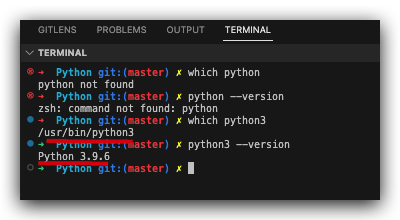
Python 3
$ which python
# python not found

$ python --version
# zsh: command not found: python
$ which python3
# /usr/bin/python3
$ python3 --version
# Python 3.9.6
Raspberry Pi 3 B
$ ssh pi@192.168.18.135
pi@192.168.18.135's password:
Linux raspberrypi 4.19.118-v7+ #1311 SMP Mon Apr 27 14:21:24 BST 2020 armv7l

The programs included with the Debian GNU/Linux system are free software;
the exact distribution terms for each program are described in the
individual files in /usr/share/doc/*/copyright.

Debian GNU/Linux comes with ABSOLUTELY NO WARRANTY, to the extent
permitted by applicable law.
Last login: Wed Mar 29 00:18:23 2023 from 192.168.18.195

SSH is enabled and the default password for the 'pi' user has not been changed.
This is a security risk - please login as the 'pi' user and type 'passwd' to set a new password.
$ python --version
Python 2.7.16

# ip, wlan0 ??? grep
$ ifconfig
nvm
$ curl -o- https://raw.githubusercontent.com/nvm-sh/nvm/v0.39.3/install.sh | bash
#  port 443: 拒绝连接

$ sudo vim /etc/hosts
$ cat /etc/hosts
127.0.0.1	localhost
::1		localhost ip6-localhost ip6-loopback
ff02::1		ip6-allnodes
ff02::2		ip6-allrouters

127.0.1.1		raspberrypi

# github
185.199.108.133 raw.githubusercontent.com
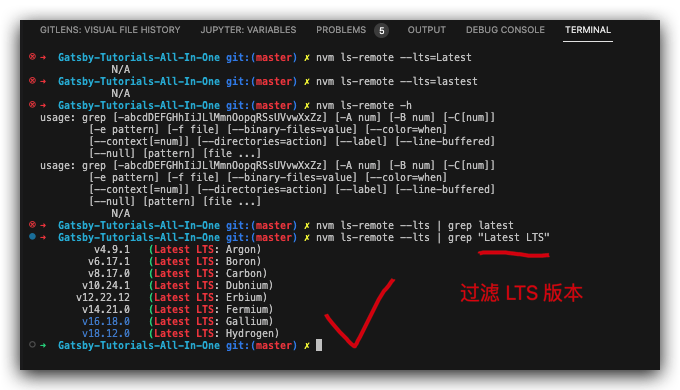
https://www.cnblogs.com/xgqfrms/p/16852071.html#5163462
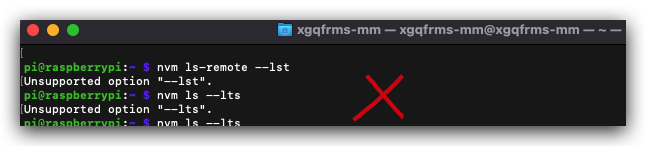
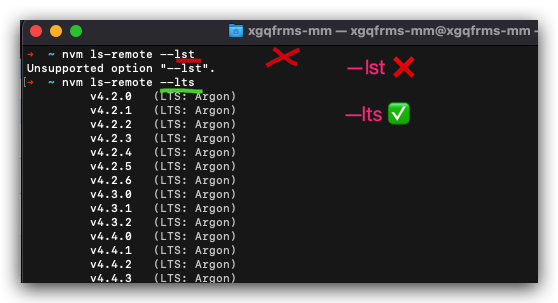
# ✅ ---lts !== --lst ❌
$ nvm ls-remote --lst
zh-Hans
# 中文输入法 设置成功

\`\`\`sh
# 1. 更新
$ sudo apt-get update

# 2. 安装中文输入法 chinese input
$ sudo apt-get install scim-pinyin

# 3. 重启系统
$ sudo reboot
# 或者
$ sudo shutdown -r now

# sudo apt-get install fcitx fcitx-googlepinyin fcitx-module-cloudpinyin fcitx-sunpinyin

\`\`\`

切换中英文输入法方式

1. Shift
2. Ctrl + Space

https://blog.csdn.net/u012313335/article/details/53519302

截图 ?

\`\`\`sh

sudo shutdown -r +1 "一分钟后重启系统"

\`\`\`


## emoji bug

 ✅
?? China flag

https://www.emojicopy.com/
(? 反爬虫测试!打击盗版⚠️)如果你看到这个信息, 说明这是一篇剽窃的文章,请访问 https://www.cnblogs.com/xgqfrms/ 查看原创文章!
refs
©xgqfrms 2012-2021
www.cnblogs.com/xgqfrms 发布文章使用:只允许注册用户才可以访问!
原创文章,版权所有©️xgqfrms, 禁止转载 ?️,侵权必究⚠️!