下载资源:https://dev.mysql.com/downloads/

下载安装包:

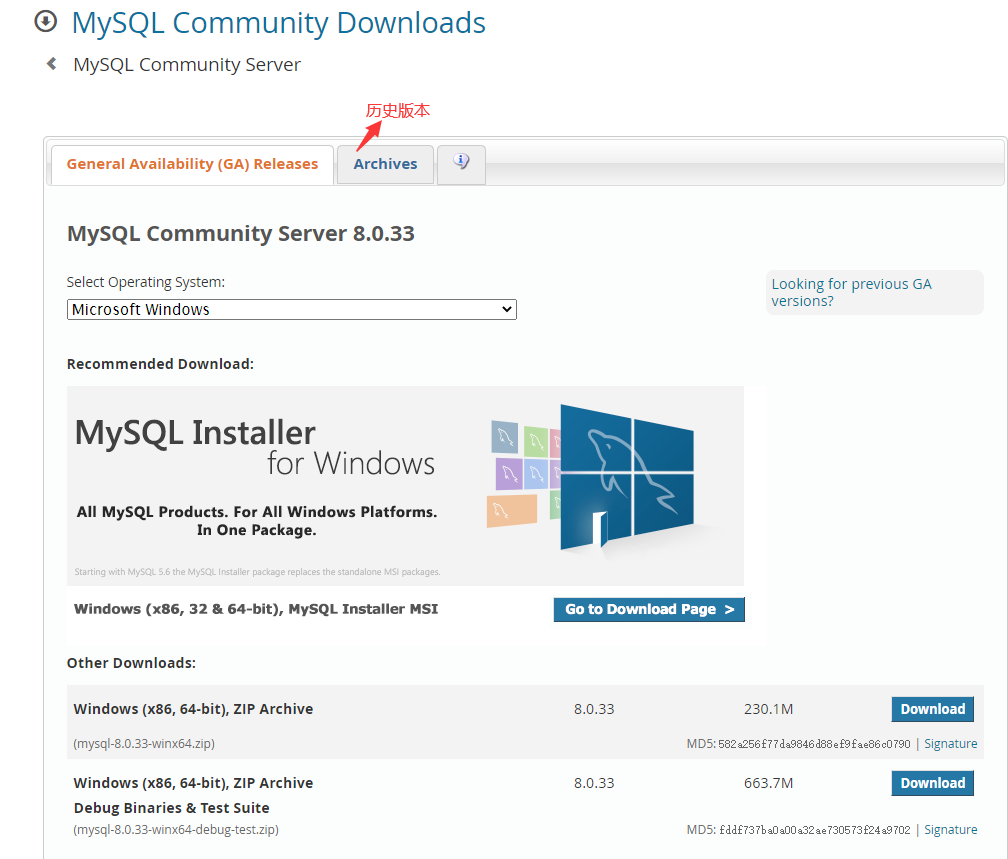
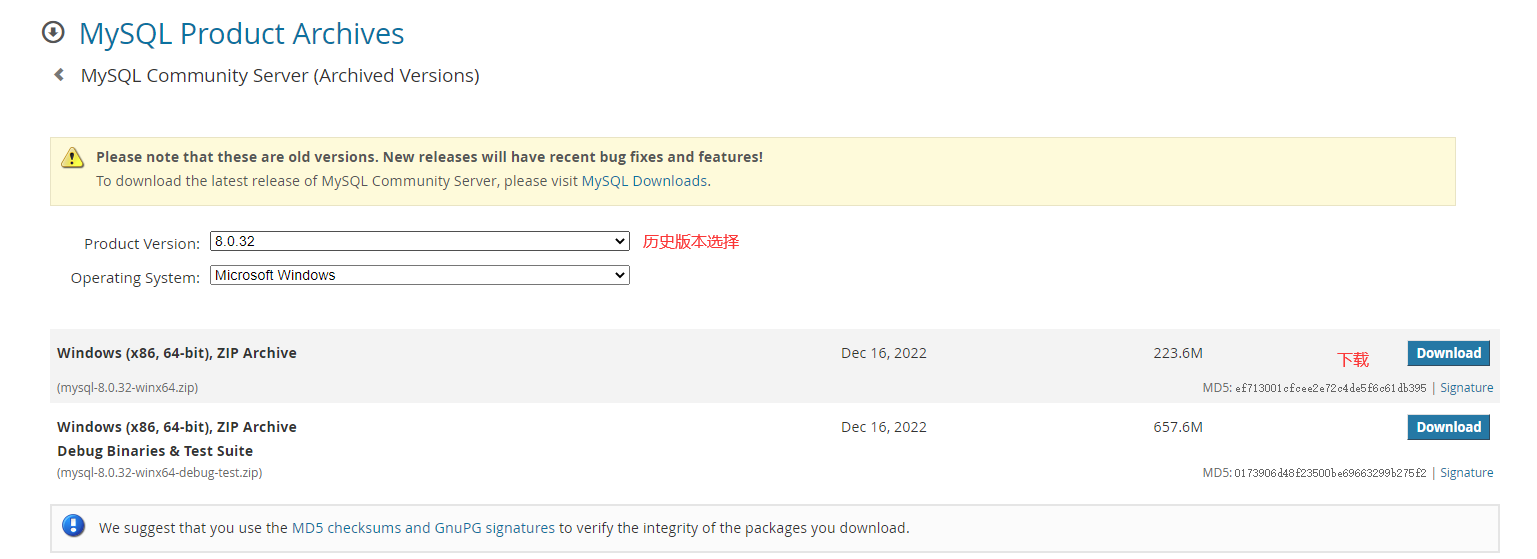
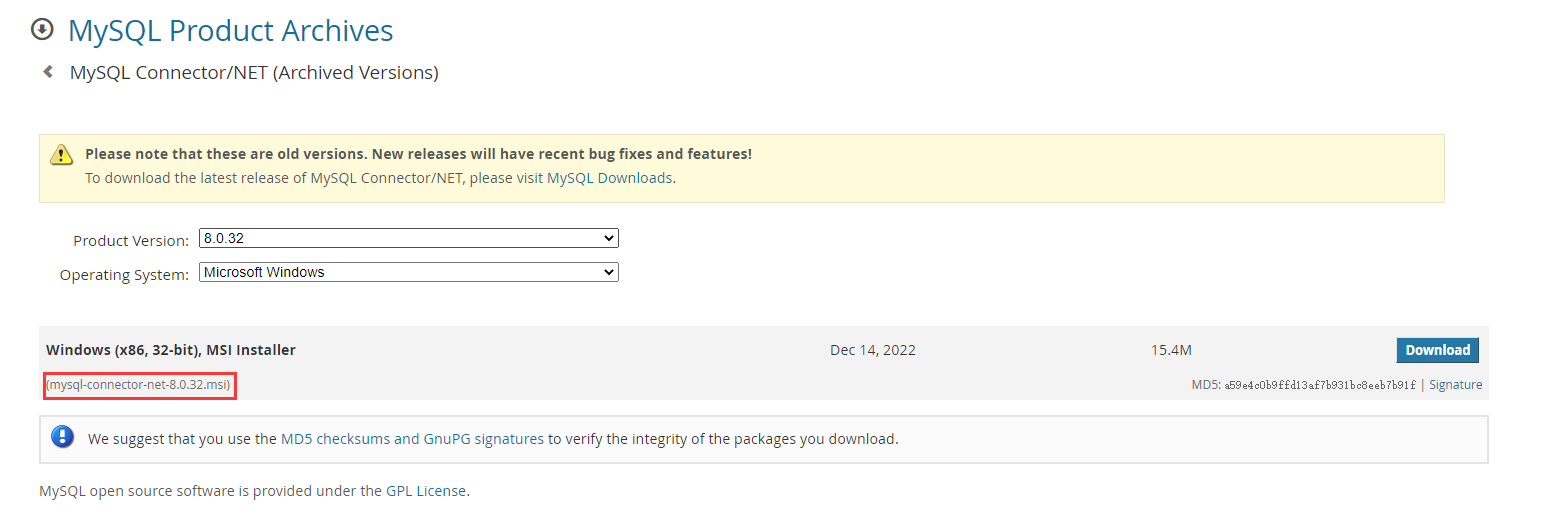

安装步骤
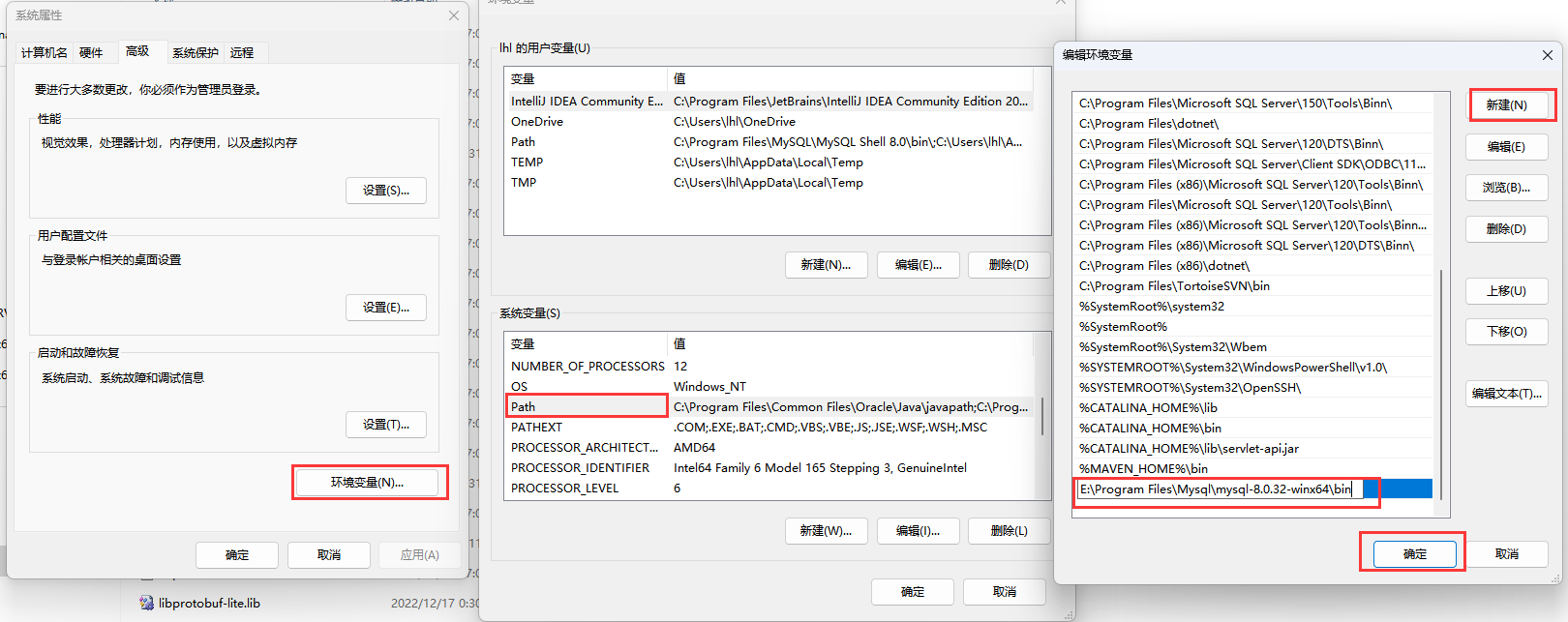
1.环境变量
path 中加入 解压后的MySQL文件目录至bin目录
2.添加 my.ini文件
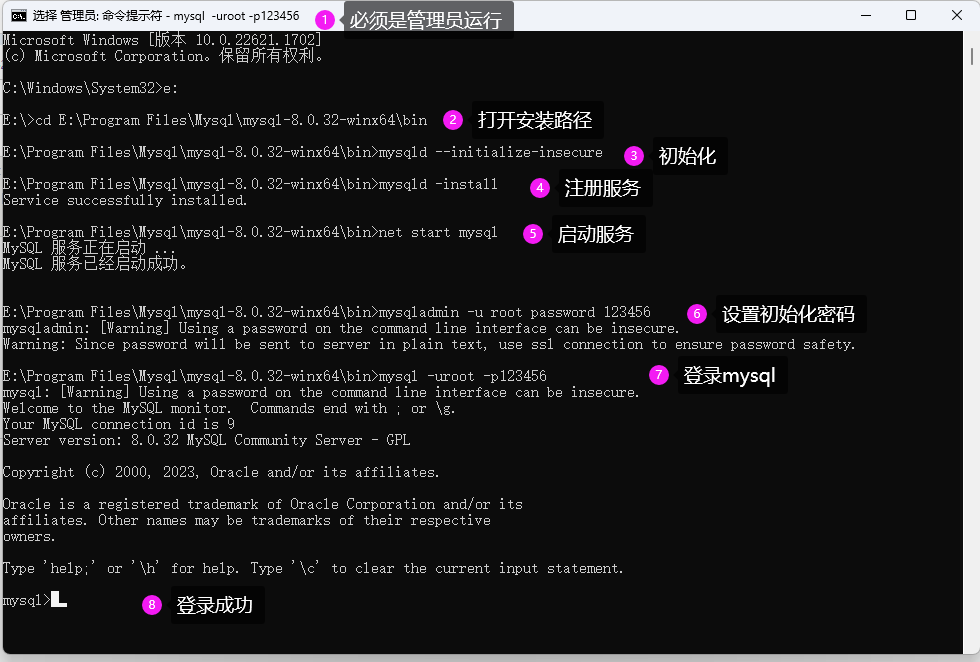
CMD 》管理员运行 》 cd 安装包路径
3.初始化
mysqld --initialize-insecure
4.注册MySQL服务
mysqld -install
5.启动MySQL服务
net start mysql
6.修改默认账户密码
mysqladmin -u root password 123456

7.登录MySQL
mysql -uroot -p123456
1. 将下载的免安装包解压到系统,同时添加my.ini文件
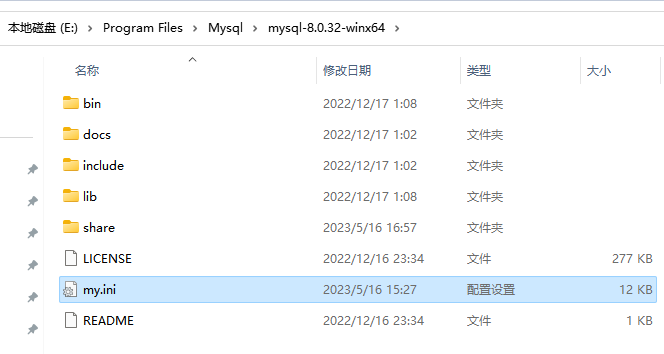
1.环境变量
path 中加入 解压后的MySQL文件目录至bin目录
2.添加 my.ini文件
 [mysql]

# 设置mysql客户端默认字符集
# default-character-set=utf8
[mysqld]


#feedback=off


#设置3306端口
port = 3306

# 设置mysql的安装目录
basedir=E:\Program Files\Mysql\mysql-8.0.32-winx64

# 设置数据库文件存放目录
datadir=E:\Program Files\Mysql\mysql-8.0.32-winx64\Data

# Secure File Priv.
# secure-file-priv=D:\Program Files\MySql\MySQL Server 8.0_P/Uploads

# 允许最大连接数
max_connections=200
# 服务端使用的字符集默认为8比特编码的latin1字符集
# character-set-server=utf8
# 创建新表时将使用的默认存储引擎
default-storage-engine=INNODB


 # The default character set that will be used when a new schema or table is
# created and no character set is defined
# character-set-server=

# The default authentication plugin to be used when connecting to the server
default_authentication_plugin=mysql_native_password

# The default storage engine that will be used when create new tables when
default-storage-engine=INNODB

# Set the SQL mode to strict
sql-mode="STRICT_TRANS_TABLES,NO_ENGINE_SUBSTITUTION"

# 日志.
log-output=FILE
general-log=0
general_log_file="MSL.log"
slow-query-log=1
slow_query_log_file="MSL-slow.log"
long_query_time=10

# 异常日志.
log-error="MSL.err"

# The maximum amount of concurrent sessions the MySQL server will
# allow. One of these connections will be reserved for a user with
# SUPER privileges to allow the administrator to login even if the
# connection limit has been reached.
max_connections=151

# The number of open tables for all threads. Increasing this value
# increases the number of file descriptors that mysqld requires.
# Therefore you have to make sure to set the amount of open files
# allowed to at least 4096 in the variable "open-files-limit" in
# section [mysqld_safe]
table_open_cache=256

# Maximum size for internal (in-memory) temporary tables. If a table
# grows larger than this value, it is automatically converted to disk
# based table This limitation is for a single table. There can be many
# of them.
tmp_table_size=16M

# How many threads we should keep in a cache for reuse. When a client
# disconnects, the client's threads are put in the cache if there aren't
# more than thread_cache_size threads from before.  This greatly reduces
# the amount of thread creations needed if you have a lot of new
# connections. (Normally this doesn't give a notable performance
# improvement if you have a good thread implementation.)
thread_cache_size=10

# *** MyISAM Specific options
# The maximum size of the temporary file MySQL is allowed to use while
# recreating the index (during REPAIR, ALTER TABLE or LOAD DATA INFILE.
# If the file-size would be bigger than this, the index will be created
# through the key cache (which is slower).
myisam_max_sort_file_size=100G

# If the temporary file used for fast index creation would be bigger
# than using the key cache by the amount specified here, then prefer the
# key cache method.  This is mainly used to force long character keys in
# large tables to use the slower key cache method to create the index.
myisam_sort_buffer_size=8M

# Size of the Key Buffer, used to cache index blocks for MyISAM tables.
# Do not set it larger than 30% of your available memory, as some memory
# is also required by the OS to cache rows. Even if you're not using
# MyISAM tables, you should still set it to 8-64M as it will also be
# used for internal temporary disk tables.
key_buffer_size=8M

# Size of the buffer used for doing full table scans of MyISAM tables.
# Allocated per thread, if a full scan is needed.
read_buffer_size=16M

read_rnd_buffer_size=0

# *** INNODB Specific options ***
# innodb_data_home_dir=

# Use this option if you have a MySQL server with InnoDB support enabled
# but you do not plan to use it. This will save memory and disk space
# and speed up some things.
# skip-innodb=

# If set to 1, InnoDB will flush (fsync) the transaction logs to the
# disk at each commit, which offers full ACID behavior. If you are
# willing to compromise this safety, and you are running small
# transactions, you may set this to 0 or 2 to reduce disk I/O to the
# logs. Value 0 means that the log is only written to the log file and
# the log file flushed to disk approximately once per second. Value 2
# means the log is written to the log file at each commit, but the log
# file is only flushed to disk approximately once per second.
innodb_flush_log_at_trx_commit=1

# The size of the buffer InnoDB uses for buffering log data. As soon as
# it is full, InnoDB will have to flush it to disk. As it is flushed
# once per second anyway, it does not make sense to have it very large
# (even with long transactions).
innodb_log_buffer_size=1M

# InnoDB, unlike MyISAM, uses a buffer pool to cache both indexes and
# row data. The bigger you set this the less disk I/O is needed to
# access data in tables. On a dedicated database server you may set this
# parameter up to 80% of the machine physical memory size. Do not set it
# too large, though, because competition of the physical memory may
# cause paging in the operating system.  Note that on 32bit systems you
# might be limited to 2-3.5G of user level memory per process, so do not
# set it too high.
innodb_buffer_pool_size=8M

# Size of each log file in a log group. You should set the combined size
# of log files to about 25%-100% of your buffer pool size to avoid
# unneeded buffer pool flush activity on log file overwrite. However,
# note that a larger logfile size will increase the time needed for the
# recovery process.
innodb_log_file_size=48M

# Number of threads allowed inside the InnoDB kernel. The optimal value
# depends highly on the application, hardware as well as the OS
# scheduler properties. A too high value may lead to thread thrashing.
innodb_thread_concurrency=9

# The increment size (in MB) for extending the size of an auto-extend InnoDB system tablespace file when it becomes full.
innodb_autoextend_increment=64

# The number of regions that the InnoDB buffer pool is divided into.
# For systems with buffer pools in the multi-gigabyte range, dividing the buffer pool into separate instances can improve concurrency,
# by reducing contention as different threads read and write to cached pages.
innodb_buffer_pool_instances=8

# Determines the number of threads that can enter InnoDB concurrently.
innodb_concurrency_tickets=5000

# Specifies how long in milliseconds (ms) a block inserted into the old sublist must stay there after its first access before
# it can be moved to the new sublist.
innodb_old_blocks_time=1000

# It specifies the maximum number of .ibd files that MySQL can keep open at one time. The minimum value is 10.
innodb_open_files=300

# When this variable is enabled, InnoDB updates statistics during metadata statements.
innodb_stats_on_metadata=0

# When innodb_file_per_table is enabled (the default in 5.6.6 and higher), InnoDB stores the data and indexes for each newly created table
# in a separate .ibd file, rather than in the system tablespace.
innodb_file_per_table=1

# Use the following list of values: 0 for crc32, 1 for strict_crc32, 2 for innodb, 3 for strict_innodb, 4 for none, 5 for strict_none.
innodb_checksum_algorithm=0

# The number of outstanding connection requests MySQL can have.
# This option is useful when the main MySQL thread gets many connection requests in a very short time.
# It then takes some time (although very little) for the main thread to check the connection and start a new thread.
# The back_log value indicates how many requests can be stacked during this short time before MySQL momentarily
# stops answering new requests.
# You need to increase this only if you expect a large number of connections in a short period of time.
back_log=80

# If this is set to a nonzero value, all tables are closed every flush_time seconds to free up resources and
# synchronize unflushed data to disk.
# This option is best used only on systems with minimal resources.
flush_time=0

# The minimum size of the buffer that is used for plain index scans, range index scans, and joins that do not use
# indexes and thus perform full table scans.
join_buffer_size=256K

# The maximum size of one packet or any generated or intermediate string, or any parameter sent by the
# mysql_stmt_send_long_data() C API function.
max_allowed_packet=4M

# If more than this many successive connection requests from a host are interrupted without a successful connection,
# the server blocks that host from performing further connections.
max_connect_errors=100

# Changes the number of file descriptors available to mysqld.
# You should try increasing the value of this option if mysqld gives you the error "Too many open files".
open_files_limit=4161

# If you see many sort_merge_passes per second in SHOW GLOBAL STATUS output, you can consider increasing the
# sort_buffer_size value to speed up ORDER BY or GROUP BY operations that cannot be improved with query optimization
# or improved indexing.
sort_buffer_size=256K

# The number of table definitions (from .frm files) that can be stored in the definition cache.
# If you use a large number of tables, you can create a large table definition cache to speed up opening of tables.
# The table definition cache takes less space and does not use file descriptors, unlike the normal table cache.
# The minimum and default values are both 400.
table_definition_cache=1400

# Specify the maximum size of a row-based binary log event, in bytes.
# Rows are grouped into events smaller than this size if possible. The value should be a multiple of 256.
binlog_row_event_max_size=8K

# If the value of this variable is greater than 0, a replication slave synchronizes its master.info file to disk.
# (using fdatasync()) after every sync_master_info events.
sync_master_info=10000

# If the value of this variable is greater than 0, the MySQL server synchronizes its relay log to disk.
# (using fdatasync()) after every sync_relay_log writes to the relay log.
sync_relay_log=10000

# If the value of this variable is greater than 0, a replication slave synchronizes its relay-log.info file to disk.
# (using fdatasync()) after every sync_relay_log_info transactions.
sync_relay_log_info=10000


log-bin=mysql-bin
group_concat_max_len=1024000
server-id=1
log-bin=mysql-bin

max_allowed_packet = 10M
#为设置最大的连接数
max_connections=500
#设置每用户最大的 连接数300
max_user_connections=300
#10分钟没有交互将关闭连接
wait_timeout = 600
#服务器关闭交互式连接前等待活动的秒数
interactive_timeout = 900
3.初始化
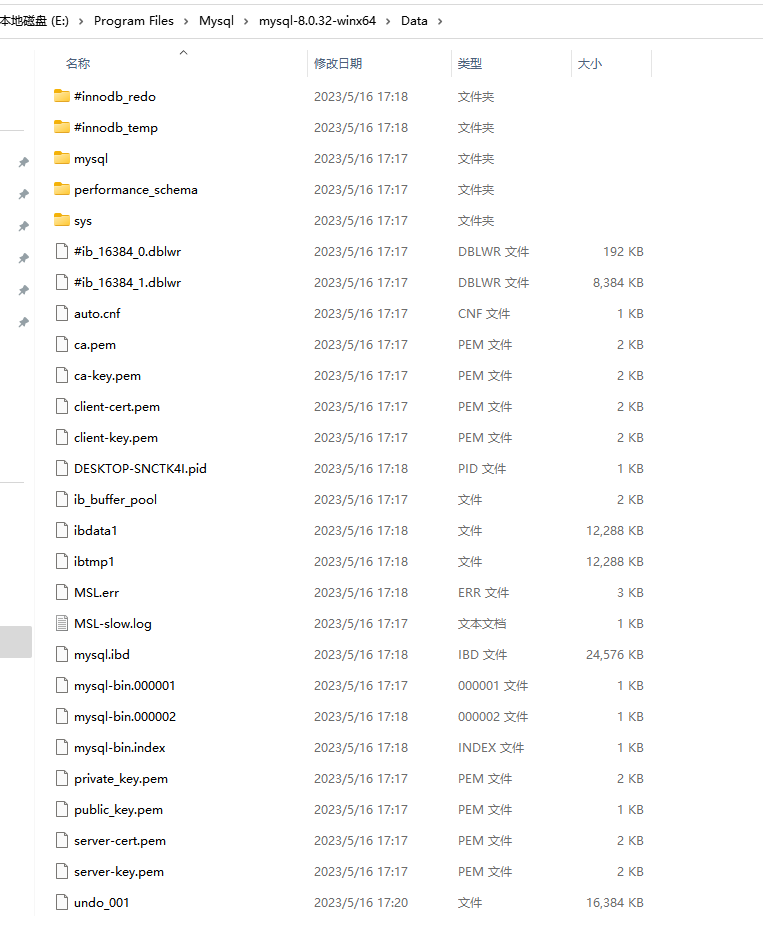
mysqld --initialize-insecure
执行成功后,会创建【datadir=E:\Program Files\Mysql\mysql-8.0.32-winx64\Data 】,并且在文件夹中生产一些文件,如图:
4.注册MySQL服务
mysqld -install
执行成功后,显示:【Service successfully installed.】
5.启动MySQL服务
net start mysql
执行成功后,显示:【MySQL 服务已经启动成功。】
6.修改默认账户密码
mysqladmin -u root password 123456
7.登录MySQL
mysql -uroot -p123456
执行成功后,显示:【mysql>】