windows版本
nginx基本命令
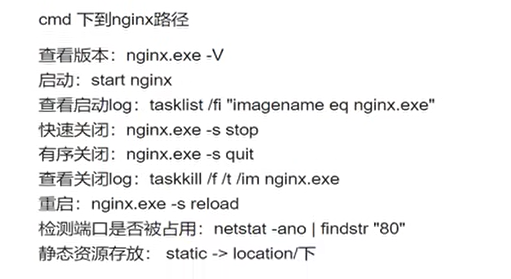
1、首先 创建vue.config.js文件:
module.exports={
    publicPath: process.env.NODE_ENV == 'production' ? './' : '/',
}
这个代码是判断你是否为开发者然后设置路径。
2、 然后运行 npm run build 打包项目,最后生成一个 dist 文件夹。
3、打开 nginx 里面重要的文件夹就2个; 一个是html放页面文件的地方,把你dist里面的复制过来就行了。
4、 还有一个是 conf 文件夹里面是放配置文件的,主要是用 nginx.conf ,里面找到 serve 这个对象,listen 80 这个是设置端口号,里面还有一个
location /{
root html;
index index.html index.htm;
}
在里面加上try_files $uri $uri/ /index.html; 用于支持在 history 模式下,运行。
root表示文件夹
5、最后还要在 serve 对象里面加一个
location /api/ {
proxy_pass http://192.168.1.91:8080/;
}
http://192.168.1.91:8080/这个就是后端的接口, 作用是在nginx 下设置代理
6、在文件夹( nginx 所在文件夹) 输入 cmd , 然后输入 start nginx 就启动了
7、然后直接浏览器输入 localhost:80 就能访问到了