第一步 获取csv格式文件
需要python爬虫的相关知识
第二步 先打印第一行观察标签
import csv
filename = 'data/sitka_weather_2014.csv'
with open(filename) as f:
    reader = csv.reader(f)
    header_row = next(reader)
    print(header_row)
['AKST', 'Max TemperatureF', 'Mean TemperatureF', 'Min TemperatureF', 'Max Dew PointF', 'MeanDew PointF', 'Min DewpointF', 'Max Humidity', ' Mean Humidity', ' Min Humidity', ' Max Sea Level PressureIn', ' Mean Sea Level PressureIn', ' Min Sea Level PressureIn', ' Max VisibilityMiles', ' Mean VisibilityMiles', ' Min VisibilityMiles', ' Max Wind SpeedMPH', ' Mean Wind SpeedMPH', ' Max Gust SpeedMPH', 'PrecipitationIn', ' CloudCover', ' Events', ' WindDirDegrees']
分析可知所需数据在每行的 【0】,【1】,【3】处
代码解释:
csv格式:一系列数据用逗号隔开保存在一个表格里
csv.reader:读取文件内容
next():读取当前行的下一行,因为是第一次调用,因此结果为csv文件的第一行
第三步:提取数据
此处以提取'Max TemperatureF'为例
import csv
filename = 'data/sitka_weather_2014.csv'
with open(filename) as f:
    reader = csv.reader(f)
    header_row = next(reader)


    highs = []
    for row in reader:
        high = int(row[1])
        highs.append(high)

print(highs)
第四步:添加datetime模块并绘制图表
import csv


from datetime import datetime

import matplotlib.pyplot as plt


filename = 'data/sitka_weather_2014.csv'
with open(filename) as f:
    reader = csv.reader(f)
    header_row = next(reader)


    dates,highs = [],[]
    for row in reader:
        current_datetime = datetime.strptime(row[0],'%Y-%m-%d')
        dates.append(current_datetime)
        high = int(row[1])
        highs.append(high)

# 绘制图形

plt.style.use('seaborn-v0_8')
fig,ax = plt.subplots()
ax.plot(dates,highs,c='red')

ax.set_title("2018年7月每日最高温度",fontsize=24)
ax.set_xlabel('',fontsize=16)
fig.autofmt_xdate()
ax.set_ylabel("温度(f)",fontsize=16)
ax.tick_params(axis = 'both',which = 'major',labelsize = 16)
plt.rcParams["font.sans-serif"]=["SimHei"]
# 设置matplotlib库字体族为非衬线字体
plt.rcParams["font.family"]="sans-serif"


plt.show()

2个大坑注意一下:
style格式中的
seaborn已经不能用了需要改为
seaborn-v0_8
如果图表标签上有中文的话,需要在ply.show()前加上
plt.rcParams["font.sans-serif"]=["SimHei"] # 设置matplotlib库字体族为非衬线字体 plt.rcParams["font.family"]="sans-serif"
代码解释:striptime:将时间数据按照指定格式规范化
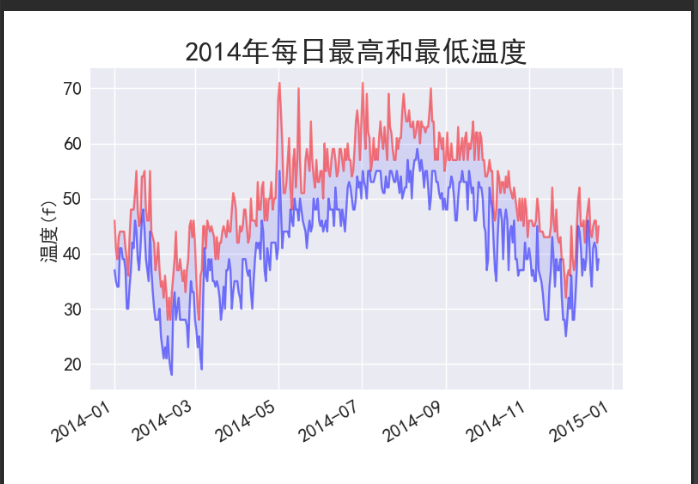
第五步:高低气温可视化
import csv


from datetime import datetime

import matplotlib.pyplot as plt


filename = 'data/sitka_weather_2014.csv'
with open(filename) as f:
    reader = csv.reader(f)
    header_row = next(reader)


    dates,highs,lows = [],[],[]
    for row in reader:
        current_datetime = datetime.strptime(row[0],'%Y-%m-%d')
        dates.append(current_datetime)
        high = int(row[1])
        highs.append(high)
        low = int(row[3])
        lows.append(low)

# 绘制图形

plt.style.use('seaborn-v0_8')
fig,ax = plt.subplots()
ax.plot(dates,highs,c='red',alpha=0.5)
ax.plot(dates,lows,c='blue',alpha=0.5)
ax.fill_between(dates,highs,lows,facecolor='blue',alpha = 0.1)

ax.set_title("2014年每日最高和最低温度",fontsize=24)
ax.set_xlabel('',fontsize=16)
fig.autofmt_xdate()
ax.set_ylabel("温度(f)",fontsize=16)
ax.tick_params(axis = 'both',which = 'major',labelsize = 16)
plt.rcParams["font.sans-serif"]=["SimHei"]
# 设置matplotlib库字体族为非衬线字体
plt.rcParams["font.family"]="sans-serif"


plt.show()