[root@gitlab ~]# cd /usr/local/
[root@gitlab local]# mkdir mongodb
在 mongodb目录下创建data目录和logs目录,以及日志文件mongodb.log的目录
[root@gitlab local]# cd mongodb/
[root@gitlab mongodb]# mkdir {data,logs}
[root@gitlab mongodb]# ls
data logs
[root@gitlab mongodb]# touch mongodb.log
将内容解压到mongodb目录下面:
tar -zxvf mongodb-linux-x86_64-rhel70-5.0.13.tgz -C /usr/local/mongodb

/etc/profile添加mongodb的环境变量:
#mongodb
export Mongo_HOME=/usr/local/mongodb
export PATH=$Mongo_HOME/bin:$PATH
添加完,source生效配置文件
vi /etc/profile
[root@gitlab mongodb]# source /etc/profile
、添加 MongoDB 配置文件
1、编辑mongodb.conf文件
[root@gitlab mongodb]# cat /etc/mongodb.conf
#指定数据库路径
dbpath=/usr/local/mongodb/data
#指定mongodb的日志路径:
logpath=/usr/local/mongodb/logs/mongodb.log
#指定写日志为追加
logappend=true
#端口号
port=27017
#方便外网访问,写成所有网段
bind_ip=0.0.0.0
fork=true #以守护进程运行mongodb,创建mongodb进程
#auth=true #启用用户验证
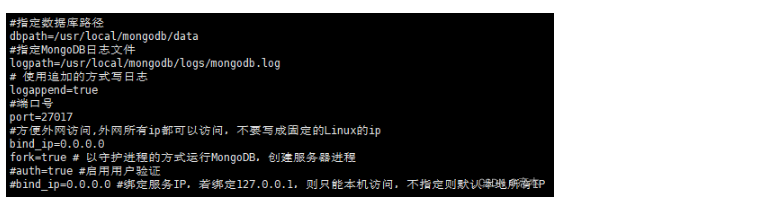
[root@gitlab mongodb]#
启动和关闭 MongoDB
[root@gitlab bin]# mongod -f /etc/mongodb.conf
about to fork child process, waiting until server is ready for connections.
forked process: 3267
child process started successfully, parent exiting
[root@gitlab bin]#
[root@gitlab bin]#
[root@gitlab bin]# pwd
/usr/local/mongodb/bin
[root@gitlab ~]# ps -ef|grep mon
dbus 750 1 0 16:28 ? 00:00:00 /usr/bin/dbus-daemon --system --address=systemd: --nofork --nopidfile --systemd-activation
root 816 1 0 16:28 ? 00:00:02 /usr/sbin/NetworkManager --no-daemon
root 3267 1 11 16:54 ? 00:00:07 mongod -f /etc/mongodb.conf
root 3457 1665 0 16:55 pts/0 00:00:00 grep --color=auto mon
[root@gitlab ~]# netstat -ntulp |grep 27017
tcp 0 0 0.0.0.0:27017 0.0.0.0:* LISTEN 3267/mongod
[root@gitlab ~]#