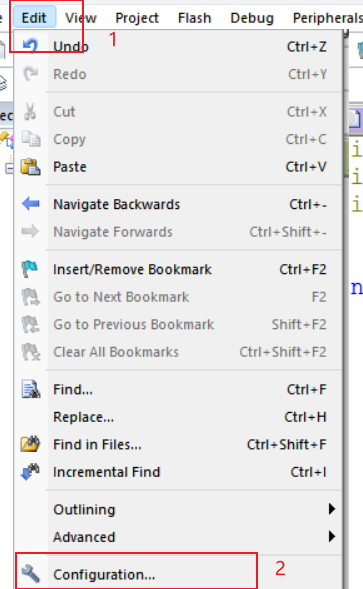
- 点击Edit打开Configuration
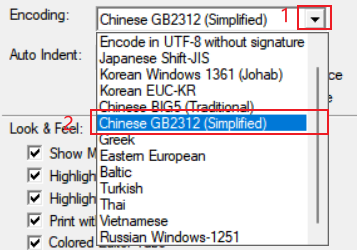
- 点击Econding右边的下拉按钮选择Chinese GB2312
- 工程从keil移植到cube ide 无法进入stop mode的问题
- keil与stc--isp软件使用
- keil 工程编译报错browse infomation of one or more files is not available: ……Doing a project rebuild might fix this.
- Keil调试STM32卡死在文件startup_stm32f10x_hd.s的B处
- 通过keil内置标准库创建stm32工程
- keil定义的数组不能太大
- KEIL 5 level3优化等级的优化
- 【Keil】解决Error: C9555E: Failed to check out a license. & 添加新的编译器
- Keil(C/C++混编)printf问题
- Keil5如何生成bin文件
本栏目推荐文章