不同网段之间数据访问需要路由信息(路由表),路由就是通往目标的路径。路由表中有三种路由:直连路由、静态路由、动态路由。
直连路由一半只要在路由器接口配上ip地址,物理与协议都是up状态就可建立,不需要网络人员维护,但是直连路由无法获取与其不直接相邻的路由信息。直连路由是所有路由协议中优先级最高的
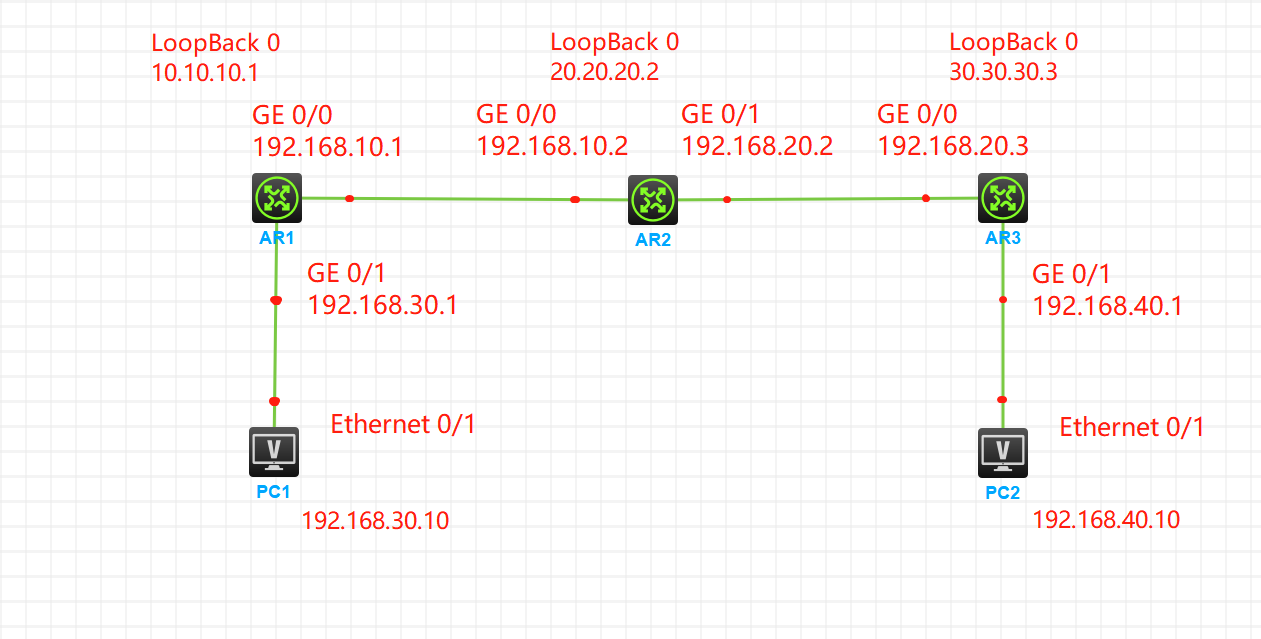
一、直连路由实际效果拓扑图
二、路由器接口ip地址基础配置
①、AR1路由器接口ip配置
<H3C>sys
System View: return to User View with Ctrl+Z.
[H3C]sysname AR1
[AR1]interface GigabitEthernet 0/0 #进入接口视图
[AR1-GigabitEthernet0/0]ip address 192.168.10.1 24 #配置ip地址
[AR1-GigabitEthernet0/0]quit
[AR1]quit
<AR1>sys
System View: return to User View with Ctrl+Z.
[AR1]interface Loo
[AR1]interface LoopBack 0 #进入环回接口视图
[AR1-LoopBack0]ip address 10.10.10.1 32 #环回接口配置ip地址
[AR1-LoopBack0]quit
[AR1]quit
<AR1>save
The current configuration will be written to the device. Are you sure? [Y/N]:Y
Please input the file name(*.cfg)[flash:/startup.cfg]
(To leave the existing filename unchanged, press the enter key):
Validating file. Please wait...
Configuration is saved to device successfully.
查看AR1接口配置信息:display ip interface brief

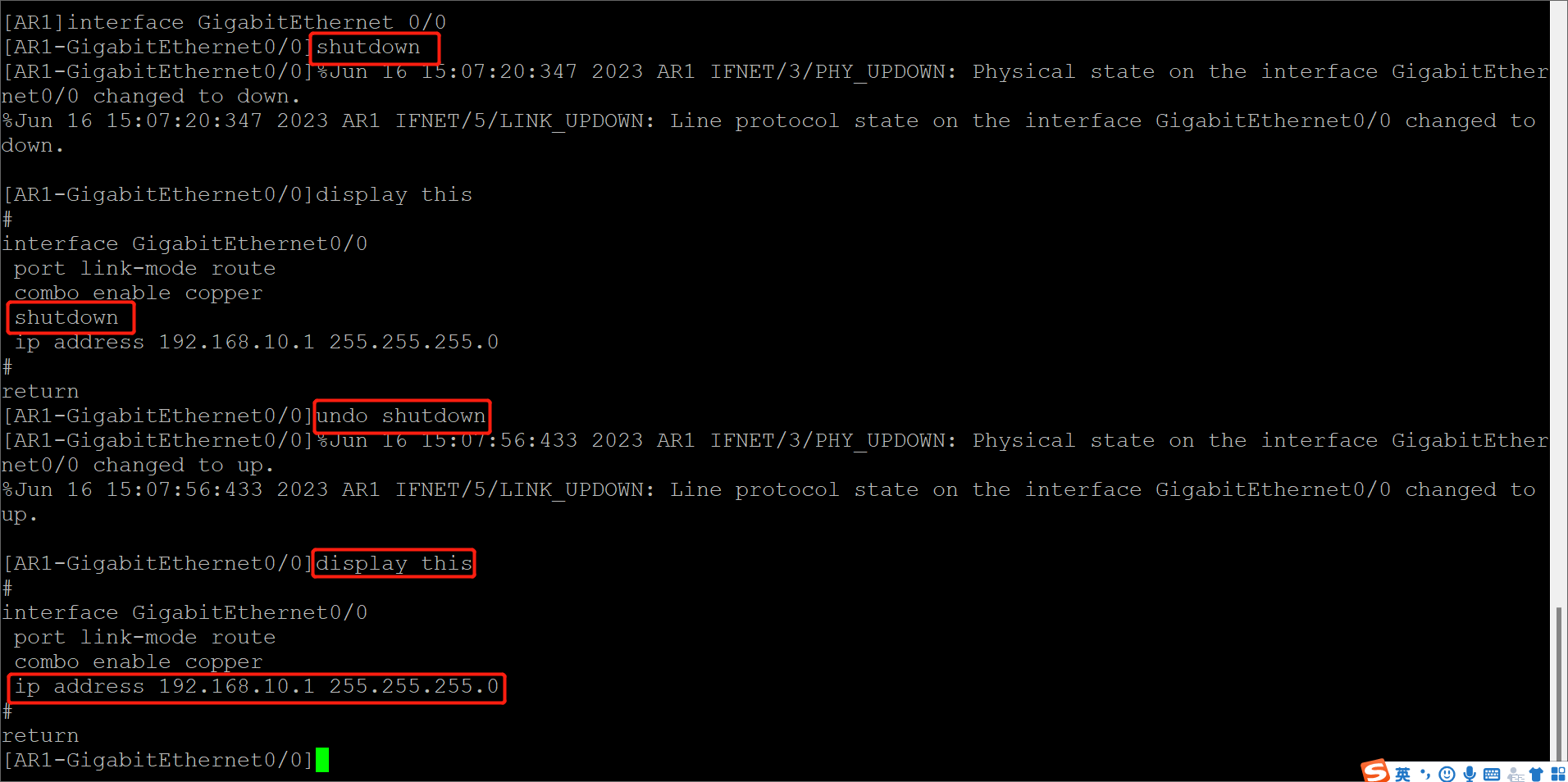
注意点:环回接口是无法手动关闭的,物理接口可以关闭。
[AR1]interface GigabitEthernet 0/0 #进入接口
[AR1-GigabitEthernet0/0]shutdown #shutdown命令关闭接口
[AR1-GigabitEthernet0/0]%Jun 16 15:07:20:347 2023 AR1 IFNET/3/PHY_UPDOWN: Physical state on the interface GigabitEthernet0/0 changed to down.
%Jun 16 15:07:20:347 2023 AR1 IFNET/5/LINK_UPDOWN: Line protocol state on the interface GigabitEthernet0/0 changed to down.

[AR1-GigabitEthernet0/0]display this
#display this 查看接口装状态显示shutdown
interface GigabitEthernet0/0
 port link-mode route
 combo enable copper
 shutdown
 ip address 192.168.10.1 255.255.255.0
#
return
[AR1-GigabitEthernet0/0]undo shutdown #重新打开接口
[AR1-GigabitEthernet0/0]%Jun 16 15:07:56:433 2023 AR1 IFNET/3/PHY_UPDOWN: Physical state on the interface GigabitEthernet0/0 changed to up.
%Jun 16 15:07:56:433 2023 AR1 IFNET/5/LINK_UPDOWN: Line protocol state on the interface GigabitEthernet0/0 changed to up.

[AR1-GigabitEthernet0/0]display this
#
interface GigabitEthernet0/0
 port link-mode route
 combo enable copper
 ip address 192.168.10.1 255.255.255.0
#
return
[AR1-GigabitEthernet0/0]
②、 AR2路由器接口ip配置
[H3C]sysname AR2
[AR2]interface GigabitEthernet 0/0
[AR2-GigabitEthernet0/0]ip address 192.168.10.2 24
[AR2-GigabitEthernet0/0]quit
[AR2]interface GigabitEthernet 0/1
[AR2-GigabitEthernet0/1]ip address 192.168.20.2 24
[AR2-GigabitEthernet0/1]quit
[AR2]interface LoopBack 0
[AR2-LoopBack0]ip address 20.20.20.2 32
[AR2-LoopBack0]quit
[AR2]quit
<AR2>save
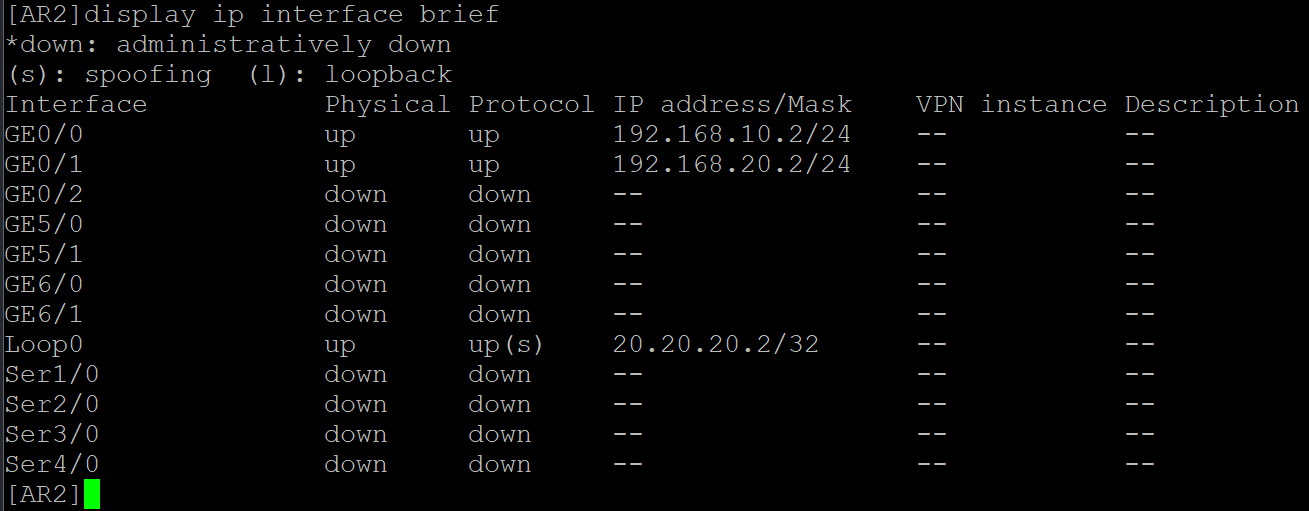
查看AR2接口配置信息
③、AR3路由器接口ip配置
[H3C]sysname AR3
[AR3]interface GigabitEthernet 0/0
[AR3-GigabitEthernet0/0]ip address 192.168.20.3 24
[AR3-GigabitEthernet0/0]quit
[AR3]interface GigabitEthernet 0/1
[AR3-GigabitEthernet0/1]ip address 192.168.40.1 24
[AR3-GigabitEthernet0/1]quit
[AR3]interface LoopBack 0
[AR3-LoopBack0]ip address 30.30.30.3 32
[AR3-LoopBack0]quit
[AR3]quit
<AR3>save
The current configuration will be written to the device. Are you sure? [Y/N]:Y
Please input the file name(*.cfg)[flash:/startup.cfg]
(To leave the existing filename unchanged, press the enter key):
Validating file. Please wait...
Configuration is saved to device successfully.
<AR3>
查看AR3接口配置信息

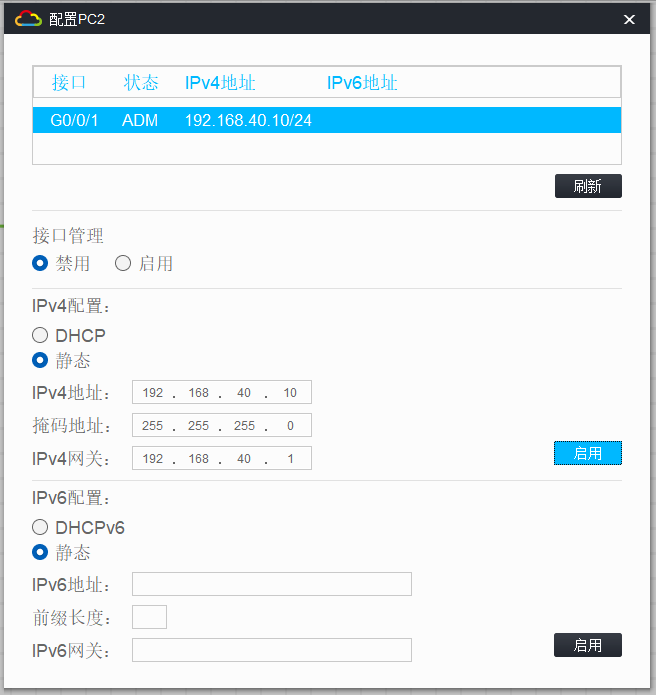
④、PC1、PC2配置