用于直接在组件中使用onLoad,onBackPress等
因为之前在写App的时候有许多弹窗,希望可以在有弹窗的时候先关闭弹窗,没有弹窗在执行返回事件,因此需要在页面onBackPress里面写很多判断,因此找了一些方法,写了可以直接在组件中调用页面生命周期的方法!
使用mixin this.$children 去循环查询子组件中是否有pageEvent(自定义的可以写其他变量)方法,如果有就执行页面中含有的方法生命周期方法
1、新建ComponentsLifeCycle.js文件
/**
 * @description 循环指定选项
 * @param {String} key 选项
 * @param {Object} param 参数
 */
const loopOptions = function(key, param = {}) {
    if (this.$children) {
        //循环子组件列表
        for (let i = 0; i < this.$children.length; i++) {
            let pageEvent = this.$children[i].$options['pageEvent'];
            //判断子组件是否有pageEvent选项
            if (pageEvent) {
                if (typeof pageEvent === 'object') {
                    if (pageEvent[key]) {
                        if (typeof pageEvent[key] === 'function') {
                            let reEv = pageEvent[key].call(this.$children[i], param);
                            //返回键判断,如果有组件返回true,阻止返回并停止循环
                            if (reEv === true) return reEv;
                        } else console.error('ComponentLifeCycle选项错误:' + key + '必须为function类型的选项\n 组件路径->' + this.$options
                        .__file);
                    }
                } else {
                    console.error('ComponentLifeCycle配置错误:pageEvent选项必须为object类型\n 组件路径->' + this.$options.__file);
                }
            }
            //递归查询深层次的组件
            let e = loopOptions.call(this.$children[i], key, param);
            if (e === true) return e;
        }
    }
}


export default {
    // 第一次触发不了,因为onshow时候组件还没加载完成
    onShow() {
        if (this.mpType === "page") loopOptions.call(this, 'onShow');
    },
    onHide() {
        if (this.mpType === "page") loopOptions.call(this, 'onHide');
    },
    onReachBottom() {
        if (this.mpType === "page") loopOptions.call(this, 'onReachBottom');
    },
    onPageScroll(e) {if (this.mpType === "page") loopOptions.call(this, 'onPageScroll', e);
    },
    onPullDownRefresh() {
        if (this.mpType === "page") loopOptions.call(this, 'onPullDownRefresh');
    },
    onBackPress(e) {
        if (this.mpType === "page") return loopOptions.call(this, 'onBackPress', e);
    },
    onReady() {
        if (this.mpType === "page") return loopOptions.call(this, 'onReady');
    },
    onResize() {
        console.log(123)
        if (this.mpType === "page") return loopOptions.call(this, 'onResize');
    },
    onTabItemTap(e) {
        if (this.mpType === "page") return loopOptions.call(this, 'onTabItemTap', e);
    }
}
2、在main.js中使用mixin混入
Nvue有时候会不触发,那么可以直接去Nvue的页面中直接引入也是可以的
import ComponentsLifeCycle from "xxx/ComponentsLifeCycle.js"

Vue.mixin(mixin);
3、这样就可以在组件中使用了
组件中使用
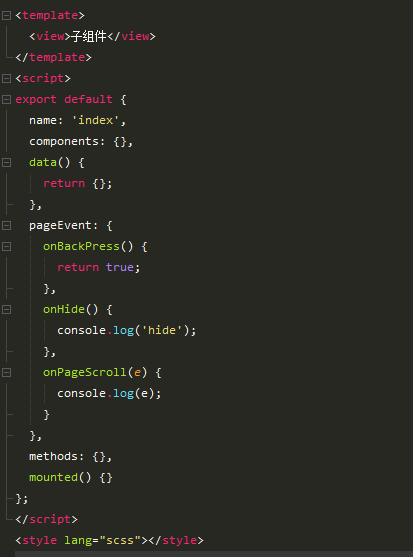
父组件需要定义一个data变量
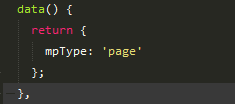
这样就可以了!