一、文档资料:
MineData开放平台:
https://minedata.cn/md-platform/login/login
MineData V2.1.0 接口文档:
http://113.108.157.29:7070/support/static/api/doc/js/v2.1.0/api-reference/index.html#map
MineData 在线实例:
http://113.108.157.29:7070/support/api/demo/js-api/zh/map/base/map-show
二、上手案例:
- 1、引入方式:
1、可以直接在打包的index.html页面写script脚本接入
<!DOCTYPE html>
<html>
<head>
  <meta charset="utf-8">
  <meta http-equiv="X-UA-Compatible" content="IE=edge,chrome=1">
  <meta name="renderer" content="webkit">
  <meta name="viewport" content="width=device-width, initial-scale=1, maximum-scale=1, user-scalable=no">
  <title>projectName</title>
  <script type="text/javascript" src="static/config.js"></script>
  <!-- 引入MineMap API插件 -->
  <link rel="stylesheet" href="http://minedata.cn/minemapapi/v2.1.1/minemap.css">
  <script src="http://minedata.cn/minemapapi/v2.1.1/minemap.js"></script>
</head>
<body style="background: #f5f7f8">
<div id="app"></div>
</body>
</html>
2、或者在Vue编写动态接入的方法 import-js.js
import axios from 'axios'

const loadJs = src => {
  return new Promise((resolve, reject) => {
    const script = document.createElement('script')
    script.type = 'text/javascript'
    script.src = src
    document.body.appendChild(script)

    script.onload = () => {
      resolve(script)
    }
    script.onerror = err => {
      console.log(`loadJsFail: ${err}`)
      reject()
    }
  })
}

const loadCss = src => {
  return new Promise((resolve, reject) => {
    axios.get(src).then(res => {
      const css = document.createElement('style')
      css.type = 'text/css'
      css.innerHTML = res.data
      document.head.appendChild(css)
      resolve(css)
    }).catch(err => {
      console.log(`loadCssFail: ${err}`)
      reject()
    })
  })
}

export {
  loadJs,
  loadCss
}
在具体某个需要使用的组件中初始化资源:
import { loadCss, loadJs } from './存放路径/import-js.js'

async created() {
  await loadCss('http://minedata.cn/minemapapi/v2.1.1/minemap.css')
  await loadJs('http://minedata.cn/minemapapi/v2.1.1/minemap.js')
}
- 2、地图初始化:
需要先赋值默认的参数变量,这里先用配置文件放好加载的变量 config.js
window._config = {
  MAP_LAT: 29.670908,
  MAP_LNG: 115.963214,

  minemapKey: '应用key,开放平台账号创建',
  minemapWhiteSolution: '地图样式id',
  minemapBlackSolution: '地图样式id',
  minemapDomainUrl: 'https://minemap.minedata.cn',
  minemapDataDomainUrl: 'https://minemap.minedata.cn',
  minemapServerDomainUrl: 'https://sd-data.minedata.cn',
  minemapSpriteUrl: 'https://minemap.minedata.cn/minemapapi/v2.1.1/sprite/sprite',
  minemapServiceUrl: 'https://service.minedata.cn/service'
}
地图初始化还是基于dom对象创建的,所以所有关于地图加载的方法一定要放到mounted周期下执行
mounted() {
  this.initialMapContainer()
},
methods: {
  async initialMapContainer() {
    window.minemap.domainUrl = window._config.minemapDomainUrl
    window.minemap.dataDomainUrl = window._config.minemapDataDomainUrl
    window.minemap.serverDomainUrl = window._config.minemapServerDomainUrl
    window.minemap.spriteUrl = window._config.minemapSpriteUrl
    window.minemap.serviceUrl = window._config.minemapServiceUrl
    window.minemap.key = window._config.minemapKey
    window.minemap.solution = window._config.minemapBlackSolution
    this.mapInstance = new window.minemap.Map({
      container: 'mapContainer',
      style: `https://service.minedata.cn/map/solu/style/${window.minemap.solution}`,
      center: [window._config.MAP_LNG, window._config.MAP_LAT],
      zoom: 12,
      pitch: 0
    })
  }
}
- 3、打点位:
addStationMarker(station) {
  // 创建点位的元素
  const isOnline = station['runStatus'] === 1
  const markerDom = window.document.createElement('div')
  markerDom.id = `station${station.id}`
  markerDom.style['background-image'] = `url(${isOnline ? this.stationIconPath2 : this.stationIconPath})`
  markerDom.style.width = '50px'
  markerDom.style.height = '50px'
  markerDom.style['border-radius'] = '2px'

  // 入参dom元素, 和元素的偏离参数(基于图标像素调整)
  const mineMarker = new window.minemap.Marker(markerDom, { offset: [-25, -50] })
  // 点位经纬度参数对象
  const markerLngLat = new window.minemap.LngLat(station.longitude, station.latitude)
  mineMarker.setLngLat(markerLngLat)
  // addTo方法将点位展示在地图上
  mineMarker.addTo(this.mapInstance)
}
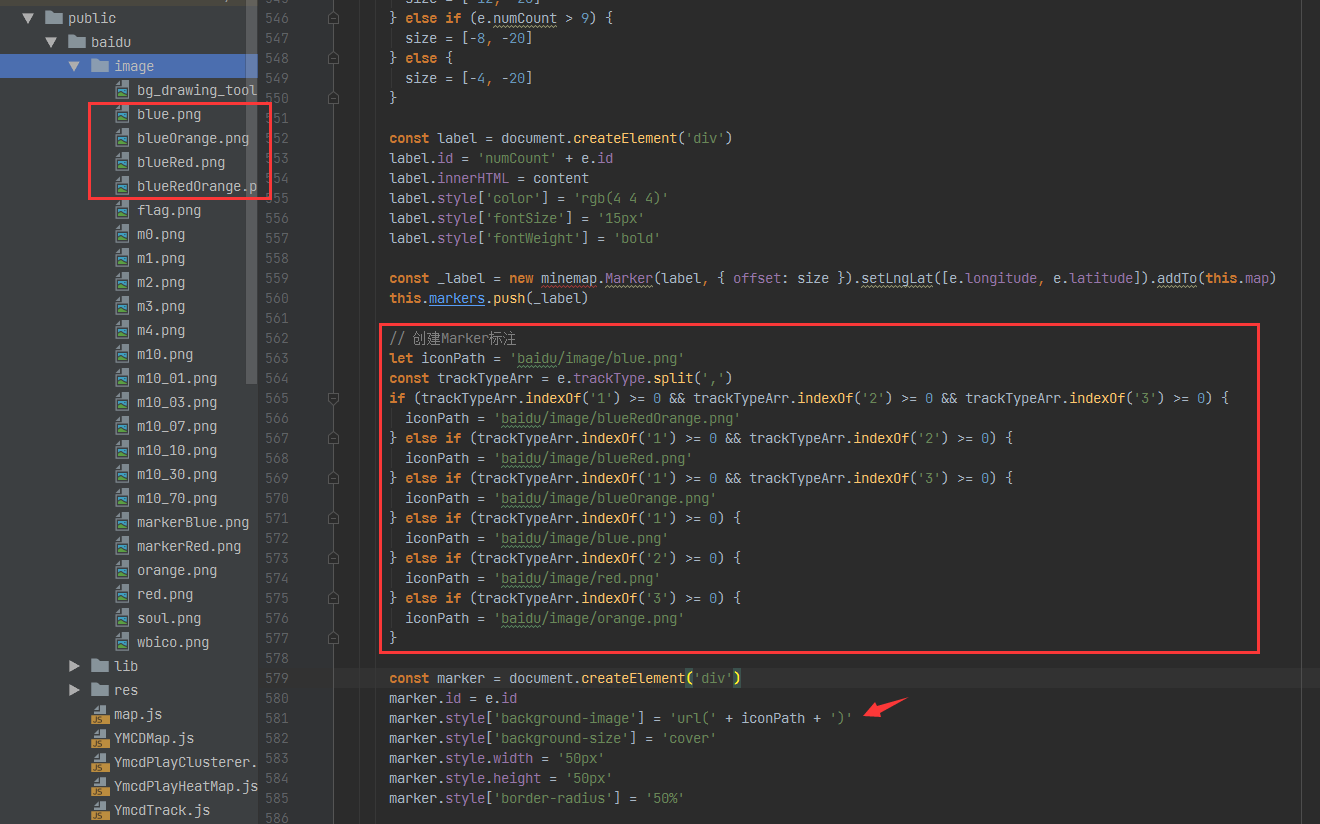
图片资源我使用require直接转为具体对象来渲染的
stationIconPath: require('@/assets/image/station-point-1.png'),
stationIconPath2: require('@/assets/image/station-point-2.png'),
如果在非打包的public目录下,可以直接写路径访问
- 4、创建点位信息窗体:
在点位创建的基础上追加弹窗窗体
addStationPopup(station, mineMarker) {
  const isOnline = station['runStatus'] === 1
  const markerLngLat = new window.minemap.LngLat(station.longitude, station.latitude)
  // 参数说明:
  // (1)closeButton,true表示会展示一个关闭按钮;
  // (2)closeOnClick,设置为true表示当地图被点击时该信息窗体会被关闭;
  // (3)offset,参数为点位置相对于其左上角偏移像素大小;
  // (4)anchor,停靠点,值域为[top,bottom,left,right,top-left,top-right,bottom-left,bottom-right],如果不设置该参数,则会根据map container动态调整。
  // (5)autoPan,设置为true时,当地图拖动到看不到popup的时候,自动将地图平移到可以看到popup,此参数只对固定popup有效;
  const stationPopup = new window.minemap.Popup({
    closeOnClick: false,
    closeButton: true,
    anchor: 'bottom',
    offset: [0, -40],
    autoPan: false
  })
  stationPopup.setLngLat(markerLngLat)

  // 弹窗内容创建
  const popupContent = window.document.createElement('div')
  popupContent.className = isOnline ? 'station-popup online' : 'station-popup offline'
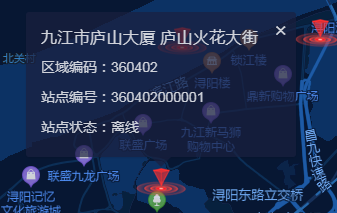
  popupContent.innerHTML = `
     <h3>${station.stationName} ${station['stationLocation']}</h3>
     <p>区域编码:${station.regionCode}</p>
     <p>站点编号:${station.stationNo}</p>
     <p>站点状态:${station['runStatus'] === 1 ? '在线' : '离线'}</p>
  `
  stationPopup.setDOMContent(popupContent)
  // stationPopup.addTo(this.mapInstance) /* 默认不打开弹窗 */
  mineMarker.setPopup(stationPopup)
}
预览内容:
窗体的样式可以直接修改:
  /* mineMap地图窗体样式设置 */
  /deep/ .minemap-popup-content {
    background: rgba(26,32,62,.7) !important;
    min-height: 100px;
    padding-top: 10px;
    overflow-y: auto;
    min-width: 200px;
    max-width: 500px !important;
    color: #D0D3DA;
  }

  /* 关闭按钮调整 */
  /deep/ .minemap-popup-close-button {
    font-size: 20px;
    color: #D0D3DA;
    right: 8px;
    top: 6px;
  }
  /* 窗体下标箭头的颜色调整 */
  /deep/ .minemap-popup-tip {
    border-top-color: rgba(26,32,62,.7) !important;
  }
  /* 窗体内部容器元素样式设置 */
  /deep/ .station-popup {
    padding: 5px;
    width: 250px;
    font-size: 14px;
  }
  /deep/ .station-popup > p {
    margin-top: 10px;
  }
- 3.1 移动居中的点位:
地图平移API,有两种,相对平移和绝对平移:
http://113.108.157.29:7070/support/api/demo/js-api/zh/map/state/map-move
panBy基于相对位置平移,panTo基于点位绝对平移
    function moveMap(vPixel, hPixel) {
        if (map) {
            map.panBy([vPixel, hPixel]);
        }
    }

    function moveMapCenter() {
        if (map) {
            map.panTo([116.46, 39.92]);
        }
    }
- 4.1 特殊窗体信息样式开发:
真是想不通为啥一定要这个样式,写起来真麻烦
可以发现这里是需要两种窗体样式的,一个是入口样式,一个是出口展示
所以不能直接对mineData的样式设置的,这样就不支持两种或多个窗体样式了
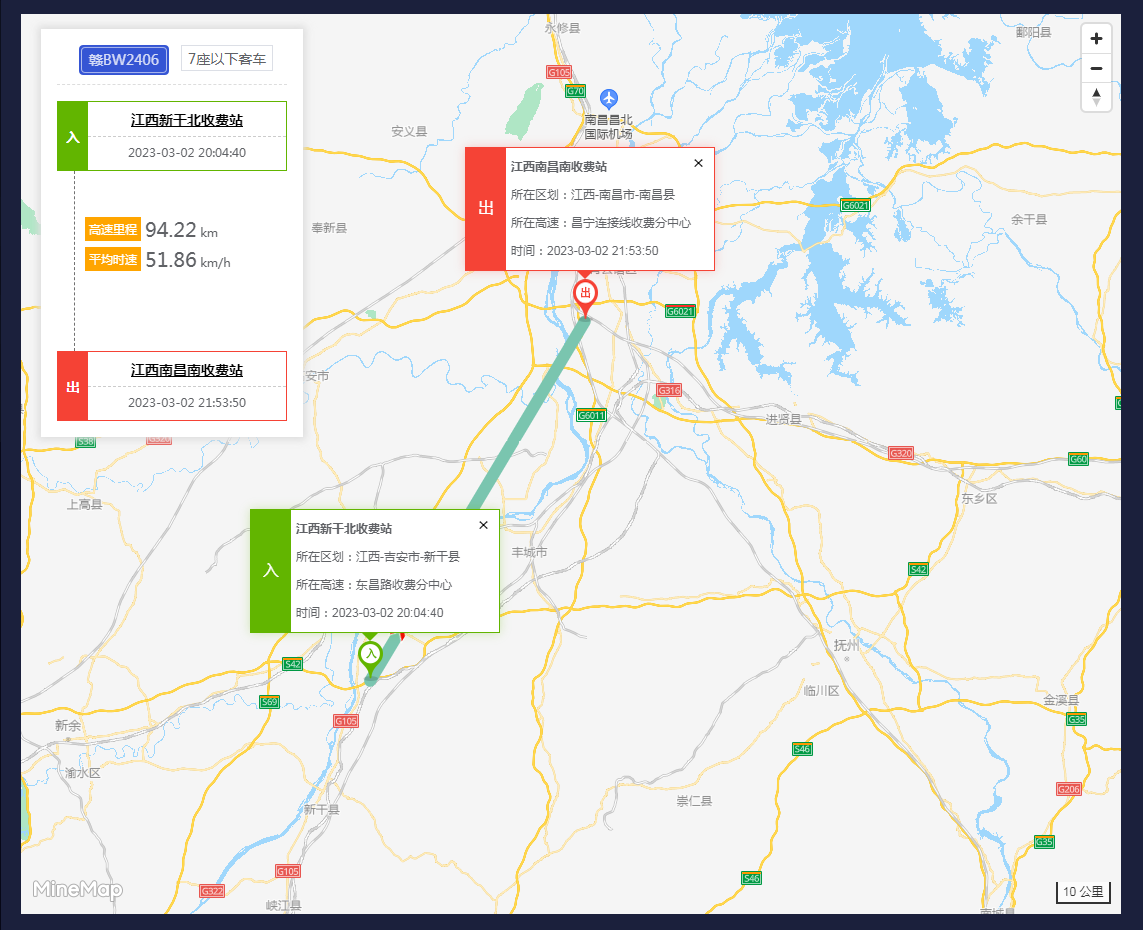
解决思路也是参考原型系统来的,我发现原型系统的默认弹窗是隐藏不展示的
这样就按我们自己声明的类名实现动态效果
第一步先把mineData的信息弹窗隐藏
/* 弹窗信息弹层不支持动态样式,隐藏展示 */
/deep/ .minemap-popup-content {
  max-width: none; /* 移除最大宽度 */
  overflow: visible !important; /* 溢出的时直接展示,不要滚动条 */
  background: none; /* 元素无背景 */
  box-shadow: none; /* 元素无阴影 */
  padding: 0; /* 内边距0 */
}
然后再是弹窗边框,内部布局这些内容:
/* 驶入弹窗边框 */
/deep/ .drive-in{
  border: 1px solid #62b500;
  box-shadow: 0 0 10px 0 #62b50045;
}
/* 驶入小箭头 */
/deep/ .station-popup.drive-in:after {
  border-color: #62b500 transparent transparent transparent;
}
/* 驶出弹窗边框 */
/deep/ .drive-out{
  border: 1px solid #f54336;
  box-shadow: 0 0 10px 0 #f5433645;
}
/* 驶出小箭头 */
/deep/ .station-popup.drive-out:after {
  border-color: #f54336 transparent transparent transparent;
}
/* 移除默认的下标箭头 */
/deep/ .minemap-popup-tip {
  display: none;
}
/* 入 */
/deep/ .station-popup.drive-in > div:first-child {
  background: #62b500;
  color: white;
  width: 40px;
  float: left;
  line-height: 120px;
  text-align: center;
  font-size: 16px;
}
/* 出 */
/deep/ .station-popup.drive-out > div:first-child {
  background: #f54336;
  width: 40px;
  color: white;
  line-height: 120px;
  text-align: center;
  font-size: 16px;
}
/deep/ .sfz_name {
  font-weight: 800;
}
/deep/ .station-pop-info {
  padding: 5px;
}
/* 关闭按钮调整 */
/deep/ .minemap-popup-close-button {
  font-size: 18px;
  right: 0;
  top: 5px;
}
弹窗初始化方法:
addStationPopup(station, mineMarker) {
  const isDriveIn = station.type === '1'
  const markerLngLat = new window.minemap.LngLat(station.longitude, station.latitude)
  const stationPopup = new window.minemap.Popup({
    closeOnClick: false,
    closeButton: true,
    anchor: 'bottom',
    offset: [0, isDriveIn ? -48 : -51],
    autoPan: false /* 关闭自动拖动 */
  })
  stationPopup.setLngLat(markerLngLat)
  const popupContent = window.document.createElement('div')
  popupContent.className = isDriveIn ? 'station-popup drive-in' : 'station-popup drive-out'
  popupContent.innerHTML = `
    <div>${isDriveIn ? '入' : '出'}</div>
    <div class="station-pop-info">
     <p class="sfz_name">${isDriveIn ? this.record.cashName : this.record.outCashName}</p>
     <p><span>所在区划:</span>${isDriveIn ? this.record.cashArea : this.record.outCashArea}</p>
     <p><span>所在高速:</span>${isDriveIn ? this.record.highwayName : this.record.outHighwayName}</p>
     <p>时间:${isDriveIn ? this.record.driveTime : this.record.outDriveTime}</p>
    </div>
  `
  stationPopup.setDOMContent(popupContent)
  stationPopup.addTo(this.mapInstance)
  mineMarker.setPopup(stationPopup)
}