Linux shell script programming All In One
shell 脚本编程

shell types
shell 类型 / shell 种类
# $ which shell

$ which bash
$ which sh
$ which zsh
| 系统 | 截图 |
|---|---|
| Raspberry Pi | 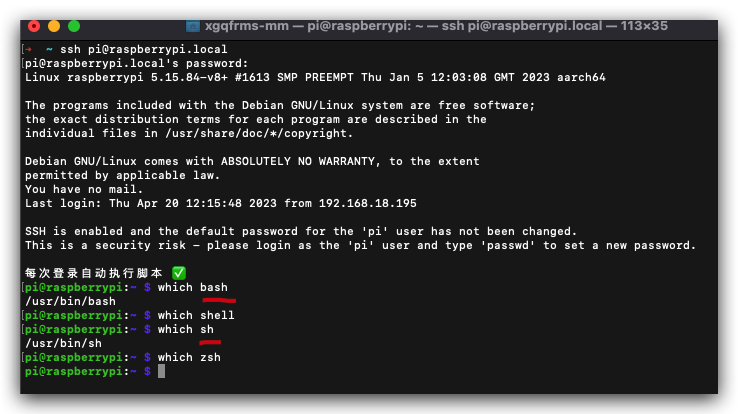 |
| macOS | 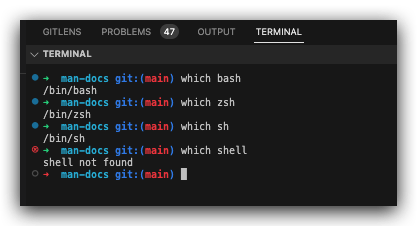 |
启动文件
- 系统的 shell 启动配置文件
/etc/profile
$ cat /etc/profile
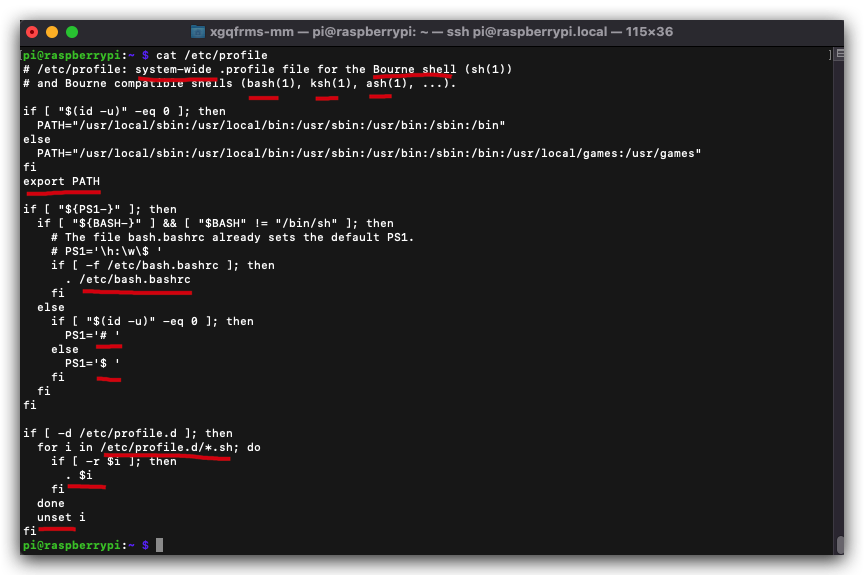
$ cat /etc/profile
# /etc/profile: system-wide .profile file for the Bourne shell (sh(1))
# and Bourne compatible shells (bash(1), ksh(1), ash(1), ...).

if [ "$(id -u)" -eq 0 ]; then
  PATH="/usr/local/sbin:/usr/local/bin:/usr/sbin:/usr/bin:/sbin:/bin"
else
  PATH="/usr/local/sbin:/usr/local/bin:/usr/sbin:/usr/bin:/sbin:/bin:/usr/local/games:/usr/games"
fi
export PATH

if [ "${PS1-}" ]; then
  if [ "${BASH-}" ] && [ "$BASH" != "/bin/sh" ]; then
    # The file bash.bashrc already sets the default PS1.
    # PS1='\h:\w\$ '
    if [ -f /etc/bash.bashrc ]; then
      . /etc/bash.bashrc
    fi
  else
    if [ "$(id -u)" -eq 0 ]; then
      PS1='# '
    else
      PS1='$ '
    fi
  fi
fi

if [ -d /etc/profile.d ]; then
  for i in /etc/profile.d/*.sh; do
    if [ -r $i ]; then
      . $i
    fi
  done
  unset i
fi
# 配置文件目录 `/etc/profile.d`
$ ls -al /etc/profile.d
- 用户的 shell 启动配置文件
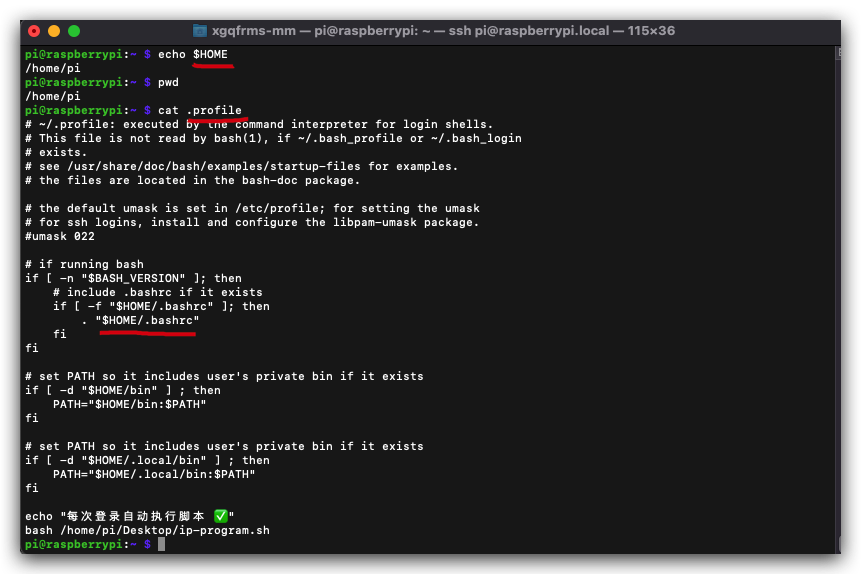
$HOME/.profile
$ cat $HOME/.profile
# 等价于
$ cd ~ && cat .profile
$ cat $HOME/.profile
# 等价于
$ cd ~ && cat .profile
# ~/.profile: executed by the command interpreter for login shells.
# This file is not read by bash(1), if ~/.bash_profile or ~/.bash_login
# exists.
# see /usr/share/doc/bash/examples/startup-files for examples.
# the files are located in the bash-doc package.

# the default umask is set in /etc/profile; for setting the umask
# for ssh logins, install and configure the libpam-umask package.
#umask 022

# if running bash
if [ -n "$BASH_VERSION" ]; then
    # include .bashrc if it exists
    if [ -f "$HOME/.bashrc" ]; then
	. "$HOME/.bashrc"
    fi
fi

# set PATH so it includes user's private bin if it exists
if [ -d "$HOME/bin" ] ; then
    PATH="$HOME/bin:$PATH"
fi

# set PATH so it includes user's private bin if it exists
if [ -d "$HOME/.local/bin" ] ; then
    PATH="$HOME/.local/bin:$PATH"
fi

echo "每次登录自动执行脚本 ✅"
bash /home/pi/Desktop/ip-program.sh
demos
(? 反爬虫测试!打击盗版⚠️)如果你看到这个信息, 说明这是一篇剽窃的文章,请访问 https://www.cnblogs.com/xgqfrms/ 查看原创文章!
refs
https://github.com/xgqfrms?tab=repositories&q=shell&type=&language=&sort=
©xgqfrms 2012-2021
www.cnblogs.com/xgqfrms 发布文章使用:只允许注册用户才可以访问!
原创文章,版权所有©️xgqfrms, 禁止转载 ?️,侵权必究⚠️!