POI-Excel写
<?xml version="1.0" encoding="UTF-8"?>
<project xmlns="http://maven.apache.org/POM/4.0.0"
         xmlns:xsi="http://www.w3.org/2001/XMLSchema-instance"
         xsi:schemaLocation="http://maven.apache.org/POM/4.0.0 http://maven.apache.org/xsd/maven-4.0.0.xsd">
    <modelVersion>4.0.0</modelVersion>

    <groupId>com.llq</groupId>
    <artifactId>llq-poi</artifactId>
    <version>1.0-SNAPSHOT</version>

    <dependencies>
        <!-- xls(03)-->
        <dependency>
            <groupId>org.apache.poi</groupId>
            <artifactId>poi</artifactId>
            <version>3.9</version>
        </dependency>
        <!--xlsx(07)-->
        <dependency>
            <groupId>org.apache.poi</groupId>
            <artifactId>poi-ooxml</artifactId>
            <version>3.9</version>
        </dependency>

        <!-- 日期格式化工具 -->
        <dependency>
            <groupId>joda-time</groupId>
            <artifactId>joda-time</artifactId>
            <version>2.10.1</version>
        </dependency>

        <dependency>
            <groupId>junit</groupId>
            <artifactId>junit</artifactId>
            <version>4.12</version>
            <scope>test</scope>
        </dependency>
        <dependency>
            <groupId>org.junit.jupiter</groupId>
            <artifactId>junit-jupiter</artifactId>
            <version>RELEASE</version>
            <scope>compile</scope>
        </dependency>

    </dependencies>


</project>
package com.llq;

public class ExcelWriteTest {

    @Test
    public void testWrite03(){
        String path = "F:\\llq-poi\\";

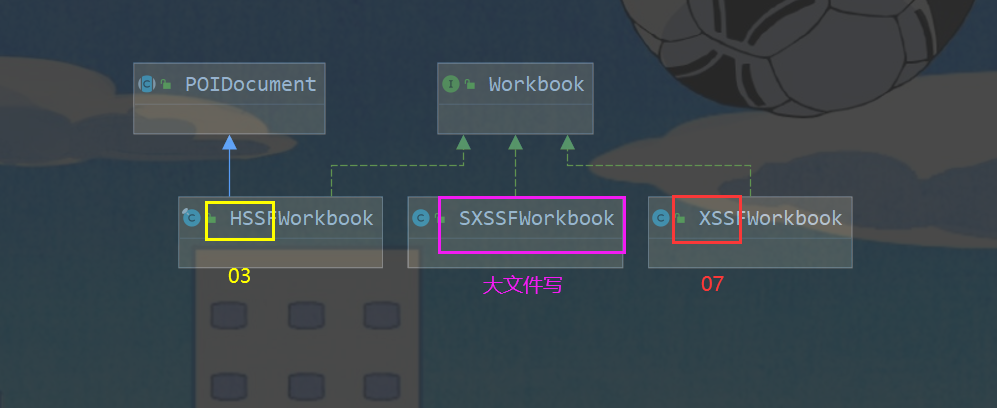
        //  1. 创建一个工作簿【03:HSS、07:XSS】
        Workbook Workbook = new HSSFWorkbook();
        //  2. 创建一个工作表
        Sheet sheet = Workbook.createSheet("爱新觉罗LQ 五杀集锦");

        //  3. 创建一个行
        Row row1 = sheet.createRow(0);
        //  4. 创建一个单元格
        Cell cell1 = row1.createCell(0);
        cell1.setCellValue("霞无敌");  //  (1, 1)
        Cell cell2 = row1.createCell(1);
        cell2.setCellValue("卡莎无敌"); //  (1, 2)

        Row row2 = sheet.createRow(1);

        Cell cell21 = row2.createCell(0);
        cell21.setCellValue("统计时间");  //  (2, 1)
        Cell cell22 = row2.createCell(1);
        String time = new DateTime().toString("yyyy-MM-dd HH:mm:ss");
        cell22.setCellValue(time); //  (2, 2)

        //  生成一张表(IO 流)03 xls 结尾
        try {
            FileOutputStream fileOutputStream = new FileOutputStream(path + "ACLQ.xls");
            Workbook.write(fileOutputStream);
            fileOutputStream.close();
            System.out.println("生成完毕");

        } catch (FileNotFoundException e) {
            e.printStackTrace();
        } catch (IOException e) {
            e.printStackTrace();
        }


    }


}
大批量写入
    @Test
    public void testWrite03BigData() throws IOException {
        long start = System.currentTimeMillis();
        Workbook workbook = new HSSFWorkbook();
        Sheet sheet = workbook.createSheet();
        for (int i = 0; i < 65536; i++) {
            Row row = sheet.createRow(i);
            for (int j = 0; j < 10; j++) {
                Cell cell = row.createCell(j);
                cell.setCellValue(j);
            }
        }
        System.out.println("over");
        FileOutputStream fileOutputStream = new FileOutputStream(path + "testWirte03.xls");
        workbook.write(fileOutputStream);
        fileOutputStream.close();
        long end = System.currentTimeMillis();
        System.out.println(end - start);
    }
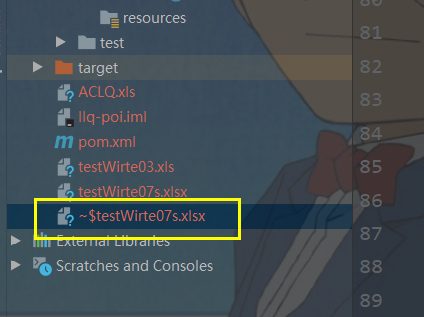
大文件写(SXSSF):100万条,写数据更快,占用更少内存,但是会临时文件,需要清理
  //  清除临时文件
        ((SXSSFWorkbook)workbook).dispose();
@Test
    public void testWrite03BigDataS() throws IOException {
        long start = System.currentTimeMillis();
        Workbook workbook = new SXSSFWorkbook();
        Sheet sheet = workbook.createSheet();
        for (int i = 0; i < 100000; i++) {
            Row row = sheet.createRow(i);
            for (int j = 0; j < 10; j++) {
                Cell cell = row.createCell(j);
                cell.setCellValue(j);
            }
        }
        System.out.println("over");
        FileOutputStream fileOutputStream = new FileOutputStream(path + "testWirte07s.xlsx");
        workbook.write(fileOutputStream);
        fileOutputStream.close();
        //  清除临时文件
        ((SXSSFWorkbook)workbook).dispose();
        long end = System.currentTimeMillis();
        System.out.println(end - start);
    }